
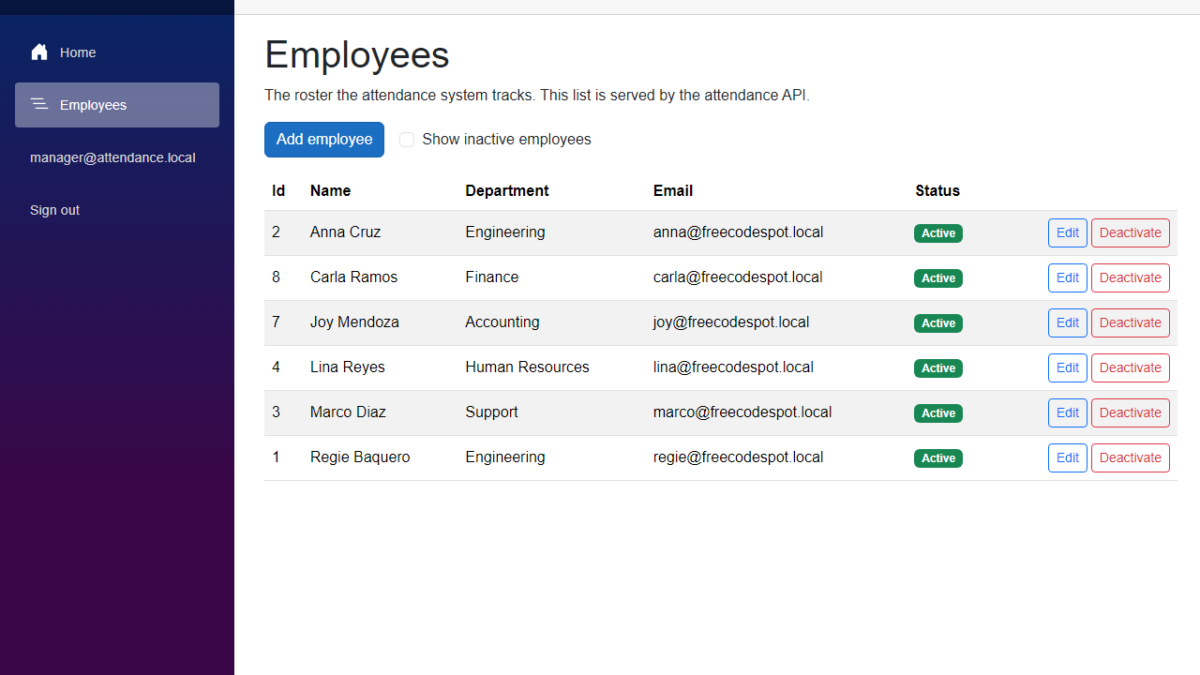
In this tutorial, we will add Blazor authentication to our Employee Attendance System. We will let users sign in with an email and a password, give them a Manager or an Employee role, and protect both the Blazor pages and the API. We will use ASP.NET Core Identity for the users and roles, and the API will issue the tokens. I used Claude Code to generate the code again, and I will show what we changed before keeping it.
Table of Contents
This is part of the Employee Attendance System series:
- Project Setup
- SQL Server with Entity Framework Core
- Employee Management with Blazor Forms
- Blazor Authentication and Roles (this article)
What We're Building
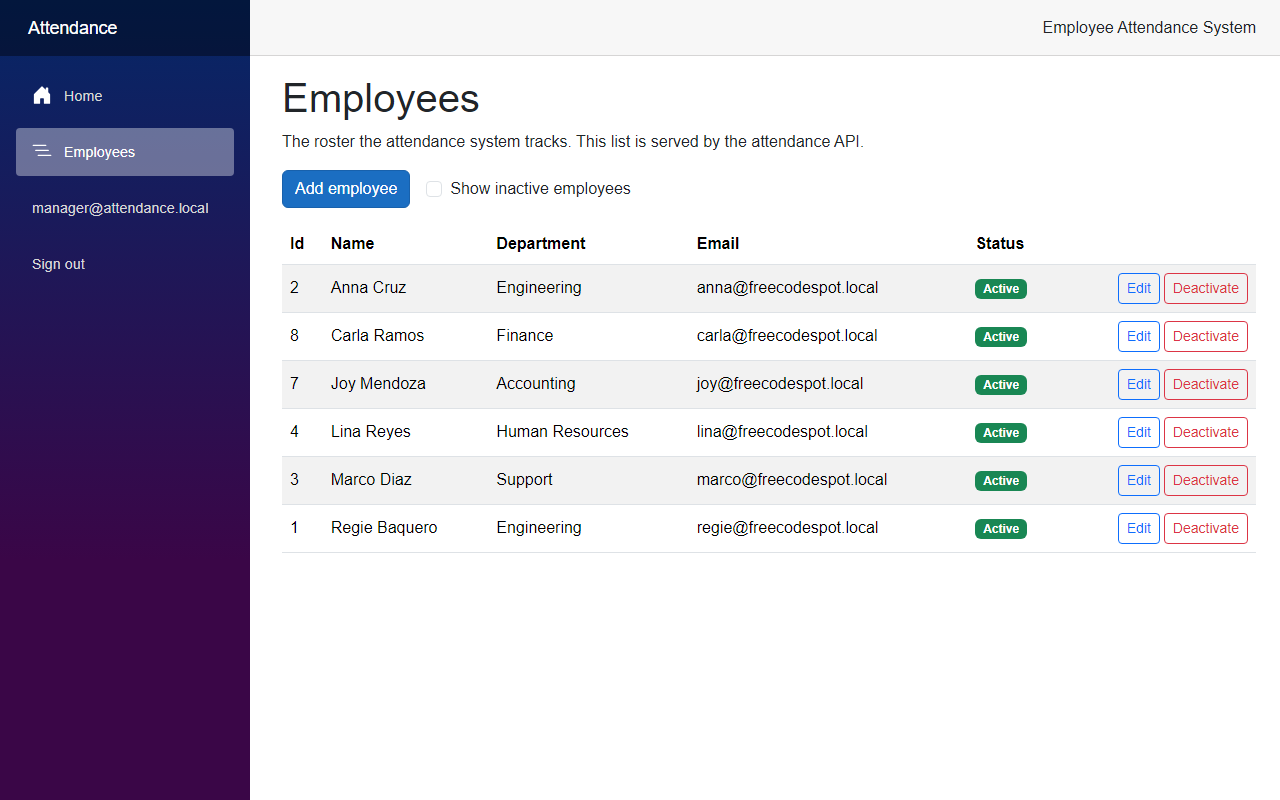
By the end of this article, nobody can use the employee attendance system without signing in. Managers can open the Employees pages and change the roster. Employees can sign in, but they cannot open the roster, and the API refuses their requests too.
Now let's see how we built it.
Before We Start
Before we start, make sure you have the following installed:
- .NET 10 SDK (I used 10.0.401)
- SQL Server LocalDB, or the SQL Server instance you used in the previous articles
- The EF Core command-line tools (I used 10.0.12)
- Claude Code
We add one NuGet package in this article, Microsoft.AspNetCore.Identity.EntityFrameworkCore.
Starting Point
After the previous article, anyone who opened the Web app could add, edit and deactivate employees. The API had no authentication either. Anyone who knew the address could call https://localhost:7020/api/employees.
Authentication and Authorization in This App
These two words are easy to mix up, so here is how we use them.
- Authentication answers the question "who are you?". The user gives an email and a password, and the system checks them.
- Authorization answers the question "what are you allowed to do?". Here it depends on the role of the user.
Our app has two parts, so we need both in both places. The API owns the users and the roles. When someone signs in, the API checks the password and gives back a token. The Web app keeps that token for the signed-in user and sends it with every call to the API. The API reads the token, finds the role inside, and decides if the call is allowed.
The Goal
- Add the ASP.NET Core Identity tables to the database with a migration
- Create the Manager and Employee roles and two demo users
- Add a login endpoint to the API that returns a token
- Only allow managers to call the employee endpoints
- Add a login page, a sign out button and a role-aware menu to the Blazor app
- Only allow managers to open the Employees pages
- Test the sign in and the role rules
Building It with AI
Step 1 – Add Identity to the database
I asked Claude Code to add sign in and roles to the project. I also told it where the users should live. The API owns them, in the same database as the employees, and the Web app only talks to the API.
First, add the Identity package to the Infrastructure project:
cd src/FreeCodeSpot.Attendance.Infrastructure
dotnet add package Microsoft.AspNetCore.Identity.EntityFrameworkCore --version 10.0.12
Next, open AttendanceDbContext.cs. The context now inherits from IdentityDbContext instead of DbContext, so the users, the roles and the employees are in one database.
src/FreeCodeSpot.Attendance.Infrastructure/Persistence/AttendanceDbContext.cs
using FreeCodeSpot.Attendance.Domain.Employees;
using Microsoft.AspNetCore.Identity;
using Microsoft.AspNetCore.Identity.EntityFrameworkCore;
using Microsoft.EntityFrameworkCore;

namespace FreeCodeSpot.Attendance.Infrastructure.Persistence;

/// <summary>
/// The EF Core session for the attendance database. It extends IdentityDbContext,
/// so the users, the roles and the employees live in one database. Table
/// mappings live in their own configuration classes so this file stays short as
/// tables are added.
/// </summary>
public sealed class AttendanceDbContext(DbContextOptions<AttendanceDbContext> options)
    : IdentityDbContext<IdentityUser>(options)
{
    public DbSet<Employee> Employees => Set<Employee>();

    protected override void OnModelCreating(ModelBuilder modelBuilder)
    {
        base.OnModelCreating(modelBuilder);
        modelBuilder.ApplyConfigurationsFromAssembly(typeof(AttendanceDbContext).Assembly);
    }
}
Do not skip the base.OnModelCreating call. It is the line that adds the Identity tables to the model. We keep IdentityUser as it is, because we do not need extra columns on the user yet.
Now let's create the migration and apply it:
dotnet ef migrations add AddIdentity --project src/FreeCodeSpot.Attendance.Infrastructure --startup-project src/FreeCodeSpot.Attendance.Api
dotnet ef database update --project src/FreeCodeSpot.Attendance.Infrastructure --startup-project src/FreeCodeSpot.Attendance.Api
I checked the generated migration before applying it, because the migration in the previous article needed a fix. This one only creates tables. It creates seven of them (AspNetUsers, AspNetRoles, AspNetUserRoles and four more), and it does not touch Employees.
Step 2 – Create the roles and the demo users
We need something to sign in with. The role names go in one place, so a typo cannot lock somebody out. Create Roles.cs in the Application project.
src/FreeCodeSpot.Attendance.Application/Security/Roles.cs
namespace FreeCodeSpot.Attendance.Application.Security;

/// <summary>
/// The role names used by the Identity store, the API policies and the Blazor
/// pages. Keeping them in one place stops a typo from silently locking people out.
/// </summary>
public static class Roles
{
    public const string Manager = "Manager";
    public const string Employee = "Employee";

    public static IReadOnlyList<string> All { get; } = [Manager, Employee];
}
The demo users come from configuration. We do not want a password in a C# file, so the seeder reads it through an options class.
src/FreeCodeSpot.Attendance.Infrastructure/Identity/SeedUsersOptions.cs
namespace FreeCodeSpot.Attendance.Infrastructure.Identity;

/// <summary>
/// The demo accounts created on startup in development. The password is read
/// from configuration so it never appears in code.
/// </summary>
public sealed class SeedUsersOptions
{
    public const string SectionName = "SeedUsers";

    public string ManagerEmail { get; set; } = "";
    public string EmployeeEmail { get; set; } = "";
    public string Password { get; set; } = "";
}
Now the seeder. It creates the two roles and the two users, and it does nothing if they already exist, so you can start the API as many times as you want.
src/FreeCodeSpot.Attendance.Infrastructure/Identity/IdentitySeeder.cs
using FreeCodeSpot.Attendance.Application.Security;
using Microsoft.AspNetCore.Identity;
using Microsoft.Extensions.DependencyInjection;
using Microsoft.Extensions.Options;

namespace FreeCodeSpot.Attendance.Infrastructure.Identity;

/// <summary>
/// Creates the two roles and the two demo users. Running it twice changes nothing.
/// </summary>
public static class IdentitySeeder
{
    public static async Task SeedAsync(IServiceProvider services)
    {
        using var scope = services.CreateScope();
        var options = scope.ServiceProvider.GetRequiredService<IOptions<SeedUsersOptions>>().Value;
        var roleManager = scope.ServiceProvider.GetRequiredService<RoleManager<IdentityRole>>();
        var userManager = scope.ServiceProvider.GetRequiredService<UserManager<IdentityUser>>();

        foreach (var role in Roles.All)
        {
            if (!await roleManager.RoleExistsAsync(role))
            {
                Check(await roleManager.CreateAsync(new IdentityRole(role)));
            }
        }

        await EnsureUserAsync(userManager, options.ManagerEmail, options.Password, Roles.Manager);
        await EnsureUserAsync(userManager, options.EmployeeEmail, options.Password, Roles.Employee);
    }

    private static async Task EnsureUserAsync(
        UserManager<IdentityUser> userManager,
        string email,
        string password,
        string role)
    {
        if (string.IsNullOrWhiteSpace(email) || string.IsNullOrWhiteSpace(password))
        {
            throw new InvalidOperationException(
                $"SeedUsers is not configured for the {role} account. Set SeedUsers:Password and the account emails.");
        }

        var user = await userManager.FindByEmailAsync(email);
        if (user is null)
        {
            user = new IdentityUser { UserName = email, Email = email, EmailConfirmed = true };
            Check(await userManager.CreateAsync(user, password));
        }

        if (!await userManager.IsInRoleAsync(user, role))
        {
            Check(await userManager.AddToRoleAsync(user, role));
        }
    }

    private static void Check(IdentityResult result)
    {
        if (!result.Succeeded)
        {
            throw new InvalidOperationException(
                "Seeding identity data failed: " + string.Join("; ", result.Errors.Select(e => e.Description)));
        }
    }
}
The emails go in appsettings.json. The password goes in appsettings.Development.json, which is only loaded when you run the API in development.
src/FreeCodeSpot.Attendance.Api/appsettings.json
{
  "ConnectionStrings": {
    "AttendanceDb": "Server=(localdb)\\MSSQLLocalDB;Database=FreeCodeSpotAttendance;Trusted_Connection=True;TrustServerCertificate=True"
  },
  "SeedUsers": {
    "ManagerEmail": "manager@attendance.local",
    "EmployeeEmail": "employee@attendance.local"
  },
  "Logging": {
    "LogLevel": {
      "Default": "Information",
      "Microsoft.AspNetCore": "Warning"
    }
  },
  "AllowedHosts": "*"
}
src/FreeCodeSpot.Attendance.Api/appsettings.Development.json
{
  "Logging": {
    "LogLevel": {
      "Default": "Information",
      "Microsoft.AspNetCore": "Warning"
    }
  },
  "SeedUsers": {
    "Password": "Attendance#2026"
  }
}
This password is only for your own machine. A real deployment should never seed a known password, so use your own way of creating users there.
Step 3 – Add the login endpoint to the API
Now let's set up the API. ASP.NET Core can map a ready-made set of Identity endpoints with MapIdentityApi, but I did not use it. That set also includes a public register endpoint, and in an attendance system people should not create their own accounts. So we only map the two routes we need, and we use the same pieces that MapIdentityApi uses inside.
First, the endpoints.
src/FreeCodeSpot.Attendance.Api/Auth/AuthEndpoints.cs
using System.Security.Claims;
using Microsoft.AspNetCore.Identity;

namespace FreeCodeSpot.Attendance.Api.Auth;

/// <summary>
/// Maps the sign-in routes. Login checks the password and answers with a bearer
/// token. Me tells a signed-in caller who they are and which roles they hold.
/// </summary>
public static class AuthEndpoints
{
    public static IEndpointRouteBuilder MapAuthEndpoints(this IEndpointRouteBuilder app)
    {
        var group = app.MapGroup("/auth")
            .WithTags("Authentication");

        group.MapPost("/login", async (LoginRequest request, SignInManager<IdentityUser> signInManager) =>
            {
                // Ask for a bearer token instead of a cookie.
                signInManager.AuthenticationScheme = IdentityConstants.BearerScheme;

                var result = await signInManager.PasswordSignInAsync(
                    request.Email, request.Password, isPersistent: false, lockoutOnFailure: true);

                // On success the bearer handler has already written the token to the response.
                return result.Succeeded
                    ? TypedResults.Empty
                    : Results.Problem("The email or password is not correct.", statusCode: StatusCodes.Status401Unauthorized);
            })
            .AllowAnonymous()
            .WithName("Login")
            .Produces(StatusCodes.Status200OK)
            .Produces(StatusCodes.Status401Unauthorized);

        group.MapGet("/me", (ClaimsPrincipal user) =>
                Results.Ok(new CurrentUser(
                    user.FindFirstValue(ClaimTypes.Email) ?? user.Identity?.Name ?? "",
                    user.FindAll(ClaimTypes.Role).Select(claim => claim.Value).Order().ToList())))
            .RequireAuthorization()
            .WithName("GetCurrentUser")
            .Produces<CurrentUser>()
            .Produces(StatusCodes.Status401Unauthorized);

        return app;
    }
}

/// <summary>The body of a login request.</summary>
public sealed record LoginRequest(string Email, string Password);

/// <summary>Who the bearer token belongs to.</summary>
public sealed record CurrentUser(string Email, IReadOnlyList<string> Roles);
Setting AuthenticationScheme to the bearer scheme is the line that matters here. It tells the SignInManager to write a token to the response and not a cookie. The lockoutOnFailure: true part locks the account for a while after five wrong passwords, which is the Identity default.
The /auth/me route is there for the Web app. After the login, it asks the API who the token belongs to and which roles that person has. This way the roles always come from the API.
Next, a name for the policy we need.
src/FreeCodeSpot.Attendance.Api/Auth/Policies.cs
namespace FreeCodeSpot.Attendance.Api.Auth;

/// <summary>Names of the authorization policies the endpoints refer to.</summary>
public static class Policies
{
    public const string ManagerOnly = "ManagerOnly";
}
Now open Program.cs in the API project and register everything.
src/FreeCodeSpot.Attendance.Api/Program.cs
using FreeCodeSpot.Attendance.Api.Auth;
using FreeCodeSpot.Attendance.Api.Endpoints;
using FreeCodeSpot.Attendance.Application.Employees;
using FreeCodeSpot.Attendance.Application.Security;
using FreeCodeSpot.Attendance.Infrastructure;
using FreeCodeSpot.Attendance.Infrastructure.Identity;
using FreeCodeSpot.Attendance.Infrastructure.Persistence;
using Microsoft.AspNetCore.Identity;

var builder = WebApplication.CreateBuilder(args);

builder.Services.AddOpenApi();
var connectionString = builder.Configuration.GetConnectionString("AttendanceDb")
    ?? throw new InvalidOperationException(
        "ConnectionStrings:AttendanceDb is not configured. Add it to appsettings.json.");

builder.Services.AddInfrastructure(connectionString);
builder.Services.AddScoped<EmployeeService>();

// Authentication: callers present a bearer token that /auth/login issued.
builder.Services.AddAuthentication(IdentityConstants.BearerScheme)
    .AddBearerToken(IdentityConstants.BearerScheme);

// Identity: users and roles in the same database, plus the SignInManager that checks passwords.
builder.Services.AddIdentityCore<IdentityUser>()
    .AddRoles<IdentityRole>()
    .AddEntityFrameworkStores<AttendanceDbContext>()
    .AddSignInManager();

// Authorization: a named policy per rule, so endpoints say what they need.
builder.Services.AddAuthorizationBuilder()
    .AddPolicy(Policies.ManagerOnly, policy => policy.RequireRole(Roles.Manager));

builder.Services.Configure<SeedUsersOptions>(builder.Configuration.GetSection(SeedUsersOptions.SectionName));

var app = builder.Build();

if (app.Environment.IsDevelopment())
{
    app.MapOpenApi();
    await IdentitySeeder.SeedAsync(app.Services);
}

app.UseHttpsRedirection();

app.UseAuthentication();
app.UseAuthorization();

app.MapAuthEndpoints();
app.MapEmployeeEndpoints();

app.Run();

/// <summary>
/// Exposed so the integration tests can boot this application with
/// WebApplicationFactory.
/// </summary>
public partial class Program;
The order of the two Use calls matters. UseAuthentication reads the token and builds the user, and then UseAuthorization checks that user against the rules. The seeder runs in development only, right after the app is built.
Finally, protect the employee endpoints. We add one line to the route group, so every employee route needs a manager. Open EmployeeEndpoints.cs.
src/FreeCodeSpot.Attendance.Api/Endpoints/EmployeeEndpoints.cs
using FreeCodeSpot.Attendance.Api.Auth;
using FreeCodeSpot.Attendance.Application.Employees;
using FreeCodeSpot.Attendance.Domain.Employees;

namespace FreeCodeSpot.Attendance.Api.Endpoints;

/// <summary>
/// Maps the employee routes. Keeping them here stops Program.cs from turning
/// into a list of every route in the application.
/// </summary>
public static class EmployeeEndpoints
{
    public static IEndpointRouteBuilder MapEmployeeEndpoints(this IEndpointRouteBuilder app)
    {
        var group = app.MapGroup("/api/employees")
            .WithTags("Employees")
            .RequireAuthorization(Policies.ManagerOnly);

        // ... unrelated code omitted
The routes below the group are the same as in the previous article. They are all protected because they belong to the group.
Step 4 – Add Blazor authentication with a sign-in cookie
This is the part that took the most thinking, because the Web app is a separate application. It cannot use the token from the API directly in the browser. So we do this:
- The login form posts the email and password to the Web server, which sends them to the API.
- The API answers with a token. The Web server asks
/auth/mefor the roles. - The Web server creates a normal sign-in cookie, and puts the user, the roles and the token inside it.
The cookie is encrypted, and the token never goes to the browser as plain text. Let's start with a small record that holds the result of a login.
src/FreeCodeSpot.Attendance.Web/Security/SignedInUser.cs
using System.Security.Claims;
using Microsoft.AspNetCore.Authentication.Cookies;

namespace FreeCodeSpot.Attendance.Web.Security;

/// <summary>
/// Who signed in, what they may do, and the API token that proves it. The token
/// travels in a claim so it lives inside the encrypted sign-in cookie and never
/// reaches the browser in the clear.
/// </summary>
public sealed record SignedInUser(string Email, IReadOnlyList<string> Roles, string AccessToken, TimeSpan ExpiresIn)
{
    public const string AccessTokenClaim = "access_token";

    public ClaimsPrincipal ToPrincipal()
    {
        var claims = new List<Claim>
        {
            new(ClaimTypes.Name, Email),
            new(AccessTokenClaim, AccessToken),
        };
        claims.AddRange(Roles.Select(role => new Claim(ClaimTypes.Role, role)));

        return new ClaimsPrincipal(new ClaimsIdentity(claims, CookieAuthenticationDefaults.AuthenticationScheme));
    }
}
The Web app keeps its own copy of the role names, like it already keeps its own Employee model. This way it does not need a reference to the API's projects.
src/FreeCodeSpot.Attendance.Web/Security/AppRoles.cs
namespace FreeCodeSpot.Attendance.Web.Security;

/// <summary>
/// The role names the pages check. They match the names the API puts in its
/// tokens. The Web app keeps its own copy, like it does for the employee model,
/// so it does not reference the API's projects.
/// </summary>
public static class AppRoles
{
    public const string Manager = "Manager";
    public const string Employee = "Employee";
}
Now the client that talks to the login endpoint.
src/FreeCodeSpot.Attendance.Web/Services/AuthApiClient.cs
using System.Net;
using System.Net.Http.Headers;
using System.Net.Http.Json;
using FreeCodeSpot.Attendance.Web.Security;

namespace FreeCodeSpot.Attendance.Web.Services;

/// <summary>
/// Signs a user in against the attendance API. The API owns the users and the
/// roles, so the Web app never sees a password hash.
/// </summary>
public sealed class AuthApiClient(HttpClient httpClient)
{
    /// <summary>Returns the signed-in user, or null when the email or password is wrong.</summary>
    public async Task<SignedInUser?> LoginAsync(string email, string password, CancellationToken cancellationToken = default)
    {
        using var loginResponse = await httpClient.PostAsJsonAsync("auth/login", new { email, password }, cancellationToken);
        if (loginResponse.StatusCode == HttpStatusCode.Unauthorized)
        {
            return null;
        }

        loginResponse.EnsureSuccessStatusCode();
        var token = await loginResponse.Content.ReadFromJsonAsync<TokenResponse>(cancellationToken)
            ?? throw new InvalidOperationException("The API returned an empty login response.");

        // Ask the API who the token belongs to, so the roles come from the API and not from us.
        using var meRequest = new HttpRequestMessage(HttpMethod.Get, "auth/me");
        meRequest.Headers.Authorization = new AuthenticationHeaderValue("Bearer", token.AccessToken);
        using var meResponse = await httpClient.SendAsync(meRequest, cancellationToken);
        meResponse.EnsureSuccessStatusCode();
        var me = await meResponse.Content.ReadFromJsonAsync<MeResponse>(cancellationToken)
            ?? throw new InvalidOperationException("The API returned an empty profile.");

        return new SignedInUser(me.Email, me.Roles, token.AccessToken, TimeSpan.FromSeconds(token.ExpiresIn));
    }

    private sealed record TokenResponse(string AccessToken, long ExpiresIn);

    private sealed record MeResponse(string Email, string[] Roles);
}
Now open Program.cs in the Web project. We add the cookie sign-in, the authorization services, the cascading authentication state that Blazor components need, and the new client. We also map the sign out route.
src/FreeCodeSpot.Attendance.Web/Program.cs
using FreeCodeSpot.Attendance.Web.Components;
using FreeCodeSpot.Attendance.Web.Services;
using Microsoft.AspNetCore.Authentication;
using Microsoft.AspNetCore.Authentication.Cookies;
using Microsoft.AspNetCore.Mvc;

var builder = WebApplication.CreateBuilder(args);

builder.Services.AddRazorComponents()
    .AddInteractiveServerComponents();

// Sign-in: a cookie that holds the signed-in user's claims, including the API token.
builder.Services.AddAuthentication(CookieAuthenticationDefaults.AuthenticationScheme)
    .AddCookie(options =>
    {
        options.LoginPath = "/login";
        options.AccessDeniedPath = "/access-denied";
        options.SlidingExpiration = false;
    });
builder.Services.AddAuthorization();
builder.Services.AddCascadingAuthenticationState();

var apiBaseUrl = builder.Configuration["AttendanceApi:BaseUrl"]
    ?? throw new InvalidOperationException(
        "AttendanceApi:BaseUrl is not configured. Add it to appsettings.json.");

builder.Services.AddHttpClient<AuthApiClient>(client =>
{
    client.BaseAddress = new Uri(apiBaseUrl);
});

builder.Services.AddHttpClient<EmployeeApiClient>(client =>
{
    client.BaseAddress = new Uri(apiBaseUrl);
});

var app = builder.Build();

if (!app.Environment.IsDevelopment())
{
    app.UseExceptionHandler("/Error", createScopeForErrors: true);
    app.UseHsts();
}
app.UseStatusCodePagesWithReExecute("/not-found", createScopeForStatusCodePages: true);
app.UseHttpsRedirection();

app.UseAuthentication();
app.UseAuthorization();
app.UseAntiforgery();

app.MapStaticAssets();

// Sign out. It is a POST with an antiforgery token, so another site cannot sign a user out.
app.MapPost("/logout", async (HttpContext context, [FromForm] string? returnUrl) =>
{
    await context.SignOutAsync(CookieAuthenticationDefaults.AuthenticationScheme);
    return Results.LocalRedirect("~/login");
});

app.MapRazorComponents<App>()
    .AddInteractiveServerRenderMode();

app.Run();
AccessDeniedPath is where ASP.NET Core sends a signed-in user who does not have the role for a page. Without it, that user would be sent to the login page, which makes no sense when you are already signed in. I only found this out after testing, and I show it in the review section.
Now the login page. It does not use @rendermode, so it is a normal server-rendered page with a form post. We need that, because the sign-in cookie can only be written while the browser is waiting for a response.
src/FreeCodeSpot.Attendance.Web/Components/Pages/Login.razor
@page "/login"
@using System.ComponentModel.DataAnnotations
@using FreeCodeSpot.Attendance.Web.Services
@using Microsoft.AspNetCore.Authentication
@using Microsoft.AspNetCore.Authentication.Cookies
@inject AuthApiClient AuthApi
@inject NavigationManager Navigation

<PageTitle>Sign in</PageTitle>

<h1>Sign in</h1>

<p>Sign in with your attendance account.</p>

@if (errorMessage is not null)
{
    <div class="alert alert-danger" role="alert">@errorMessage</div>
}

<EditForm Model="Input" FormName="login" OnValidSubmit="SignInAsync" class="login-form">
    <DataAnnotationsValidator />
    <ValidationSummary class="text-danger" />

    <div class="mb-3">
        <label for="email" class="form-label">Email</label>
        <InputText id="email" class="form-control" @bind-Value="Input!.Email" autocomplete="username" />
    </div>

    <div class="mb-3">
        <label for="password" class="form-label">Password</label>
        <InputText id="password" type="password" class="form-control" @bind-Value="Input!.Password" autocomplete="current-password" />
    </div>

    <button type="submit" class="btn btn-primary">Sign in</button>
</EditForm>

@code {
    [CascadingParameter]
    private HttpContext HttpContext { get; set; } = default!;

    [SupplyParameterFromQuery]
    private string? ReturnUrl { get; set; }

    [SupplyParameterFromForm]
    private LoginModel? Input { get; set; }

    private string? errorMessage;

    protected override void OnInitialized() => Input ??= new();

    private async Task SignInAsync()
    {
        SignedInUser? user;
        try
        {
            user = await AuthApi.LoginAsync(Input!.Email, Input!.Password);
        }
        catch (HttpRequestException)
        {
            errorMessage = "The attendance API could not be reached. Check that it is running, then try again.";
            return;
        }

        if (user is null)
        {
            errorMessage = "The email or password is not correct.";
            return;
        }

        // The cookie stops working when the API token does.
        await HttpContext.SignInAsync(
            CookieAuthenticationDefaults.AuthenticationScheme,
            user.ToPrincipal(),
            new AuthenticationProperties { ExpiresUtc = DateTimeOffset.UtcNow.Add(user.ExpiresIn) });

        Navigation.NavigateTo(Security.ReturnUrl.OrHome(ReturnUrl));
    }

    private sealed class LoginModel
    {
        [Required(ErrorMessage = "Enter your email.")]
        [EmailAddress(ErrorMessage = "Enter a valid email address.")]
        public string Email { get; set; } = "";

        [Required(ErrorMessage = "Enter your password.")]
        public string Password { get; set; } = "";
    }
}
Two parts of this page matter. The cookie gets the same expiry as the API token. The token the API issues lasts one hour, so after one hour the cookie stops working and the user signs in again. And the page uses a small helper to decide where to go after the login.
src/FreeCodeSpot.Attendance.Web/Security/ReturnUrl.cs
namespace FreeCodeSpot.Attendance.Web.Security;

/// <summary>
/// Decides where to send a user after signing in. Only paths on this site are
/// followed, so the login page cannot be used to redirect someone elsewhere.
/// </summary>
public static class ReturnUrl
{
    public static string OrHome(string? url) => IsLocal(url) ? url! : "/";

    private static bool IsLocal(string? url) =>
        !string.IsNullOrEmpty(url)
        && url.StartsWith('/')
        && !url.StartsWith("//")
        && !url.StartsWith("/\\");
}
When a visitor opens /employees without signing in, they are sent to /login?ReturnUrl=%2Femployees. After the login, we send them back. If we followed any address in ReturnUrl, somebody could send a link that signs you in and then takes you to another site. That is why only paths that start with a single / are accepted.
Step 5 – Send the token and protect the pages
Now the Employees pages need to send the token to the API. Open EmployeeApiClient.cs. Every method now calls UseSignedInUserAsync first. It reads the token from the claims of the signed-in user and puts it in the Authorization header.
src/FreeCodeSpot.Attendance.Web/Services/EmployeeApiClient.cs
public sealed class EmployeeApiClient(
    HttpClient httpClient,
    AuthenticationStateProvider authenticationStateProvider,
    ILogger<EmployeeApiClient> logger)
{
    public async Task<IReadOnlyList<Employee>> GetEmployeesAsync(
        bool includeInactive = false,
        CancellationToken cancellationToken = default)
    {
        await UseSignedInUserAsync();
        logger.LogInformation("Requesting the employee roster from {BaseAddress}", httpClient.BaseAddress);

        var route = includeInactive ? "api/employees?includeInactive=true" : "api/employees";
        var employees = await httpClient.GetFromJsonAsync<List<Employee>>(route, cancellationToken);

        return employees ?? [];
    }

    // ... the other methods start with the same call, the rest of the file is unchanged

    private async Task UseSignedInUserAsync()
    {
        var state = await authenticationStateProvider.GetAuthenticationStateAsync();
        var token = state.User.FindFirst(SignedInUser.AccessTokenClaim)?.Value;

        httpClient.DefaultRequestHeaders.Authorization =
            token is null ? null : new AuthenticationHeaderValue("Bearer", token);
    }
The usual way to add a token to every call is a message handler on the HttpClient. We did not use one here. In an interactive Blazor Server page, a handler created by IHttpClientFactory lives in its own scope, so it cannot see the signed-in user of the circuit. The client class itself is created in the circuit scope, so setting the header there works.
Now we protect the pages. The three Employees pages get one new line below the @rendermode line:
src/FreeCodeSpot.Attendance.Web/Components/Pages/Employees.razor
@page "/employees"
@rendermode InteractiveServer
@attribute [Authorize(Roles = AppRoles.Manager)]
EmployeeCreate.razor and EmployeeEdit.razor get the same attribute. The home page only needs a signed-in user, so it gets @attribute [Authorize], and it shows who is signed in and their roles.
src/FreeCodeSpot.Attendance.Web/Components/Pages/Home.razor
@page "/"
@attribute [Authorize]

<PageTitle>Attendance</PageTitle>

<h1>Employee Attendance System</h1>

<AuthorizeView>
    <p>
        Signed in as <strong>@context.User.Identity?.Name</strong>
        (@string.Join(", ", context.User.FindAll(System.Security.Claims.ClaimTypes.Role).Select(claim => claim.Value))).
    </p>
</AuthorizeView>

<AuthorizeView Roles="@AppRoles.Manager">
    <Authorized>
        <p>
            A Blazor front end backed by an ASP.NET Core Web API. Open the
            <a href="employees">Employees</a> page to manage the roster the API serves.
        </p>
    </Authorized>
    <NotAuthorized>
        <p>
            A Blazor front end backed by an ASP.NET Core Web API. The employee roster is managed by managers.
        </p>
    </NotAuthorized>
</AuthorizeView>
The router has to know what to do when a user is not allowed to see a page. Open Routes.razor and replace RouteView with AuthorizeRouteView.
src/FreeCodeSpot.Attendance.Web/Components/Routes.razor
@using FreeCodeSpot.Attendance.Web.Components.Pages

<Router AppAssembly="typeof(Program).Assembly" NotFoundPage="typeof(Pages.NotFound)">
    <Found Context="routeData">
        <AuthorizeRouteView RouteData="routeData" DefaultLayout="typeof(Layout.MainLayout)">
            <NotAuthorized>
                @if (context.User.Identity?.IsAuthenticated == true)
                {
                    <AccessDenied />
                }
                else
                {
                    <RedirectToLogin />
                }
            </NotAuthorized>
        </AuthorizeRouteView>
        <FocusOnNavigate RouteData="routeData" Selector="h1" />
    </Found>
</Router>
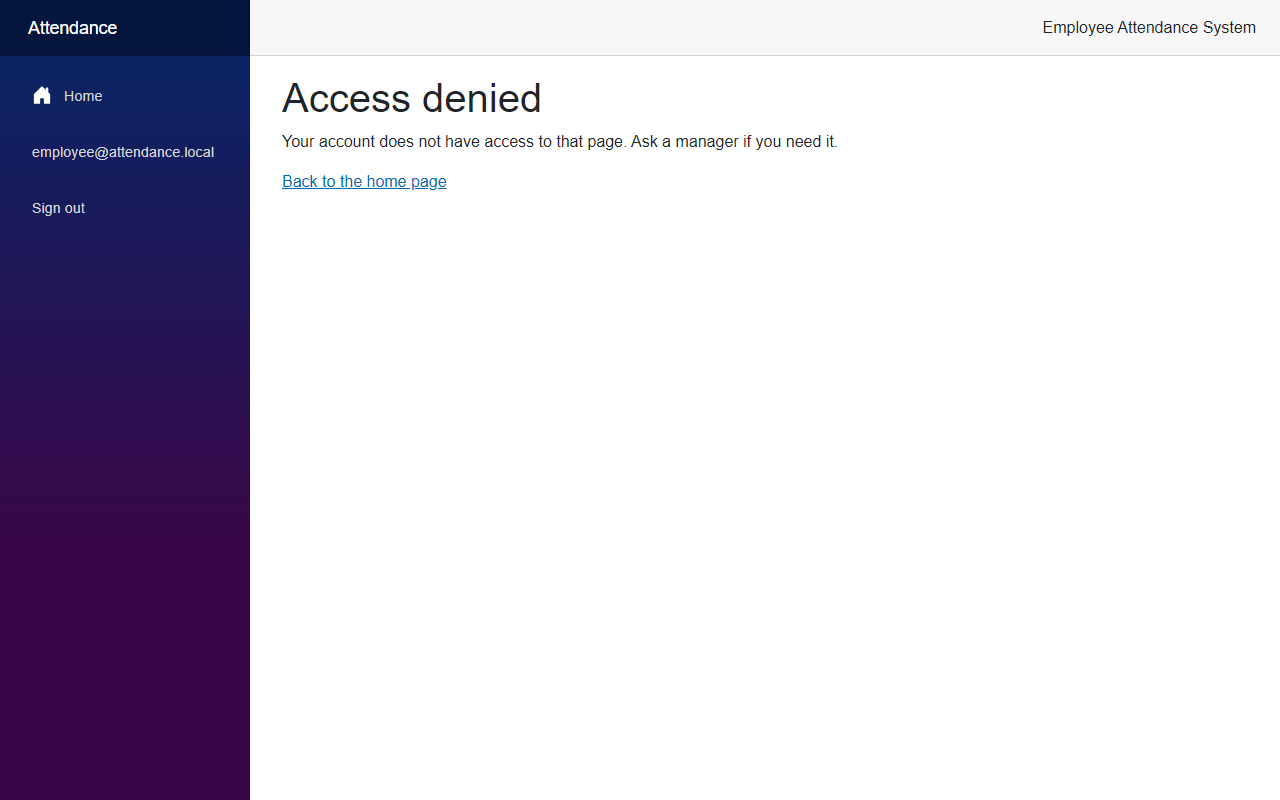
Someone who is not signed in goes to the login page. Someone who is signed in but has the wrong role sees the access denied page. Here are the two small pieces it uses.
src/FreeCodeSpot.Attendance.Web/Components/Layout/RedirectToLogin.razor
@inject NavigationManager Navigation

@code {
    // Send visitors who are not signed in to the login page, and bring them back here afterwards.
    protected override void OnInitialized()
    {
        var returnUrl = Uri.EscapeDataString("/" + Navigation.ToBaseRelativePath(Navigation.Uri));
        Navigation.NavigateTo($"login?returnUrl={returnUrl}", forceLoad: true);
    }
}
src/FreeCodeSpot.Attendance.Web/Components/Pages/AccessDenied.razor
@page "/access-denied"
@attribute [Authorize]

<PageTitle>Access denied</PageTitle>

<h1>Access denied</h1>

<p role="alert">Your account does not have access to that page. Ask a manager if you need it.</p>

<p><a href="">Back to the home page</a></p>
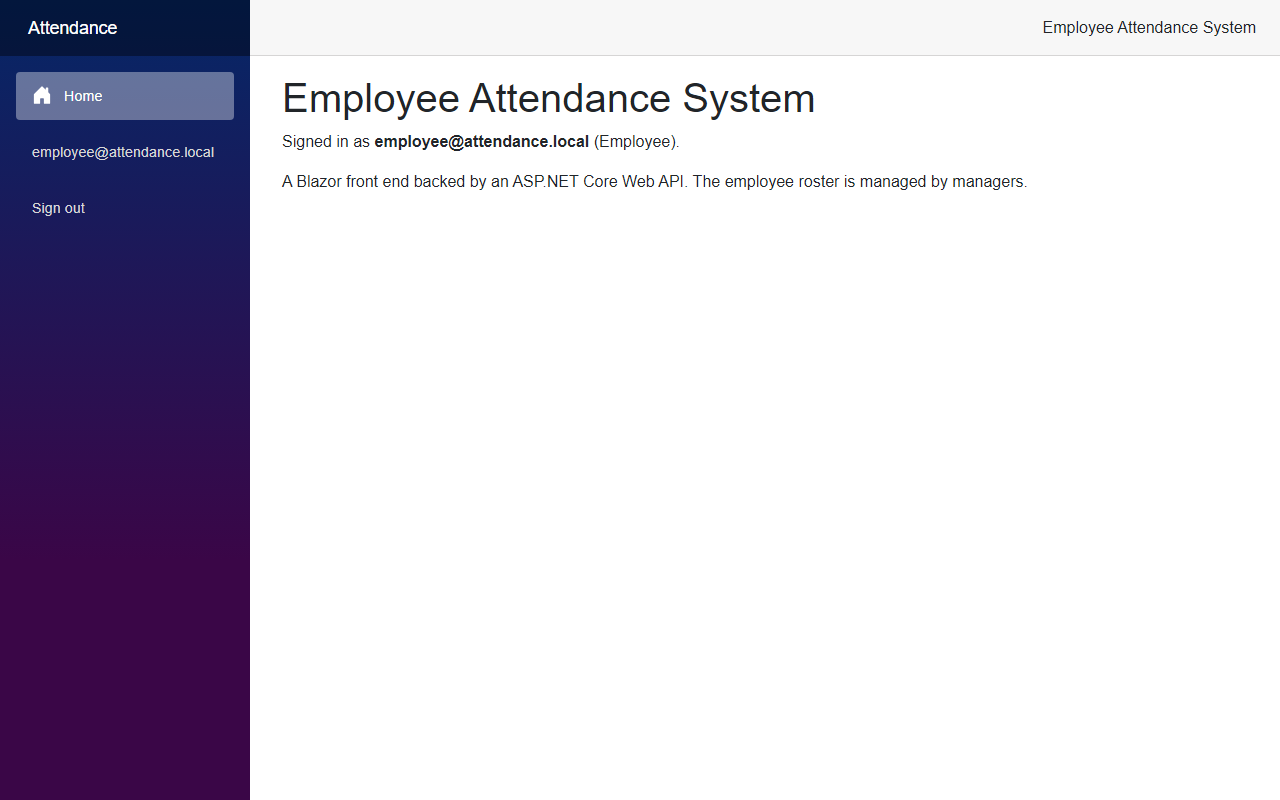
The last piece is the menu. The Employees link is only for managers, and the menu shows who is signed in with a Sign out button, or a Sign in link when nobody is signed in. Sign out is a form with an antiforgery token, because it changes something.
src/FreeCodeSpot.Attendance.Web/Components/Layout/NavMenu.razor
<AuthorizeView Roles="@AppRoles.Manager">
    <div class="nav-item px-3">
        <NavLink class="nav-link" href="employees">
            <span class="bi bi-list-nested-nav-menu" aria-hidden="true"></span> Employees
        </NavLink>
    </div>
</AuthorizeView>

<AuthorizeView>
    <Authorized>
        <div class="nav-item px-3 signed-in">
            <span class="nav-link">@context.User.Identity?.Name</span>
        </div>

        <div class="nav-item px-3">
            <form action="logout" method="post">
                <AntiforgeryToken />
                <input type="hidden" name="returnUrl" value="" />
                <button type="submit" class="nav-link">Sign out</button>
            </form>
        </div>
    </Authorized>
    <NotAuthorized>
        <div class="nav-item px-3">
            <NavLink class="nav-link" href="login">Sign in</NavLink>
        </div>
    </NotAuthorized>
</AuthorizeView>
The Home link above these blocks did not change, so I only show the new part. We also added the authorization namespaces to _Imports.razor.
src/FreeCodeSpot.Attendance.Web/Components/_Imports.razor
@using Microsoft.AspNetCore.Authorization
@using Microsoft.AspNetCore.Components.Authorization
@using FreeCodeSpot.Attendance.Web.Security
The menu only hides the link. It does not protect anything on its own. The real protection is the [Authorize] attribute on the pages, and the policy on the API.
Step 6 – Update the tests
Every existing endpoint test called the API without signing in, so they all started failing with 401. I asked Claude to update them. We changed the test factory in two ways. It now starts the API in the Testing environment, and it creates the demo users after the migrations. In Development the API seeds the users while it starts, which is before the factory has rebuilt the test database. It also has a method that signs in and returns a client with the token.
tests/FreeCodeSpot.Attendance.IntegrationTests/AttendanceApiFactory.cs
using System.Net.Http.Headers;
using System.Net.Http.Json;
using FreeCodeSpot.Attendance.Infrastructure.Identity;
using FreeCodeSpot.Attendance.Infrastructure.Persistence;
using Microsoft.AspNetCore.Hosting;
using Microsoft.AspNetCore.Mvc.Testing;
using Microsoft.EntityFrameworkCore;
using Microsoft.Extensions.DependencyInjection;

namespace FreeCodeSpot.Attendance.IntegrationTests;

/// <summary>
/// Boots the API against its own SQL Server database. The database is rebuilt
/// from the migrations and seeded with the two demo users before the tests run,
/// and dropped afterwards, so the tests never touch the development data and
/// always see the seeded roster.
/// </summary>
public sealed class AttendanceApiFactory : WebApplicationFactory<Program>, IAsyncLifetime
{
    public const string ManagerEmail = "manager@test.local";
    public const string EmployeeEmail = "employee@test.local";
    public const string Password = "Test#Passw0rd";

    private const string TestConnectionString =
        @"Server=(localdb)\MSSQLLocalDB;Database=FreeCodeSpotAttendance_Tests;Trusted_Connection=True;TrustServerCertificate=True";

    protected override void ConfigureWebHost(IWebHostBuilder builder)
    {
        // Not Development: the API seeds on startup there, and these tests seed after migrating.
        builder.UseEnvironment("Testing");
        builder.UseSetting("ConnectionStrings:AttendanceDb", TestConnectionString);
        builder.UseSetting("SeedUsers:ManagerEmail", ManagerEmail);
        builder.UseSetting("SeedUsers:EmployeeEmail", EmployeeEmail);
        builder.UseSetting("SeedUsers:Password", Password);
    }

    public async Task InitializeAsync()
    {
        using (var scope = Services.CreateScope())
        {
            var db = scope.ServiceProvider.GetRequiredService<AttendanceDbContext>();

            await db.Database.EnsureDeletedAsync();
            await db.Database.MigrateAsync();
        }

        await IdentitySeeder.SeedAsync(Services);
    }

    /// <summary>Signs in through /auth/login and returns a client that sends the bearer token.</summary>
    public async Task<HttpClient> CreateSignedInClientAsync(string email, string password = Password)
    {
        var client = CreateClient();

        var response = await client.PostAsJsonAsync("/auth/login", new { Email = email, Password = password });
        response.EnsureSuccessStatusCode();

        var token = await response.Content.ReadFromJsonAsync<TokenResponse>();
        client.DefaultRequestHeaders.Authorization = new AuthenticationHeaderValue("Bearer", token!.AccessToken);
        return client;
    }

    async Task IAsyncLifetime.DisposeAsync()
    {
        using (var scope = Services.CreateScope())
        {
            var db = scope.ServiceProvider.GetRequiredService<AttendanceDbContext>();
            await db.Database.EnsureDeletedAsync();
        }

        await base.DisposeAsync();
    }

    private sealed record TokenResponse(string AccessToken);
}
EmployeeEndpointsTests now signs in as the manager before each test, so its tests did not change. Then we added a new test class for the sign in and the role rules. Here are three of its tests:
tests/FreeCodeSpot.Attendance.IntegrationTests/Auth/AuthEndpointsTests.cs
[Fact]
public async Task Login_WithTheWrongPassword_Returns401()
{
    var client = factory.CreateClient();

    var response = await client.PostAsJsonAsync("/auth/login", new { Email = AttendanceApiFactory.ManagerEmail, Password = "Wrong#Passw0rd" });

    Assert.Equal(HttpStatusCode.Unauthorized, response.StatusCode);
}

[Fact]
public async Task Employees_Return401WithoutAToken()
{
    var client = factory.CreateClient();

    var response = await client.GetAsync("/api/employees");

    Assert.Equal(HttpStatusCode.Unauthorized, response.StatusCode);
}

[Fact]
public async Task Employees_Return403ForAnEmployee()
{
    using var client = await factory.CreateSignedInClientAsync(AttendanceApiFactory.EmployeeEmail);

    var read = await client.GetAsync("/api/employees");
    var write = await client.PostAsJsonAsync("/api/employees", new { FullName = "Joy Mendoza", Department = "Finance", Email = "joy@test.local" });

    Assert.Equal(HttpStatusCode.Forbidden, read.StatusCode);
    Assert.Equal(HttpStatusCode.Forbidden, write.StatusCode);
}
The class has ten tests in total. They cover a correct login, a wrong password and an unknown email. They check that /auth/me returns the roles for a manager and for an employee, and that it needs a token. They also check that the employee routes answer 401 without a token or with a token that is not valid, 403 for an employee, and 200 for a manager.
Now run all the tests:
dotnet testAll 18 unit tests and 28 integration tests passed. Ten of the integration tests are the new ones.
Reviewing the Generated Code
Most of the generated code was fine. Here is what we changed or decided, and a few limits.
The demo password is not in the code. The seeder reads it from configuration. It is still a known password in appsettings.Development.json, which is fine on your machine and not fine anywhere else.
We did not use MapIdentityApi. It gives you register, reset password and two-factor routes that this app does not need. The register route would let anyone create an account. We only map /auth/login and /auth/me.
An employee was sent to the login page. When I tested with the employee account, opening /employees answered with a redirect, and the redirect went to the login page, even though the employee was signed in. I had set the cookie's AccessDeniedPath to /login. We added an access denied page and pointed the cookie to it.
The token is set in the client, not in a message handler. I described this in Step 5. A handler is the usual way, but it cannot see the signed-in user in an interactive page.
The return URL check did not compile in the page. My first version was a helper method inside the @code block of Login.razor, and the Razor compiler rejected it. We moved the check to ReturnUrl.cs, a normal C# class.
A compiler warning about the form model. The first version of Login.razor gave a BL0008 warning because the form property had an initial value, and a form post can replace it with null. We now set it in OnInitialized.
The existing tests had to sign in. The old endpoint tests call the API without a token, so they would get 401. They now sign in as the manager.
The token is not refreshed. The API also returns a refresh token, and we do not use it. After one hour the cookie expires and the user signs in again. I kept it that way to keep the article about one thing.
There is no register page, no password reset and no email confirmation. Users are created by the seeder, and the demo accounts are marked as confirmed.
The Employee role does not open anything yet. The role exists, it is in the token and the access rules treat it differently from the manager. But no page is meant for an employee yet, so an employee only sees the home page.
The return URL check has no test. The Web project does not have a test project. I tested the redirect by hand with /employees as the return URL.
Seeing It in Action
Now let's run the employee attendance system. If you have not applied the new migration yet, run dotnet ef database update from the repository root first, with the same options as in Step 1. Then start the API first and the Web app after that, in two terminals:
cd src/FreeCodeSpot.Attendance.Api
dotnet run --launch-profile https
cd src/FreeCodeSpot.Attendance.Web
dotnet run --launch-profile httpsThe API creates the two demo users when it starts. Open https://localhost:7098/employees without signing in. You are sent to the login page:
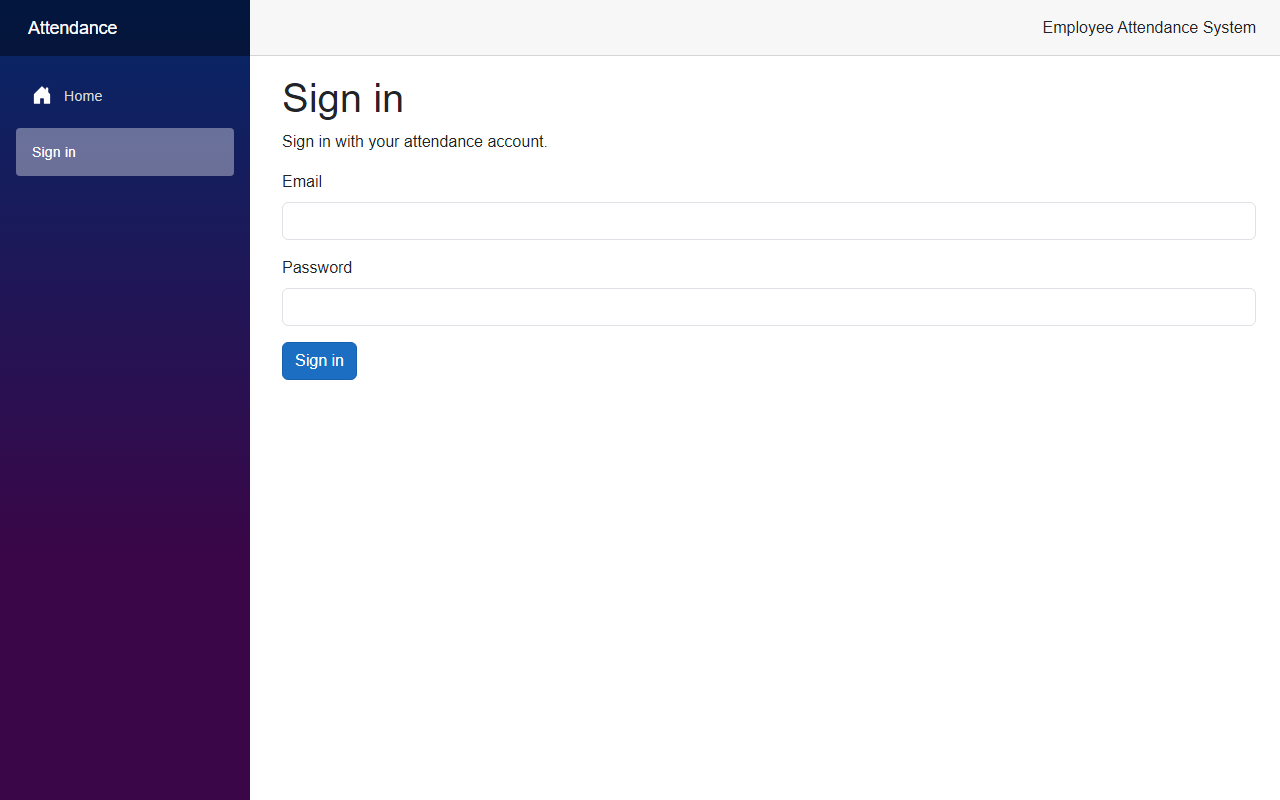
/employees, so after the login the app takes us back to it.First, try a wrong password for manager@attendance.local:
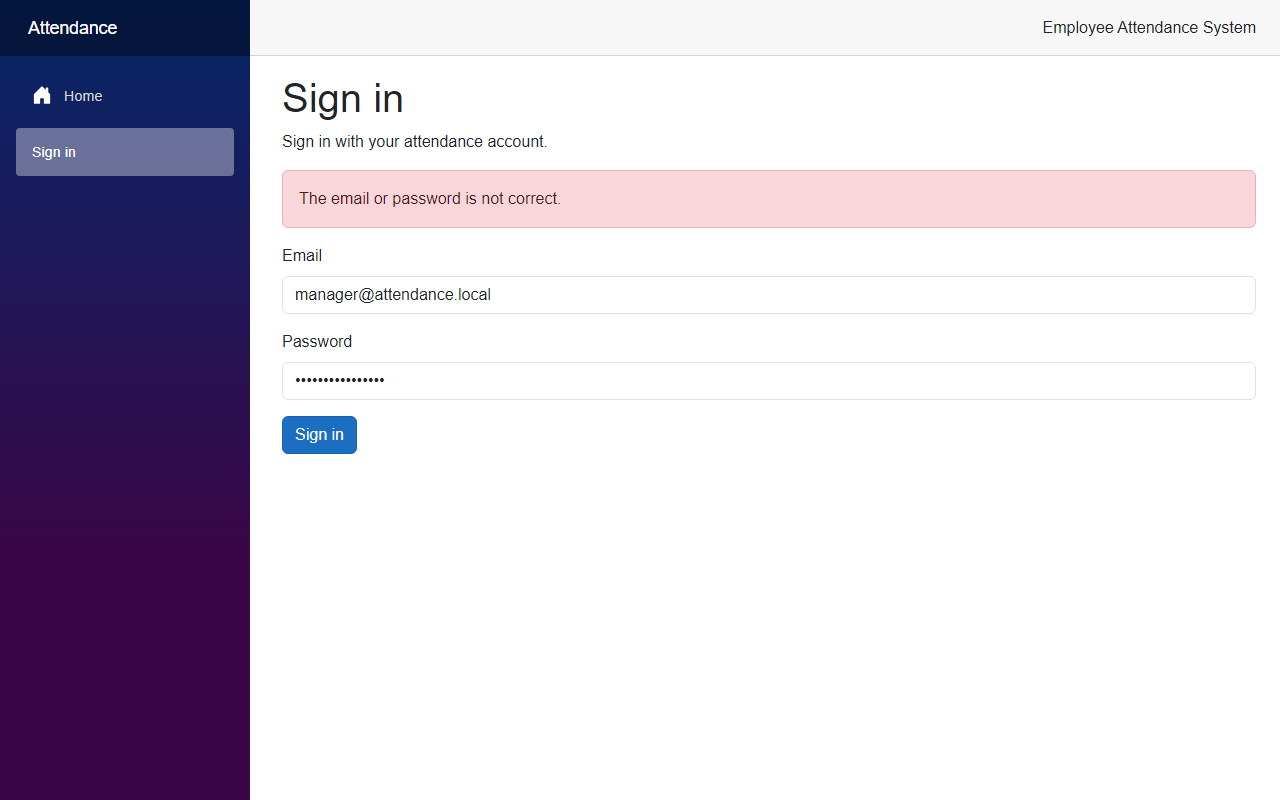
Now sign in as the manager with the password from appsettings.Development.json:
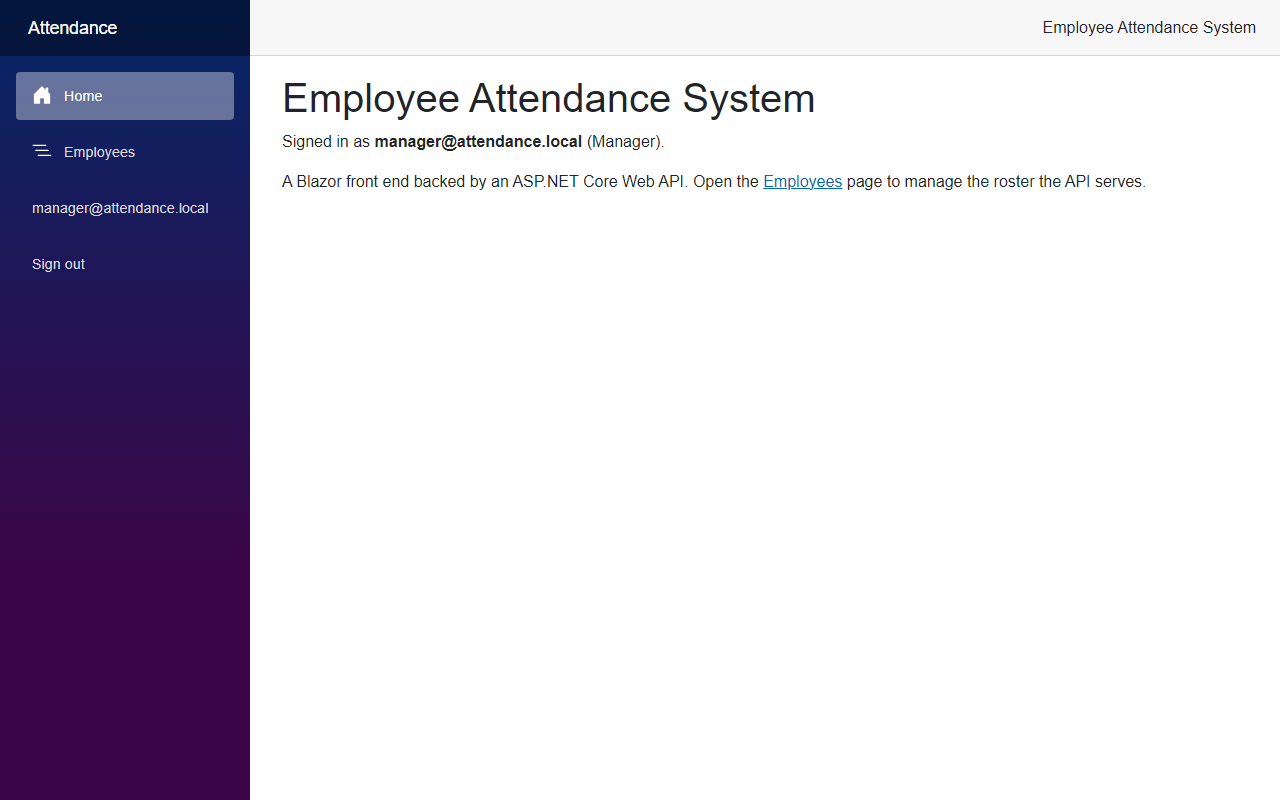
Click Employees. The roster is the same as before, and the API calls now carry the token. This is the screenshot from the beginning of the article. Click Sign out, and sign in as employee@attendance.local:
The link is hidden, but what if the employee types the address? Open https://localhost:7098/employees:
The API protects itself, too. You can see it with curl. First, a call without a token:
curl -k -i https://localhost:7020/api/employeesHTTP/1.1 401 Unauthorized
Content-Length: 0
Server: Kestrel
WWW-Authenticate: BearerNow sign in to get a token, and use it for the same call:
curl -k -X POST https://localhost:7020/auth/login -H "Content-Type: application/json" -d "{\"email\":\"manager@attendance.local\",\"password\":\"<the demo password>\"}"{"tokenType":"Bearer","accessToken":"<token>","expiresIn":3600,"refreshToken":"<token>"}curl -k -i https://localhost:7020/api/employees -H "Authorization: Bearer <accessToken>"With the manager's token, the API answered 200 and returned the roster. With the token of employee@attendance.local, the same call answered 403 Forbidden. A wrong password answers 401 with the message The email or password is not correct.
Project Structure
These are the files this article added or changed.
src/
  FreeCodeSpot.Attendance.Application/
    Security/Roles.cs                                  added
  FreeCodeSpot.Attendance.Infrastructure/
    Identity/IdentitySeeder.cs                         added
    Identity/SeedUsersOptions.cs                       added
    Persistence/AttendanceDbContext.cs                 changed
    Persistence/Migrations/                            added AddIdentity (2 files), snapshot changed
  FreeCodeSpot.Attendance.Api/
    Auth/AuthEndpoints.cs                              added
    Auth/Policies.cs                                   added
    Endpoints/EmployeeEndpoints.cs                     changed
    Program.cs                                         changed
    appsettings.json                                   changed
    appsettings.Development.json                       changed
  FreeCodeSpot.Attendance.Web/
    Components/Layout/NavMenu.razor                    changed
    Components/Layout/RedirectToLogin.razor            added
    Components/Pages/AccessDenied.razor                added
    Components/Pages/EmployeeCreate.razor              changed
    Components/Pages/EmployeeEdit.razor                changed
    Components/Pages/Employees.razor                   changed
    Components/Pages/Home.razor                        changed
    Components/Pages/Login.razor                       added
    Components/Routes.razor                            changed
    Components/_Imports.razor                          changed
    Security/AppRoles.cs                               added
    Security/ReturnUrl.cs                              added
    Security/SignedInUser.cs                           added
    Services/AuthApiClient.cs                          added
    Services/EmployeeApiClient.cs                      changed
    Program.cs                                         changed
tests/
  FreeCodeSpot.Attendance.IntegrationTests/
    Auth/AuthEndpointsTests.cs                         added
    Employees/EmployeeEndpointsTests.cs                changed
    AttendanceApiFactory.cs                            changed
Source Code
You can find the complete source code for this tutorial on GitHub. The code is tagged article-004 so it stays exactly as described here.
Summary
In this tutorial, we added Blazor authentication to the Employee Attendance System with ASP.NET Core Identity. Users sign in through the API, get a Manager or Employee role, and only managers can open the Employees pages or call the employee endpoints. We also updated the integration tests to sign in, and added tests for the 401 and 403 answers.
