
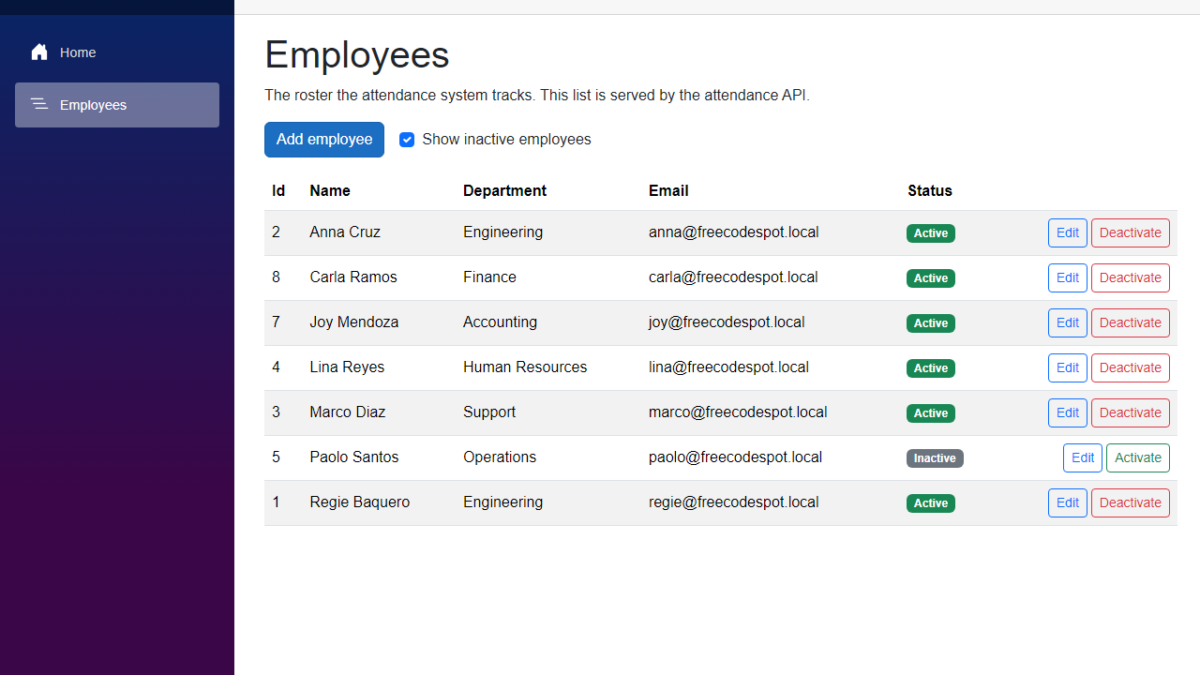
In this tutorial, we will add employee management to our Employee Attendance System. We will create pages to add and edit employees, validate what the user types, and deactivate employees instead of deleting them. We will also switch the repository, the service and the API endpoints to async, which we left for later in the previous article. I used Claude Code to generate the code again, and I will show what we changed before keeping it.
Table of Contents
This is part of the Employee Attendance System series:
- Project Setup
- SQL Server with Entity Framework Core
- Employee Management with Blazor Forms (this article)
What We're Building
By the end of this article, the Employees page is no longer read-only. Every employee has an Edit button and a Deactivate button, and you can show the inactive employees with one checkbox.
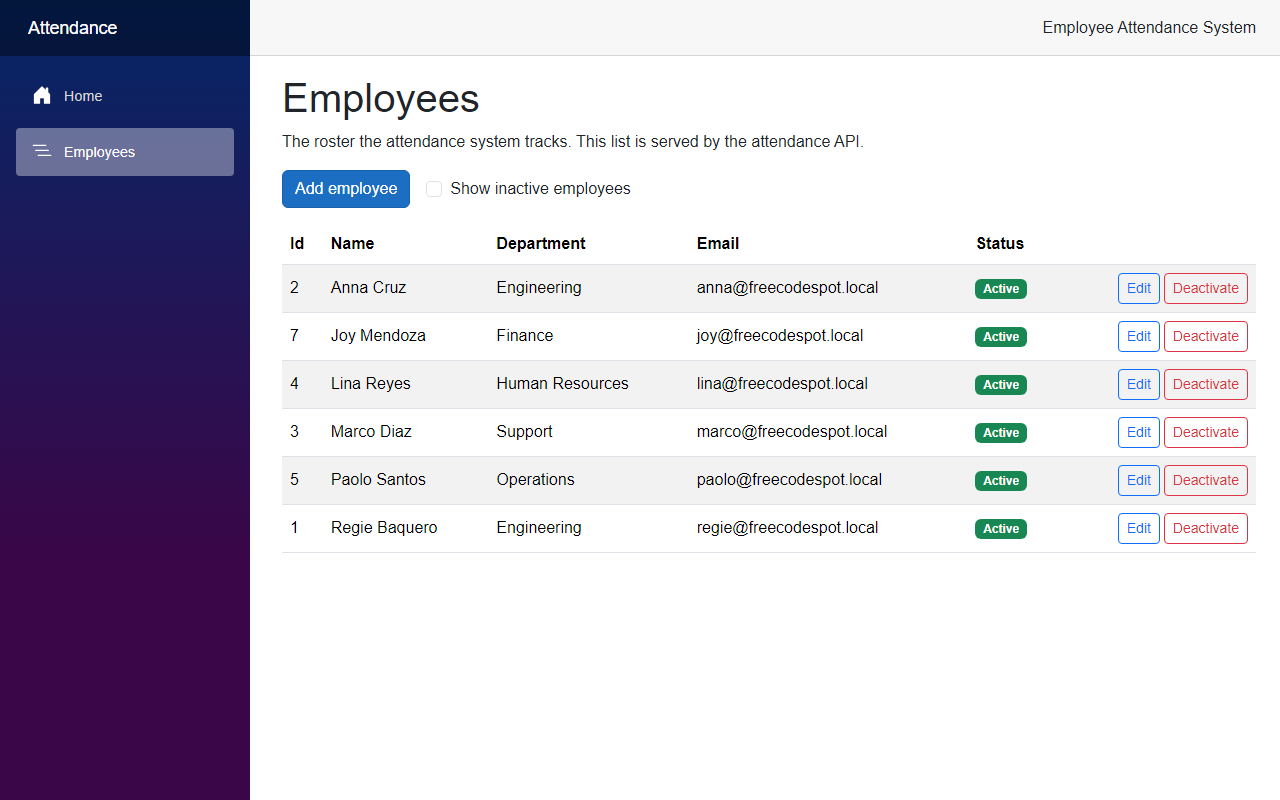
Now let's see how we built it.
Before We Start
Before we start, make sure you have the following installed:
- .NET 10 SDK (I used 10.0.401)
- SQL Server LocalDB, or the SQL Server instance you used in the previous article
- The EF Core command-line tools (I used 10.0.12)
- Claude Code
We do not add any new NuGet packages in this article.
Starting Point
After the previous article, the roster lived in SQL Server, but you could only read it. IEmployeeRepository had two synchronous methods, GetAll and GetById, and the API had two GET endpoints. The Employees page showed the list in a table and nothing else.
There was no validation at all. The only rules were the column lengths and the unique index on Email in the database.
The Goal
- Add an
IsActiveflag toEmployee, and never delete an employee - Add a migration for the new column without making existing employees inactive
- Make the repository, the service and the endpoints async
- Put the rules for a valid employee in
EmployeeService - Add API endpoints to create, update, deactivate and activate an employee
- Add Blazor pages to add and edit employees, and buttons on the Employees page
- Test the new rules and endpoints
Building It with AI
Step 1 – Add IsActive to the Employee record
I asked Claude Code to add employee management to the project: create, edit and deactivate, with validation, and async database calls. I also told it one rule up front. Employees are never deleted. In an attendance system, the records of an employee have to stay, even after that person leaves the company.
So instead of a delete, an employee gets an IsActive flag. Open Employee.cs in the Domain project.
src/FreeCodeSpot.Attendance.Domain/Employees/Employee.cs
namespace FreeCodeSpot.Attendance.Domain.Employees;

/// <summary>
/// A person whose attendance the system tracks. Employees are never deleted,
/// because their attendance history has to stay. They are deactivated instead.
/// </summary>
public record Employee(int Id, string FullName, string Department, string Email, bool IsActive = true);
The new parameter has a default value of true, so a new employee is active unless we say otherwise. It also means the seed data in EmployeeConfiguration did not need any change. The five new Employee(...) calls there are now active employees.
Step 2 – Create the migration
Now create the migration for the new column. Run this from the solution folder:
dotnet ef migrations add AddEmployeeIsActive --project src/FreeCodeSpot.Attendance.Infrastructure --startup-project src/FreeCodeSpot.Attendance.Api --output-dir Persistence/MigrationsEF Core printed a warning here: "An operation was scaffolded that may result in the loss of data. Please review the migration for accuracy." So let's read it. This is the first part of the Up method, after the change we made:
src/FreeCodeSpot.Attendance.Infrastructure/Persistence/Migrations/20260927095148_AddEmployeeIsActive.cs
migrationBuilder.AddColumn<bool>(
    name: "IsActive",
    table: "Employees",
    type: "bit",
    nullable: false,
    // Changed from false: employees that already exist are active.
    defaultValue: true);

migrationBuilder.UpdateData(
    table: "Employees",
    keyColumn: "Id",
    keyValue: 1,
    column: "IsActive",
    value: true);
The generated migration had defaultValue: false. A new bit column needs a value for the rows that are already there, and EF Core picked false. Then it added UpdateData calls that set IsActive to true, but only for the five seeded employees.
That is a problem for anyone who followed the previous article. In that article we added Joy Mendoza straight into the database with sqlcmd. She is not seed data, so with defaultValue: false she would have become inactive, and nobody would have noticed until she disappeared from the list. We changed the default to true. The UpdateData calls do not hurt, so we kept them as generated.
Now apply the migration:
dotnet ef database update --project src/FreeCodeSpot.Attendance.Infrastructure --startup-project src/FreeCodeSpot.Attendance.ApiI checked the table after the update. Joy Mendoza and the five seeded employees all had IsActive set to 1.
Step 3 – Make the repository async
Next, open IEmployeeRepository.cs in the Application project. Every method is async now, and there are three new ones.
src/FreeCodeSpot.Attendance.Application/Employees/IEmployeeRepository.cs
using FreeCodeSpot.Attendance.Domain.Employees;

namespace FreeCodeSpot.Attendance.Application.Employees;

/// <summary>
/// Storage for the employee roster. The Application layer owns this contract
/// so the storage that satisfies it can change without touching callers.
/// There is no delete: employees are deactivated through UpdateAsync.
/// </summary>
public interface IEmployeeRepository
{
    Task<IReadOnlyList<Employee>> GetAllAsync(bool includeInactive, CancellationToken cancellationToken = default);

    Task<Employee?> GetByIdAsync(int id, CancellationToken cancellationToken = default);

    /// <summary>
    /// True when another employee, active or not, already uses this email.
    /// </summary>
    Task<bool> EmailExistsAsync(string email, int? exceptId, CancellationToken cancellationToken = default);

    Task<Employee> AddAsync(Employee employee, CancellationToken cancellationToken = default);

    Task UpdateAsync(Employee employee, CancellationToken cancellationToken = default);
}
There is no DeleteAsync, and that is on purpose. Deactivating an employee is just an update that sets IsActive to false.
EmailExistsAsync takes an exceptId. When we edit an employee, their own email is of course already in the database, so we skip their own row.
Now open EfEmployeeRepository.cs in the Infrastructure project and replace it.
src/FreeCodeSpot.Attendance.Infrastructure/Employees/EfEmployeeRepository.cs
using FreeCodeSpot.Attendance.Application.Employees;
using FreeCodeSpot.Attendance.Domain.Employees;
using FreeCodeSpot.Attendance.Infrastructure.Persistence;
using Microsoft.EntityFrameworkCore;

namespace FreeCodeSpot.Attendance.Infrastructure.Employees;

/// <summary>
/// Stores the roster in SQL Server through EF Core. Nothing stays tracked
/// between calls: reads use AsNoTracking, and writes detach the record once it
/// is saved. Employee is an immutable record, so an update always arrives as a
/// new instance, and a tracked old one would clash with it.
/// </summary>
public sealed class EfEmployeeRepository(AttendanceDbContext db) : IEmployeeRepository
{
    public async Task<IReadOnlyList<Employee>> GetAllAsync(bool includeInactive, CancellationToken cancellationToken = default)
    {
        var query = db.Employees.AsNoTracking();

        if (!includeInactive)
        {
            query = query.Where(employee => employee.IsActive);
        }

        return await query.ToListAsync(cancellationToken);
    }

    public Task<Employee?> GetByIdAsync(int id, CancellationToken cancellationToken = default) =>
        db.Employees
            .AsNoTracking()
            .FirstOrDefaultAsync(employee => employee.Id == id, cancellationToken);

    // SQL Server's default collation compares case-insensitively, so
    // "Anna@..." and "anna@..." count as the same email, like the unique index.
    public Task<bool> EmailExistsAsync(string email, int? exceptId, CancellationToken cancellationToken = default) =>
        db.Employees.AnyAsync(
            employee => employee.Email == email && (exceptId == null || employee.Id != exceptId),
            cancellationToken);

    public async Task<Employee> AddAsync(Employee employee, CancellationToken cancellationToken = default)
    {
        db.Employees.Add(employee);
        await db.SaveChangesAsync(cancellationToken);
        db.Entry(employee).State = EntityState.Detached;

        // EF Core wrote the new identity value into employee.Id.
        return employee;
    }

    public async Task UpdateAsync(Employee employee, CancellationToken cancellationToken = default)
    {
        db.Employees.Update(employee);
        await db.SaveChangesAsync(cancellationToken);
        db.Entry(employee).State = EntityState.Detached;
    }
}ToListAsync, FirstOrDefaultAsync and AnyAsync are the async versions of the calls we used before. While the database works on the query, the thread can serve other requests.
The Where for IsActive runs in SQL, not in memory. The inactive employees never leave the database unless we ask for them.
The Detached lines were not in the first version. I explain why they are there in the review section.
Step 4 – Put the rules in EmployeeService
Now we need a place for the rules of a valid employee. I kept them all in EmployeeService, so the unit tests can check them without a database.
First, create two small types in the Employees folder of the Application project. EmployeeDetails is what a caller sends when it creates or edits an employee.
src/FreeCodeSpot.Attendance.Application/Employees/EmployeeDetails.cs
namespace FreeCodeSpot.Attendance.Application.Employees;

/// <summary>
/// What a caller sends to create or edit an employee. The values come from a
/// request body, so any of them can be null even though the types say otherwise.
/// </summary>
public sealed record EmployeeDetails(string FullName, string Department, string Email);
EmployeeResult is what the service returns when something changes.
src/FreeCodeSpot.Attendance.Application/Employees/EmployeeResult.cs
using FreeCodeSpot.Attendance.Domain.Employees;

namespace FreeCodeSpot.Attendance.Application.Employees;

public enum EmployeeOutcome
{
    Success,
    NotFound,
    Invalid
}

/// <summary>
/// The result of a change to the roster. The API turns it into a status code;
/// Errors is keyed by field name so a form can show each message next to its input.
/// </summary>
public sealed record EmployeeResult(
    EmployeeOutcome Outcome,
    Employee? Employee,
    IReadOnlyDictionary<string, string[]> Errors)
{
    private static readonly IReadOnlyDictionary<string, string[]> NoErrors = new Dictionary<string, string[]>();

    public static EmployeeResult Success(Employee employee) => new(EmployeeOutcome.Success, employee, NoErrors);

    public static EmployeeResult NotFound() => new(EmployeeOutcome.NotFound, null, NoErrors);

    public static EmployeeResult Invalid(IReadOnlyDictionary<string, string[]> errors) =>
        new(EmployeeOutcome.Invalid, null, errors);
}
The service does not know about HTTP. It only says what happened, and the API decides which status code that is.
Now open EmployeeService.cs. The file is longer now, so I am showing the parts that matter. This is how an employee is created and how the input is checked:
src/FreeCodeSpot.Attendance.Application/Employees/EmployeeService.cs
public async Task<EmployeeResult> CreateAsync(EmployeeDetails details, CancellationToken cancellationToken = default)
{
    var (clean, errors) = await ValidateAsync(details, exceptId: null, cancellationToken);
    if (errors.Count > 0)
    {
        return EmployeeResult.Invalid(errors);
    }

    var employee = await repository.AddAsync(
        new Employee(0, clean.FullName, clean.Department, clean.Email),
        cancellationToken);

    return EmployeeResult.Success(employee);
}

// ... unrelated code omitted

private async Task<(EmployeeDetails Clean, Dictionary<string, string[]> Errors)> ValidateAsync(
    EmployeeDetails details,
    int? exceptId,
    CancellationToken cancellationToken)
{
    var clean = new EmployeeDetails(
        details.FullName?.Trim() ?? string.Empty,
        details.Department?.Trim() ?? string.Empty,
        details.Email?.Trim() ?? string.Empty);

    var errors = new Dictionary<string, string[]>();

    if (clean.FullName.Length == 0)
        errors[nameof(EmployeeDetails.FullName)] = ["Name is required."];
    else if (clean.FullName.Length > FullNameMaxLength)
        errors[nameof(EmployeeDetails.FullName)] = [$"Name must be {FullNameMaxLength} characters or fewer."];

    if (clean.Department.Length == 0)
        errors[nameof(EmployeeDetails.Department)] = ["Department is required."];
    else if (clean.Department.Length > DepartmentMaxLength)
        errors[nameof(EmployeeDetails.Department)] = [$"Department must be {DepartmentMaxLength} characters or fewer."];

    if (clean.Email.Length == 0)
        errors[nameof(EmployeeDetails.Email)] = ["Email is required."];
    else if (clean.Email.Length > EmailMaxLength)
        errors[nameof(EmployeeDetails.Email)] = [$"Email must be {EmailMaxLength} characters or fewer."];
    else if (!IsEmailAddress(clean.Email))
        errors[nameof(EmployeeDetails.Email)] = ["Email is not a valid email address."];
    else if (await repository.EmailExistsAsync(clean.Email, exceptId, cancellationToken))
        errors[nameof(EmployeeDetails.Email)] = ["Another employee already uses this email."];

    return (clean, errors);
}

private static bool IsEmailAddress(string value) =>
    MailAddress.TryCreate(value, out var address) && address.Address == value;
The values are trimmed first, so " Joy Mendoza " is saved as "Joy Mendoza". The max lengths are constants at the top of the class, with the same values as the columns in EmployeeConfiguration. If a name is too long, the user gets a clear message instead of a database error.
The duplicate email check runs last, and only when the email looks valid. There is no point asking the database about an email that is not an email.
IsEmailAddress compares the parsed address with the input. MailAddress also accepts things like Joy Mendoza <joy@example.com>, and we do not want that stored as an email.
Deactivating and activating share one method:
private async Task<EmployeeResult> SetActiveAsync(int id, bool isActive, CancellationToken cancellationToken)
{
    var existing = await repository.GetByIdAsync(id, cancellationToken);
    if (existing is null)
    {
        return EmployeeResult.NotFound();
    }

    // Deactivating an inactive employee (or activating an active one) changes nothing.
    if (existing.IsActive == isActive)
    {
        return EmployeeResult.Success(existing);
    }

    var updated = existing with { IsActive = isActive };
    await repository.UpdateAsync(updated, cancellationToken);

    return EmployeeResult.Success(updated);
}
existing with { IsActive = isActive } creates a copy of the record with one value changed. The employee and everything else about them stay in the database.
Deactivating someone who is already inactive is not an error. If two people click Deactivate at the same time, both get a success.
Step 5 – Add the API endpoints
Now open EmployeeEndpoints.cs in the API project. The two GET endpoints are async now, and there are four new ones. This is the part that creates an employee and the part that turns a result into a response:
src/FreeCodeSpot.Attendance.Api/Endpoints/EmployeeEndpoints.cs
group.MapPost("/", async (EmployeeDetails details, EmployeeService employees, CancellationToken cancellationToken) =>
    {
        var result = await employees.CreateAsync(details, cancellationToken);
        return result.Outcome == EmployeeOutcome.Success
            ? Results.CreatedAtRoute("GetEmployeeById", new { id = result.Employee!.Id }, result.Employee)
            : ToErrorResult(result);
    })
    .WithName("CreateEmployee")
    .Produces<Employee>(StatusCodes.Status201Created)
    .ProducesValidationProblem();

// ... unrelated code omitted

// Deactivate instead of DELETE: the employee and their history stay in the database.
group.MapPost("/{id:int}/deactivate", async (int id, EmployeeService employees, CancellationToken cancellationToken) =>
        ToStatusResult(await employees.DeactivateAsync(id, cancellationToken)))
    .WithName("DeactivateEmployee")
    .Produces(StatusCodes.Status204NoContent)
    .Produces(StatusCodes.Status404NotFound);

// ... unrelated code omitted

private static IResult ToErrorResult(EmployeeResult result) =>
    result.Outcome == EmployeeOutcome.NotFound
        ? Results.NotFound()
        : Results.ValidationProblem(result.Errors.ToDictionary());
These are all the employee endpoints now:
| Method | Route | Returns |
|---|---|---|
| GET | /api/employees | active employees, or all of them with ?includeInactive=true |
| GET | /api/employees/{id} | one employee, active or not, or 404 |
| POST | /api/employees | 201 with the new employee, or 400 |
| PUT | /api/employees/{id} | 200 with the updated employee, 400 or 404 |
| POST | /api/employees/{id}/deactivate | 204 or 404 |
| POST | /api/employees/{id}/activate | 204 or 404 |
GET /api/employees/{id} still returns an inactive employee. A record about an employee still has to show who that employee was, even after they leave.
Results.ValidationProblem sends the standard ASP.NET Core error response. This is what the API returns for an empty name and a bad email:
{"type":"https://tools.ietf.org/html/rfc9110#section-15.5.1","title":"One or more validation errors occurred.","status":400,"errors":{"FullName":["Name is required."],"Email":["Email is not a valid email address."]}}The errors are grouped by field name. That is what lets the Blazor form show each message under the right input.
Step 6 – Update the API client in the Web app
The Web app has its own copy of the employee shape, so add IsActive there too.
src/FreeCodeSpot.Attendance.Web/Models/Employee.cs
namespace FreeCodeSpot.Attendance.Web.Models;

/// <summary>
/// The shape of an employee as the API returns it.
/// </summary>
public record Employee(int Id, string FullName, string Department, string Email, bool IsActive);
Next, create EmployeeFormModel.cs in the same Models folder. This is the class the forms bind to.
src/FreeCodeSpot.Attendance.Web/Models/EmployeeFormModel.cs
using System.ComponentModel.DataAnnotations;

namespace FreeCodeSpot.Attendance.Web.Models;

/// <summary>
/// What the add and edit forms bind to. The attributes give the user instant
/// feedback in the browser; the API checks the same rules again, and it is the
/// only place that can tell whether an email is already taken.
/// </summary>
public sealed class EmployeeFormModel
{
    [Required(ErrorMessage = "Name is required.")]
    [StringLength(100, ErrorMessage = "Name must be 100 characters or fewer.")]
    public string FullName { get; set; } = string.Empty;

    [Required(ErrorMessage = "Department is required.")]
    [StringLength(50, ErrorMessage = "Department must be 50 characters or fewer.")]
    public string Department { get; set; } = string.Empty;

    [Required(ErrorMessage = "Email is required.")]
    [StringLength(256, ErrorMessage = "Email must be 256 characters or fewer.")]
    [EmailAddress(ErrorMessage = "Email is not a valid email address.")]
    public string Email { get; set; } = string.Empty;

    public static EmployeeFormModel From(Employee employee) => new()
    {
        FullName = employee.FullName,
        Department = employee.Department,
        Email = employee.Email
    };
}
Yes, the rules are written twice now, once here and once in EmployeeService. The attributes here are only there so the user sees a mistake right away, without waiting for the API. The API still checks everything, because anyone can call it without our form.
Then open EmployeeApiClient.cs in the Services folder. It gets methods to get one employee, create, update, deactivate and activate. The interesting part is how it reads the answer from the API:
src/FreeCodeSpot.Attendance.Web/Services/EmployeeApiClient.cs
private static async Task<SaveResult> ToSaveResultAsync(HttpResponseMessage response, CancellationToken cancellationToken)
{
    if (response.IsSuccessStatusCode)
    {
        return SaveResult.Saved;
    }

    if (response.StatusCode == HttpStatusCode.NotFound)
    {
        return SaveResult.Missing;
    }

    if (response.StatusCode == HttpStatusCode.BadRequest)
    {
        var problem = await response.Content.ReadFromJsonAsync<ValidationProblemResponse>(cancellationToken);
        return SaveResult.Invalid(problem?.Errors ?? []);
    }

    // Anything else is unexpected. Let the page show its error message.
    response.EnsureSuccessStatusCode();
    return SaveResult.Saved;
}

/// <summary>The part of the API's validation problem response the forms use.</summary>
private sealed record ValidationProblemResponse(Dictionary<string, string[]> Errors);
A 400 is not an exception here. It is a normal answer that says what to fix, so we read the errors from the response and hand them to the form. SaveResult is a small record in the same folder with Succeeded, NotFound and Errors.
Step 7 – Build the employee management pages
Now let's build the forms. The Add page and the Edit page have the same three fields, so I asked Claude to put the form in one component. Create a Components/Employees folder in the Web project and add EmployeeForm.razor.
src/FreeCodeSpot.Attendance.Web/Components/Employees/EmployeeForm.razor
<EditForm EditContext="editContext" OnValidSubmit="SubmitAsync">
    <DataAnnotationsValidator />

    <div class="mb-3">
        <label for="fullName" class="form-label">Name</label>
        <InputText id="fullName" class="form-control" @bind-Value="Model.FullName" />
        <ValidationMessage For="() => Model.FullName" />
    </div>

    <div class="mb-3">
        <label for="department" class="form-label">Department</label>
        <InputText id="department" class="form-control" @bind-Value="Model.Department" />
        <ValidationMessage For="() => Model.Department" />
    </div>

    <div class="mb-3">
        <label for="email" class="form-label">Email</label>
        <InputText id="email" class="form-control" @bind-Value="Model.Email" />
        <ValidationMessage For="() => Model.Email" />
    </div>

    <button type="submit" class="btn btn-primary" disabled="@saving">@SubmitText</button>
    <a href="employees" class="btn btn-link">Cancel</a>
</EditForm>
DataAnnotationsValidator checks the attributes on EmployeeFormModel. OnValidSubmit only runs when they pass.
The code part of the same file shows the API errors on the form:
protected override void OnParametersSet()
{
    if (editContext?.Model == Model)
    {
        return;
    }

    editContext = new EditContext(Model);
    serverErrors = new ValidationMessageStore(editContext);

    // A server error disappears as soon as the user edits that field.
    editContext.OnFieldChanged += (_, e) => serverErrors.Clear(e.FieldIdentifier);
}

private async Task SubmitAsync()
{
    saving = true;
    saveFailed = false;
    serverErrors.Clear();

    try
    {
        var errors = await OnSave(Model);
        foreach (var (field, messages) in errors)
        {
            serverErrors.Add(editContext.Field(field), messages);
        }

        editContext.NotifyValidationStateChanged();
    }
    catch (HttpRequestException)
    {
        saveFailed = true;
    }
    finally
    {
        saving = false;
    }
}
A ValidationMessageStore holds extra messages for the form. The API sends "Email" as the field name, and editContext.Field("Email") points to the Email property of our model. So the message from the API appears under the Email input, the same way as the messages from the attributes.
The page decides what saving means. The form only calls OnSave and shows whatever errors come back. This is the whole Add page:
src/FreeCodeSpot.Attendance.Web/Components/Pages/EmployeeCreate.razor
@page "/employees/new"
@rendermode InteractiveServer
@using FreeCodeSpot.Attendance.Web.Components.Employees
@using FreeCodeSpot.Attendance.Web.Models
@using FreeCodeSpot.Attendance.Web.Services
@inject EmployeeApiClient EmployeeApi
@inject NavigationManager Navigation

<PageTitle>Add employee</PageTitle>

<h1>Add employee</h1>

<EmployeeForm Model="model" OnSave="SaveAsync" SubmitText="Add employee" />

@code {
    private readonly EmployeeFormModel model = new();

    private async Task<IReadOnlyDictionary<string, string[]>> SaveAsync(EmployeeFormModel form)
    {
        var result = await EmployeeApi.CreateAsync(form);
        if (result.Succeeded)
        {
            Navigation.NavigateTo("employees");
        }

        return result.Errors;
    }
}
The Edit page at /employees/{Id:int}/edit works the same way. It loads the employee first, fills the form with EmployeeFormModel.From, and calls UpdateAsync when you save. If the id does not exist, it shows a message instead of the form.
Finally, open Employees.razor. The table has a new Status column and a column of buttons. This is the buttons cell:
src/FreeCodeSpot.Attendance.Web/Components/Pages/Employees.razor
<td class="text-end text-nowrap">
    <div class="d-inline-flex align-items-center gap-1">
    @if (confirmingId == employee.Id)
    {
        <span class="me-1">Deactivate @employee.FullName?</span>
        <button class="btn btn-sm btn-danger" @onclick="() => DeactivateAsync(employee.Id)">Yes, deactivate</button>
        <button class="btn btn-sm btn-link" @onclick="() => confirmingId = null">Cancel</button>
    }
    else
    {
        <a href="employees/@employee.Id/edit" class="btn btn-sm btn-outline-primary">Edit</a>
        @if (employee.IsActive)
        {
            <button class="btn btn-sm btn-outline-danger" @onclick="() => confirmingId = employee.Id">Deactivate</button>
        }
        else
        {
            <button class="btn btn-sm btn-outline-success" @onclick="() => ActivateAsync(employee.Id)">Activate</button>
        }
    }
    </div>
</td>
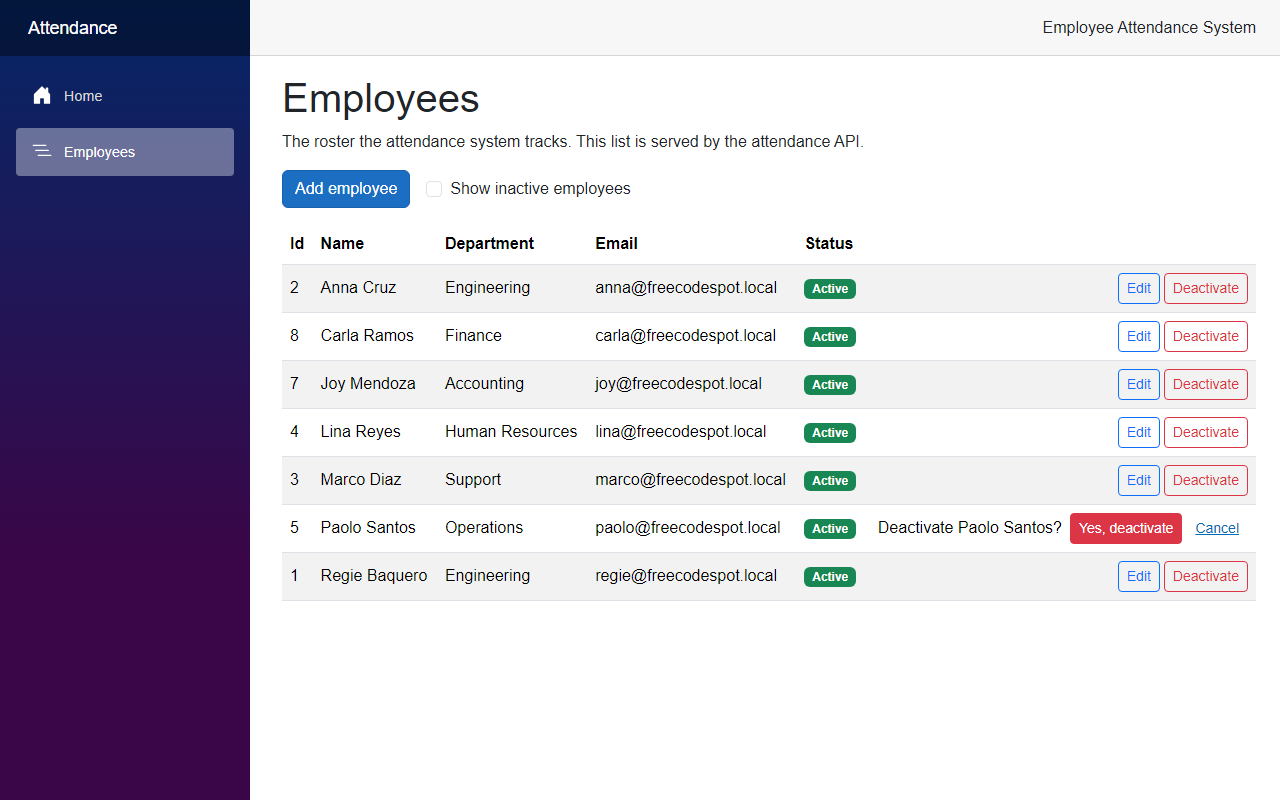
Deactivate does not act right away. It sets confirmingId, and the row asks "Deactivate Paolo Santos?" with a Yes, deactivate button. We do this inside the page instead of with a JavaScript confirm() box. An inactive employee gets an Activate button instead, so a mistake can be undone.
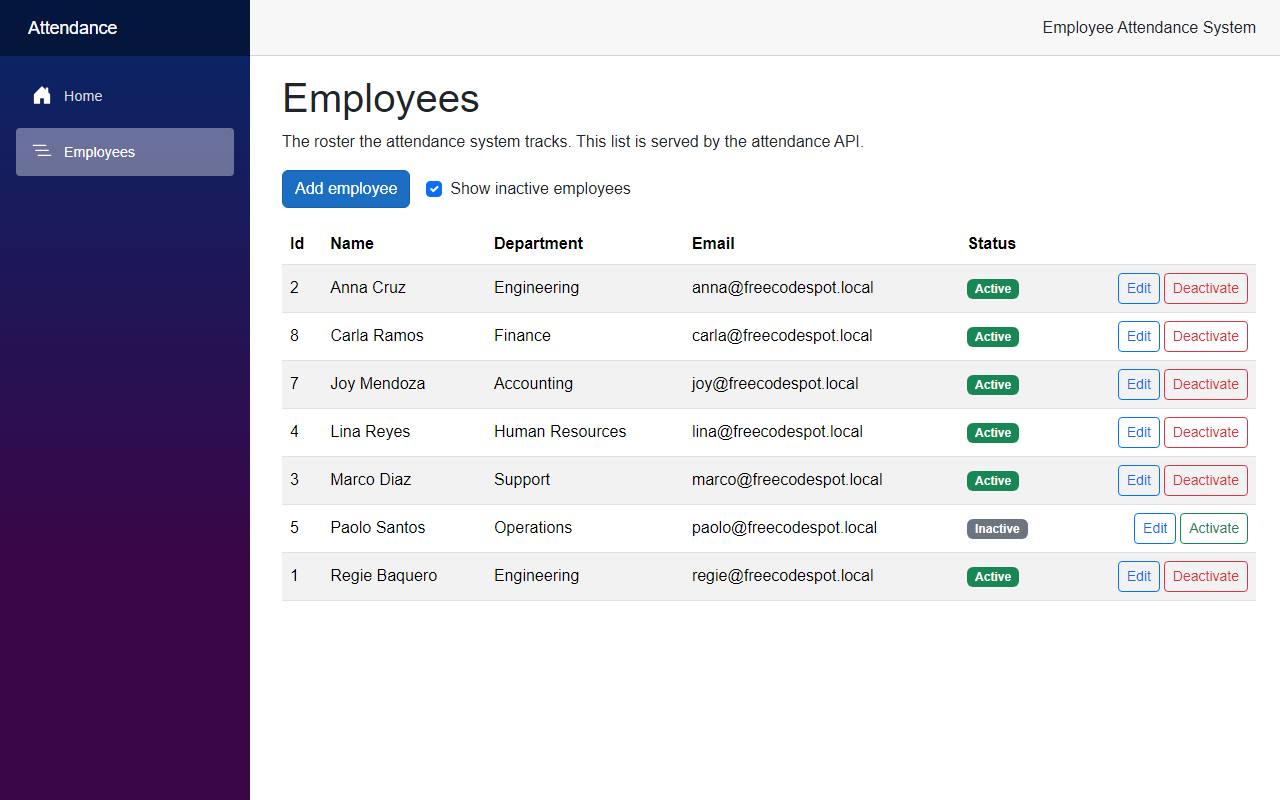
Above the table there is an Add employee button and a Show inactive employees checkbox. The checkbox reloads the list with includeInactive.
Step 8 – Update the tests
The service rules are the main thing to test, and they do not need a database. The unit tests use a small fake repository that keeps the employees in a list. This test checks that an email is still taken when it belongs to an inactive employee:
tests/FreeCodeSpot.Attendance.UnitTests/Employees/EmployeeServiceTests.cs
[Fact]
public async Task Create_RejectsAnEmailThatIsAlreadyUsed_EvenByAnInactiveEmployee()
{
    var service = new EmployeeService(new FakeRepository(Anna with { IsActive = false }));

    var result = await service.CreateAsync(new EmployeeDetails("Anna Reyes", "Finance", "ANNA@example.com"));

    Assert.Equal(EmployeeOutcome.Invalid, result.Outcome);
    Assert.Equal(["Another employee already uses this email."], result.Errors["Email"]);
}
The integration tests call the real API against the SQL Server test database from the previous article. This one checks that a deactivated employee is gone from the roster but still in the database:
tests/FreeCodeSpot.Attendance.IntegrationTests/Employees/EmployeeEndpointsTests.cs
[Fact]
public async Task Deactivate_HidesTheEmployeeFromTheRosterButKeepsTheRecord()
{
    var created = await CreateAsync();

    var response = await client.PostAsync($"/api/employees/{created.Id}/deactivate", null);

    Assert.Equal(HttpStatusCode.NoContent, response.StatusCode);

    var active = await client.GetFromJsonAsync<List<Employee>>("/api/employees");
    Assert.DoesNotContain(active!, employee => employee.Id == created.Id);

    var all = await client.GetFromJsonAsync<List<Employee>>("/api/employees?includeInactive=true");
    Assert.Contains(all!, employee => employee.Id == created.Id && !employee.IsActive);

    var byId = await client.GetFromJsonAsync<Employee>($"/api/employees/{created.Id}");
    Assert.False(byId!.IsActive);
}
CreateAsync is a helper in the test class that adds a new employee with a random email. The tests that change data never touch the five seeded employees, so the other tests can still rely on them.
Now run the tests:
dotnet testWe went from 10 tests to 36:
Passed!  - Failed:     0, Passed:    18, Skipped:     0, Total:    18, Duration: 103 ms - FreeCodeSpot.Attendance.UnitTests.dll (net10.0)
Passed!  - Failed:     0, Passed:    18, Skipped:     0, Total:    18, Duration: 1 s - FreeCodeSpot.Attendance.IntegrationTests.dll (net10.0)
Reviewing the Generated Code
Most of the generated code was fine, but two real problems came up, and a few things I kept on purpose.
The migration would have made existing employees inactive. I showed this in Step 2. EF Core picked defaultValue: false for the new column and only fixed the seeded rows. Anyone who added an employee by hand, like Joy Mendoza in the previous article, would have lost them from the list. We changed the default to true.
Adding and then updating in the same DbContext failed. The first version of AddAsync left the new employee tracked by EF Core. One of the repository tests adds an employee and then updates it, and it failed with this error:
System.InvalidOperationException : The instance of entity type 'Employee' cannot be tracked because another instance with the same key value for {'Id'} is already being tracked.Employee is an immutable record, so an update always comes in as a new object made with with. EF Core was still holding the old object with the same Id. In the running app this does not happen, because every request gets a new DbContext, but it would happen as soon as something adds and then changes an employee in one request. We now detach the record after every save, so the repository never keeps anything tracked.
The test that counted five employees had to change. GetEmployees_ReturnsTheRosterOrderedByName checked for exactly five employees. The new tests add employees to the same test database, so it now checks that the roster contains Marco Diaz and is sorted by name. The repository test does the same with the five seeded names.
An inactive employee still owns their email. You cannot add a new employee with the email of someone who was deactivated. The unique index in the database already works that way, and it keeps the history clear. One email always means one person.
Deactivate is a POST, not a DELETE. Someone reading DELETE /api/employees/5 would expect the row to be gone. POST /api/employees/5/deactivate says what really happens.
The rules stay in the service. .NET 10 has built-in validation for minimal APIs, but the duplicate email check needs the database, so it would have to be in the service anyway. I preferred to keep all the rules in one class that the unit tests cover.
Two saves at the exact same moment are not handled. If two people add an employee with the same email at the same time, both can pass the EmailExistsAsync check. The unique index then stops the second insert, and the API returns a 500 instead of a nice message. The data stays correct, so I kept it simple and did not add special handling for it.
Seeing It in Action
Now let's run the employee attendance system. Start the API first, then the Web app, in two terminals:
cd src/FreeCodeSpot.Attendance.Api
dotnet run --launch-profile https
cd src/FreeCodeSpot.Attendance.Web
dotnet run --launch-profile httpsOpen https://localhost:7098/employees and click Add employee. If you click the button on the empty form, you should see this:
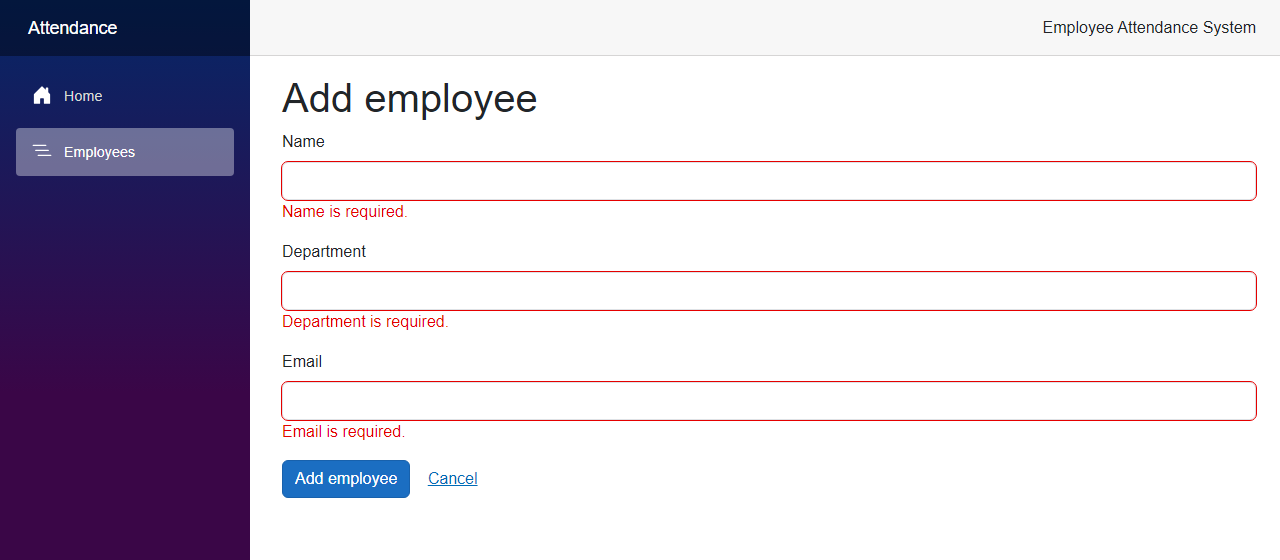
Now fill in a name and a department, and use an email that Anna Cruz already has:
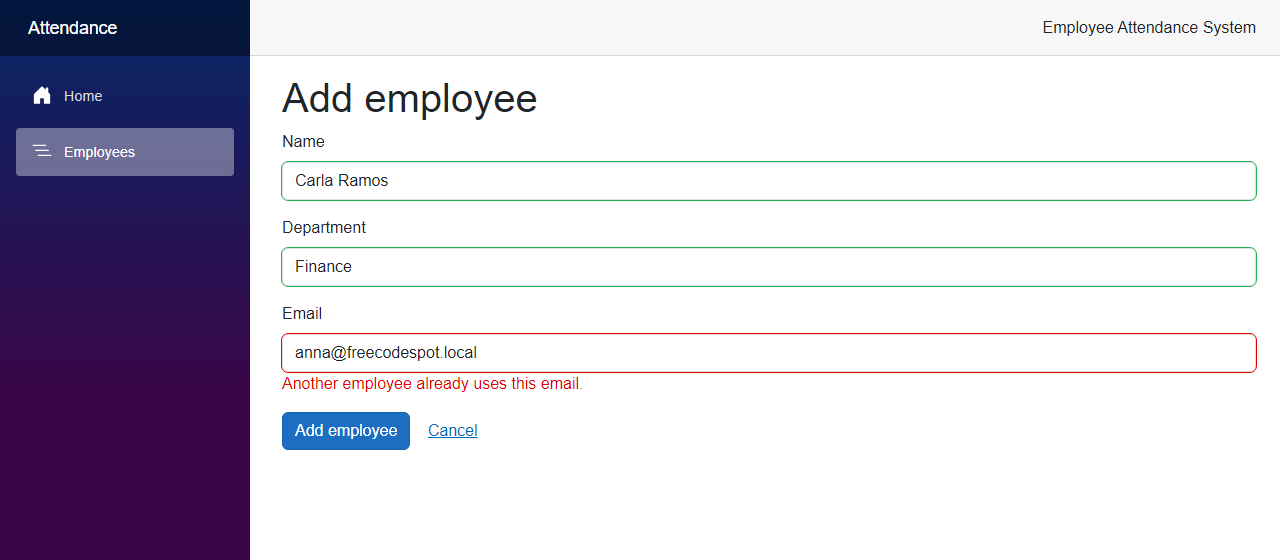
After I changed the email to carla@freecodespot.local, the form saved and went back to the roster with Carla Ramos in the list.
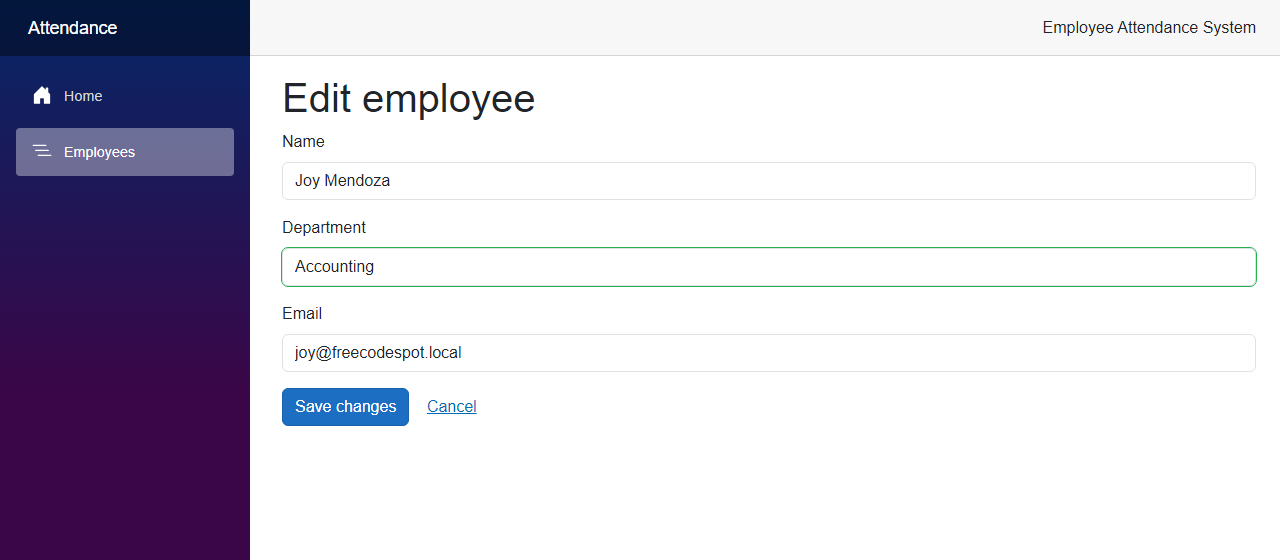
Next, click Edit on Joy Mendoza. The form opens with her details, and I changed her department to Accounting:
Now click Deactivate on Paolo Santos. The row asks first:
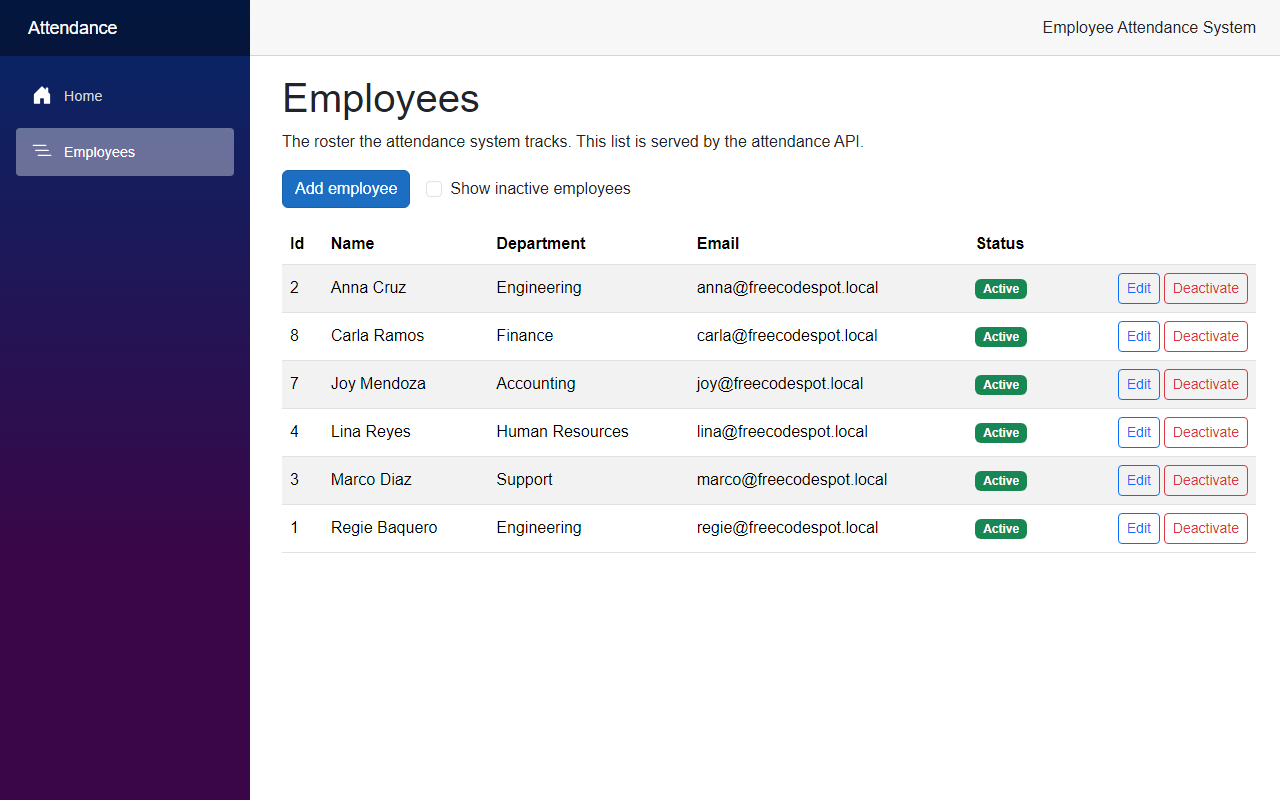
After clicking Yes, deactivate, Paolo is no longer in the list:
He is not deleted, though. Tick Show inactive employees:
Project Structure
These are the files this article added or changed.
src/
  FreeCodeSpot.Attendance.Domain/
    Employees/Employee.cs                              changed
  FreeCodeSpot.Attendance.Application/
    Employees/IEmployeeRepository.cs                   changed
    Employees/EmployeeService.cs                       changed
    Employees/EmployeeDetails.cs                       added
    Employees/EmployeeResult.cs                        added
  FreeCodeSpot.Attendance.Infrastructure/
    Employees/EfEmployeeRepository.cs                  changed
    Persistence/Migrations/                            added AddEmployeeIsActive (2 files), snapshot changed
  FreeCodeSpot.Attendance.Api/
    Endpoints/EmployeeEndpoints.cs                     changed
  FreeCodeSpot.Attendance.Web/
    Components/Employees/EmployeeForm.razor            added
    Components/Pages/EmployeeCreate.razor              added
    Components/Pages/EmployeeEdit.razor                added
    Components/Pages/Employees.razor                   changed
    Models/Employee.cs                                 changed
    Models/EmployeeFormModel.cs                        added
    Services/EmployeeApiClient.cs                      changed
    Services/SaveResult.cs                             added
tests/
  FreeCodeSpot.Attendance.UnitTests/
    Employees/EmployeeServiceTests.cs                  changed
  FreeCodeSpot.Attendance.IntegrationTests/
    Employees/EfEmployeeRepositoryTests.cs             changed
    Employees/EmployeeEndpointsTests.cs                changed
Source Code
You can find the complete source code for this tutorial on GitHub. The code is tagged article-003 so it stays exactly as described here.
Summary
In this tutorial, we added employee management to the Employee Attendance System, with pages to add and edit employees, validation in the service and the form, and deactivation instead of deleting. We also made the repository, the service and the API async, and tested the new rules against a real SQL Server database.
