
In this tutorial, we will start building an Employee Attendance System using .NET 10, ASP.NET Core Web API and Blazor. This first article sets up the solution, creates a small employee API, and shows the employee list on a Blazor page. I used Claude Code to generate most of the code, so I will also show what I asked for, what it generated, and what I checked before keeping it.
Table of Contents
This is part of the Employee Attendance System series:
- Project Setup (this article)
- SQL Server with Entity Framework Core
- Employee Management with Blazor Forms
- Blazor Authentication and Roles
- Clock In and Clock Out
- Employee Clock In Without a Manager
- Excel Import and Export
What We're Building
By the end of this article, the employee attendance system has an Employees page in the Blazor app that lists the roster served by the API.
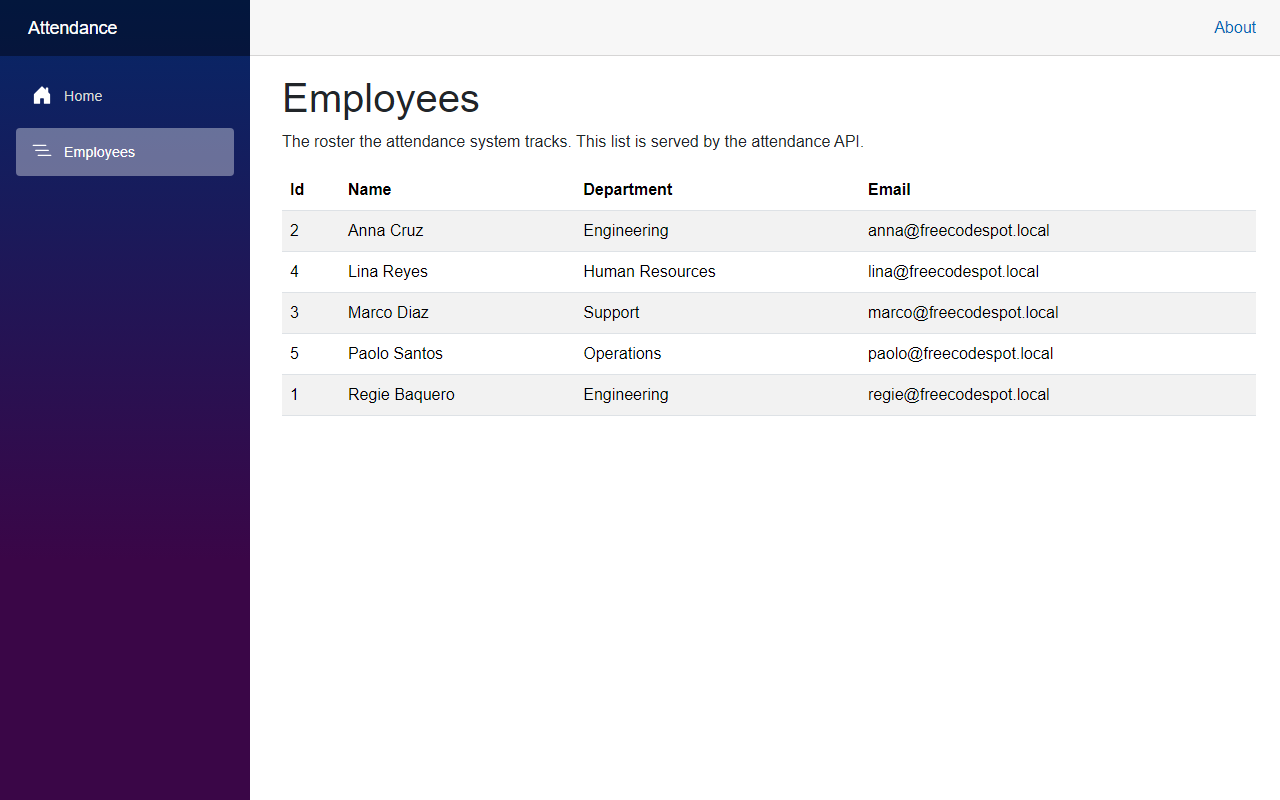
Now let's see how we built it.
Before We Start
Before we start, make sure you have the following installed:
- .NET 10 SDK (I used 10.0.401)
- Visual Studio 2022 or VS Code
- Claude Code
- A trusted HTTPS development certificate. Run
dotnet dev-certs https --trustif you have not done this before.
We do not need a database yet. The roster lives in memory for now.
Starting Point
This is the first article in the employee attendance system series, so we start from an empty folder. Everything below is created from scratch.
The Goal
- Create a solution with separate Domain, Application, Infrastructure, API and Web projects
- Add an
Employeemodel and a repository that returns a fixed list of employees - Expose
GET /api/employeesandGET /api/employees/{id}from a minimal API - Show the roster on an Employees page in the Blazor app
- Add unit tests and integration tests so we know it works before we look at the screen
Building It with AI
Step 1 – Create the employee attendance system solution
I asked Claude Code to create a .NET 10 solution named FreeCodeSpot.Attendance with five projects under src and two test projects under tests. I also told it which project should reference which, because that part is easy to get wrong and hard to undo later.
You can create the same layout with these commands:
dotnet new sln -n FreeCodeSpot.Attendance

dotnet new classlib -n FreeCodeSpot.Attendance.Domain -o src/FreeCodeSpot.Attendance.Domain
dotnet new classlib -n FreeCodeSpot.Attendance.Application -o src/FreeCodeSpot.Attendance.Application
dotnet new classlib -n FreeCodeSpot.Attendance.Infrastructure -o src/FreeCodeSpot.Attendance.Infrastructure
dotnet new webapi -n FreeCodeSpot.Attendance.Api -o src/FreeCodeSpot.Attendance.Api
dotnet new blazor -n FreeCodeSpot.Attendance.Web -o src/FreeCodeSpot.Attendance.Web --interactivity Server

dotnet new xunit -n FreeCodeSpot.Attendance.UnitTests -o tests/FreeCodeSpot.Attendance.UnitTests
dotnet new xunit -n FreeCodeSpot.Attendance.IntegrationTests -o tests/FreeCodeSpot.Attendance.IntegrationTests

dotnet sln add src/*/*.csproj tests/*/*.csproj
The references only point in one direction:
ApplicationreferencesDomainInfrastructurereferencesApplicationApireferencesApplicationandInfrastructureWebreferences nothing. It talks to the API over HTTP.
The Blazor project is a Blazor Web App with the interactive server render mode, so the pages run on the server and update over a SignalR connection.
Step 2 – Add the Employee model
Now let's create the Employee model in the Domain project. Everything else in the employee attendance system reads from this record.
src/FreeCodeSpot.Attendance.Domain/Employees/Employee.cs
namespace FreeCodeSpot.Attendance.Domain.Employees;

/// <summary>
/// A person whose attendance the system tracks.
/// </summary>
public record Employee(int Id, string FullName, string Department, string Email);
Claude generated this as a record instead of a class. I kept it. We only read employees in this article, so an immutable record is enough, and it gives us value equality for free in the tests.
Step 3 – Add the repository interface and the service
Next, we need a way to get employees without the API knowing where they come from. In the Application project, create the interface.
src/FreeCodeSpot.Attendance.Application/Employees/IEmployeeRepository.cs
using FreeCodeSpot.Attendance.Domain.Employees;

namespace FreeCodeSpot.Attendance.Application.Employees;

/// <summary>
/// Read access to the employee roster. The Application layer owns this contract
/// so the storage that satisfies it can change without touching callers.
/// </summary>
public interface IEmployeeRepository
{
    IReadOnlyList<Employee> GetAll();

    Employee? GetById(int id);
}
Then create the service that the endpoints will call.
src/FreeCodeSpot.Attendance.Application/Employees/EmployeeService.cs
using FreeCodeSpot.Attendance.Domain.Employees;

namespace FreeCodeSpot.Attendance.Application.Employees;

/// <summary>
/// The roster use cases the API exposes. Endpoints call this instead of
/// reaching for a repository directly.
/// </summary>
public sealed class EmployeeService(IEmployeeRepository repository)
{
    /// <summary>
    /// Returns the roster ordered by name, which is the order the UI displays.
    /// </summary>
    public IReadOnlyList<Employee> GetRoster() =>
        repository.GetAll()
            .OrderBy(employee => employee.FullName, StringComparer.OrdinalIgnoreCase)
            .ToList();

    public Employee? GetEmployee(int id) => repository.GetById(id);
}
The service sorts the roster by name. This is the one piece of logic we have so far, and it lives here so the API and the tests both get the same order.
Step 4 – Add the in-memory repository
In the Infrastructure project, create the repository that holds the list. The data is fixed at startup, which is enough to get something on screen.
src/FreeCodeSpot.Attendance.Infrastructure/Employees/InMemoryEmployeeRepository.cs
using FreeCodeSpot.Attendance.Application.Employees;
using FreeCodeSpot.Attendance.Domain.Employees;

namespace FreeCodeSpot.Attendance.Infrastructure.Employees;

/// <summary>
/// Holds the roster in memory. The list is fixed at startup and lives only for
/// the lifetime of the process, which is enough to get the roster on screen.
/// </summary>
public sealed class InMemoryEmployeeRepository : IEmployeeRepository
{
    private static readonly Employee[] Employees =
    [
        new(1, "Regie Baquero", "Engineering", "regie@freecodespot.local"),
        new(2, "Anna Cruz", "Engineering", "anna@freecodespot.local"),
        new(3, "Marco Diaz", "Support", "marco@freecodespot.local"),
        new(4, "Lina Reyes", "Human Resources", "lina@freecodespot.local"),
        new(5, "Paolo Santos", "Operations", "paolo@freecodespot.local")
    ];

    public IReadOnlyList<Employee> GetAll() => Employees;

    public Employee? GetById(int id) =>
        Array.Find(Employees, employee => employee.Id == id);
}
Now add an extension method so the API can register everything in Infrastructure with one call.
src/FreeCodeSpot.Attendance.Infrastructure/DependencyInjection.cs
using FreeCodeSpot.Attendance.Application.Employees;
using FreeCodeSpot.Attendance.Infrastructure.Employees;
using Microsoft.Extensions.DependencyInjection;

namespace FreeCodeSpot.Attendance.Infrastructure;

/// <summary>
/// Registers the Infrastructure implementations. Keeping this here means the
/// API never names a concrete storage class.
/// </summary>
public static class DependencyInjection
{
    public static IServiceCollection AddInfrastructure(this IServiceCollection services)
    {
        services.AddSingleton<IEmployeeRepository, InMemoryEmployeeRepository>();
        return services;
    }
}
This needs the Microsoft.Extensions.DependencyInjection.Abstractions package in the Infrastructure project, so add that package reference to the csproj.
Step 5 – Create the API endpoints
Now let's wire up the API. First, open Program.cs in the API project and register the services.
src/FreeCodeSpot.Attendance.Api/Program.cs
using FreeCodeSpot.Attendance.Api.Endpoints;
using FreeCodeSpot.Attendance.Application.Employees;
using FreeCodeSpot.Attendance.Infrastructure;

var builder = WebApplication.CreateBuilder(args);

builder.Services.AddOpenApi();
builder.Services.AddInfrastructure();
builder.Services.AddScoped<EmployeeService>();

var app = builder.Build();

if (app.Environment.IsDevelopment())
{
    app.MapOpenApi();
}

app.UseHttpsRedirection();

app.MapEmployeeEndpoints();

app.Run();

/// <summary>
/// Exposed so the integration tests can boot this application with
/// WebApplicationFactory.
/// </summary>
public partial class Program;
The public partial class Program line at the bottom matters. Without it, the integration test project cannot see the Program type and WebApplicationFactory<Program> will not compile.
Next, create the endpoints in their own file so Program.cs stays short.
src/FreeCodeSpot.Attendance.Api/Endpoints/EmployeeEndpoints.cs
using FreeCodeSpot.Attendance.Application.Employees;
using FreeCodeSpot.Attendance.Domain.Employees;

namespace FreeCodeSpot.Attendance.Api.Endpoints;

/// <summary>
/// Maps the employee routes. Keeping them here stops Program.cs from turning
/// into a list of every route in the application.
/// </summary>
public static class EmployeeEndpoints
{
    public static IEndpointRouteBuilder MapEmployeeEndpoints(this IEndpointRouteBuilder app)
    {
        var group = app.MapGroup("/api/employees")
            .WithTags("Employees");

        group.MapGet("/", (EmployeeService employees) => Results.Ok(employees.GetRoster()))
            .WithName("GetEmployees")
            .Produces<IReadOnlyList<Employee>>();

        group.MapGet("/{id:int}", (int id, EmployeeService employees) =>
            {
                var employee = employees.GetEmployee(id);
                return employee is null ? Results.NotFound() : Results.Ok(employee);
            })
            .WithName("GetEmployeeById")
            .Produces<Employee>()
            .Produces(StatusCodes.Status404NotFound);

        return app;
    }
}
We have two routes. GET /api/employees returns the sorted list, and GET /api/employees/{id} returns one employee or a 404.
The API runs on https://localhost:7020. You can check the port in Properties/launchSettings.json under the https profile.
Step 6 – Call the API from Blazor
The Web project needs to know where the API is. Open appsettings.json in the Web project and add the base URL.
src/FreeCodeSpot.Attendance.Web/appsettings.json
{
  "Logging": {
    "LogLevel": {
      "Default": "Information",
      "Microsoft.AspNetCore": "Warning"
    }
  },
  "AllowedHosts": "*",
  "AttendanceApi": {
    "BaseUrl": "https://localhost:7020/"
  }
}
Now register a typed HttpClient in the Web project's Program.cs. I am only showing the lines that changed from the template.
src/FreeCodeSpot.Attendance.Web/Program.cs
using FreeCodeSpot.Attendance.Web.Components;
using FreeCodeSpot.Attendance.Web.Services;

var builder = WebApplication.CreateBuilder(args);

builder.Services.AddRazorComponents()
    .AddInteractiveServerComponents();

var apiBaseUrl = builder.Configuration["AttendanceApi:BaseUrl"]
    ?? throw new InvalidOperationException(
        "AttendanceApi:BaseUrl is not configured. Add it to appsettings.json.");

builder.Services.AddHttpClient<EmployeeApiClient>(client =>
{
    client.BaseAddress = new Uri(apiBaseUrl);
});

var app = builder.Build();

// ... unrelated code omitted
If the setting is missing, the app fails at startup with a message that says what to fix. That is better than a null reference the first time someone opens the page.
Next, create the model and the client. The Web project has its own Employee record because it does not reference the Domain project.
src/FreeCodeSpot.Attendance.Web/Models/Employee.cs
namespace FreeCodeSpot.Attendance.Web.Models;

/// <summary>
/// The shape of an employee as the API returns it.
/// </summary>
public record Employee(int Id, string FullName, string Department, string Email);
src/FreeCodeSpot.Attendance.Web/Services/EmployeeApiClient.cs
using System.Net.Http.Json;
using FreeCodeSpot.Attendance.Web.Models;

namespace FreeCodeSpot.Attendance.Web.Services;

/// <summary>
/// Calls the attendance API. Components depend on this instead of holding an
/// HttpClient and a route string of their own.
/// </summary>
public sealed class EmployeeApiClient(HttpClient httpClient, ILogger<EmployeeApiClient> logger)
{
    public async Task<IReadOnlyList<Employee>> GetEmployeesAsync(CancellationToken cancellationToken = default)
    {
        logger.LogInformation("Requesting the employee roster from {BaseAddress}", httpClient.BaseAddress);

        var employees = await httpClient.GetFromJsonAsync<List<Employee>>(
            "api/employees",
            cancellationToken);

        return employees ?? [];
    }
}
Step 7 – Create the Employees page
Now let's create the page. Inside Components/Pages, add a new razor component named Employees.razor and add the following code.
src/FreeCodeSpot.Attendance.Web/Components/Pages/Employees.razor
@page "/employees"
@rendermode InteractiveServer
@using FreeCodeSpot.Attendance.Web.Models
@using FreeCodeSpot.Attendance.Web.Services
@inject EmployeeApiClient EmployeeApi

<PageTitle>Employees</PageTitle>

<h1>Employees</h1>

<p>The roster the attendance system tracks. This list is served by the attendance API.</p>

@if (loadFailed)
{
    <div class="alert alert-danger" role="alert">
        The employee roster could not be loaded. Check that the attendance API is running, then reload the page.
    </div>
}
else if (employees is null)
{
    <p><em>Loading the roster...</em></p>
}
else if (employees.Count == 0)
{
    <p><em>No employees have been added yet.</em></p>
}
else
{
    <table class="table table-striped">
        <thead>
            <tr>
                <th scope="col">Id</th>
                <th scope="col">Name</th>
                <th scope="col">Department</th>
                <th scope="col">Email</th>
            </tr>
        </thead>
        <tbody>
            @foreach (var employee in employees)
            {
                <tr>
                    <td>@employee.Id</td>
                    <td>@employee.FullName</td>
                    <td>@employee.Department</td>
                    <td>@employee.Email</td>
                </tr>
            }
        </tbody>
    </table>
}

@code {
    private IReadOnlyList<Employee>? employees;
    private bool loadFailed;

    protected override async Task OnInitializedAsync()
    {
        try
        {
            employees = await EmployeeApi.GetEmployeesAsync();
        }
        catch (HttpRequestException)
        {
            loadFailed = true;
        }
    }
}
The page has four states. Loading, failed, empty, and the table. The failed state shows up when the API is not running, which will happen to you at least once while working on this project.
Finally, add the page to the navigation menu. Open Components/Layout/NavMenu.razor and add a link to employees next to the Home link. The Counter and Weather links that come with the template are removed.
src/FreeCodeSpot.Attendance.Web/Components/Layout/NavMenu.razor
<div class="nav-item px-3">
    <NavLink class="nav-link" href="employees">
        <span class="bi bi-list-nested-nav-menu" aria-hidden="true"></span> Employees
    </NavLink>
</div>
Step 8 – Add the tests
I asked Claude to add tests for the service, the repository and the endpoints. It wrote two unit test classes and one integration test class.
The unit tests use a small stub repository so the service is tested on its own.
tests/FreeCodeSpot.Attendance.UnitTests/Employees/EmployeeServiceTests.cs
[Fact]
public void GetRoster_OrdersEmployeesByFullName()
{
    var service = new EmployeeService(new StubRepository(
        new Employee(1, "Zed Ortiz", "Support", "zed@example.com"),
        new Employee(2, "amy Lee", "Engineering", "amy@example.com"),
        new Employee(3, "Ben Cruz", "Operations", "ben@example.com")));

    var roster = service.GetRoster();

    Assert.Equal(["amy Lee", "Ben Cruz", "Zed Ortiz"], roster.Select(employee => employee.FullName));
}
The lowercase "amy" is on purpose. It checks that the sort ignores case, which is why the service uses StringComparer.OrdinalIgnoreCase.
The integration tests boot the real API in memory with WebApplicationFactory and call it over HTTP. I am showing the two tests for the by-id route. The third test checks the full roster the same way.
tests/FreeCodeSpot.Attendance.IntegrationTests/Employees/EmployeeEndpointsTests.cs
public class EmployeeEndpointsTests(WebApplicationFactory<Program> factory)
    : IClassFixture<WebApplicationFactory<Program>>
{
    private readonly HttpClient client = factory.CreateClient();

    // ... unrelated code omitted

    [Fact]
    public async Task GetEmployeeById_ReturnsTheEmployee()
    {
        var employee = await client.GetFromJsonAsync<Employee>("/api/employees/3");

        Assert.NotNull(employee);
        Assert.Equal("Marco Diaz", employee.FullName);
    }

    [Fact]
    public async Task GetEmployeeById_Returns404ForUnknownId()
    {
        var response = await client.GetAsync("/api/employees/999");

        Assert.Equal(HttpStatusCode.NotFound, response.StatusCode);
    }
}
This test project needs the Microsoft.AspNetCore.Mvc.Testing package. Now run the tests from the solution folder.
dotnet testYou should get 10 passing tests. 7 from the unit test project and 3 from the integration test project.
Passed!  - Failed:     0, Passed:     7, Skipped:     0, Total:     7, Duration: 100 ms - FreeCodeSpot.Attendance.UnitTests.dll (net10.0)
Passed!  - Failed:     0, Passed:     3, Skipped:     0, Total:     3, Duration: 388 ms - FreeCodeSpot.Attendance.IntegrationTests.dll (net10.0)
Reviewing the Generated Code
Most of what Claude generated was fine for a first article, but I did not keep it without reading it. These are the things I checked.
The Web project has its own Employee model. It would be easy to reference the Domain project from the Web project and reuse the record. I kept the separate model instead. The Web app is a client of the API, and a client should depend on the JSON the API returns, not on the API's internal types. It is four lines of duplication.
The repository is a singleton. AddInfrastructure registers InMemoryEmployeeRepository as a singleton and Program.cs registers EmployeeService as scoped. That is correct here because the repository holds a static array and has no state per request. When the storage changes, this registration is the one line to revisit.
Sorting happens in the service, not the endpoint. Claude put the OrderBy in EmployeeService.GetRoster() instead of in the route handler. I agree with that. The unit test can check the order without booting the API, and the integration test confirms the endpoint passes it through unchanged.
The page only catches HttpRequestException. The Employees page catches that one exception type and shows the alert. It does not catch everything. If the API returns JSON the page cannot read, that is a bug we want to see, not hide behind a friendly message.
The template's Counter and Weather pages are gone. The sample pages and their nav links are not in the project. I checked that nothing else referenced them before accepting that.
Nothing in this round needed a rewrite.
Seeing It in Action
Now let's run the employee attendance system. Start the API first, then the Web app, in two terminals.
cd src/FreeCodeSpot.Attendance.Api
dotnet run --launch-profile https
cd src/FreeCodeSpot.Attendance.Web
dotnet run --launch-profile httpsOpen https://localhost:7098. You should see the following page:
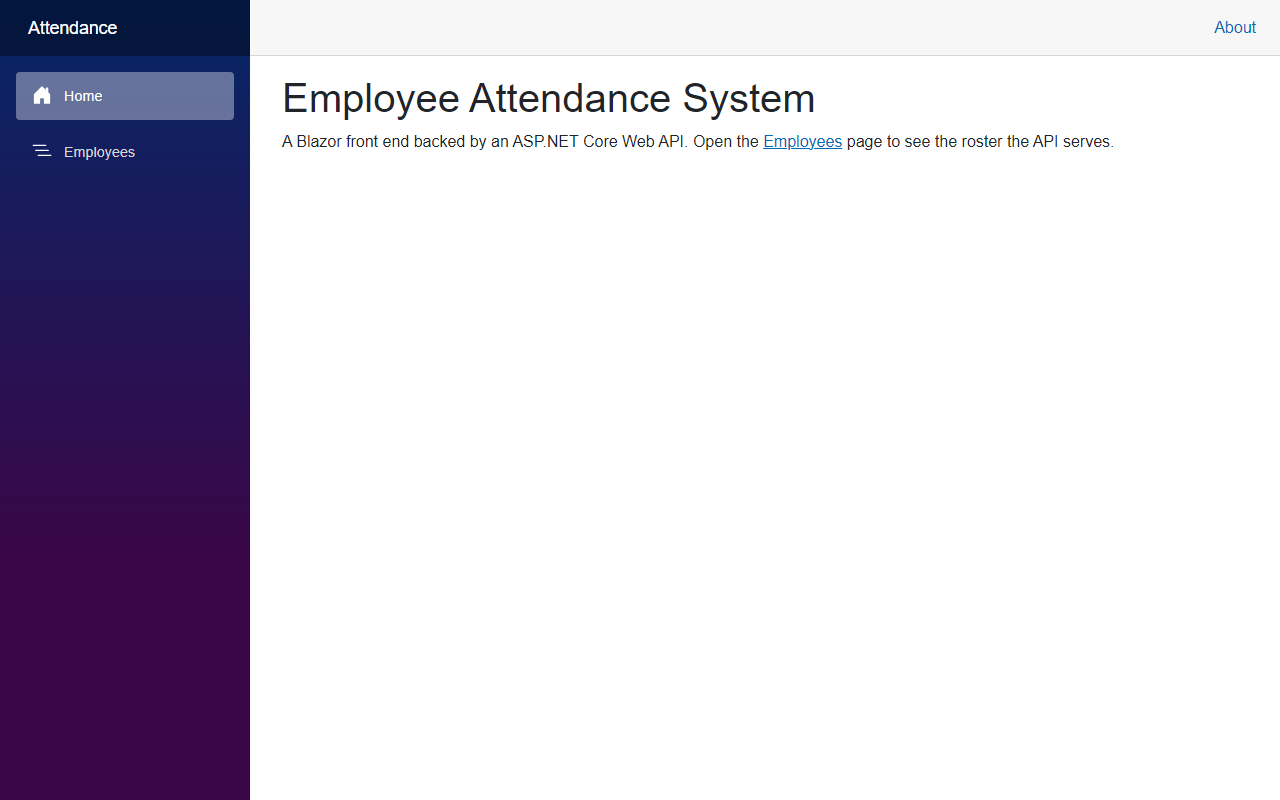
Click Employees. The page calls the API and shows the roster:
You can also call the API directly. Open https://localhost:7020/api/employees in the browser:

And https://localhost:7020/api/employees/3 returns one employee:

Project Structure
These are the files this article added to the employee attendance system. Template files that were left as generated are not listed.
FreeCodeSpot.Attendance.sln
src/
  FreeCodeSpot.Attendance.Domain/
    Employees/Employee.cs
  FreeCodeSpot.Attendance.Application/
    Employees/IEmployeeRepository.cs
    Employees/EmployeeService.cs
  FreeCodeSpot.Attendance.Infrastructure/
    DependencyInjection.cs
    Employees/InMemoryEmployeeRepository.cs
  FreeCodeSpot.Attendance.Api/
    Program.cs
    Endpoints/EmployeeEndpoints.cs
  FreeCodeSpot.Attendance.Web/
    Program.cs
    appsettings.json
    Models/Employee.cs
    Services/EmployeeApiClient.cs
    Components/Pages/Home.razor
    Components/Pages/Employees.razor
    Components/Layout/NavMenu.razor
tests/
  FreeCodeSpot.Attendance.UnitTests/
    Employees/EmployeeServiceTests.cs
    Employees/InMemoryEmployeeRepositoryTests.cs
  FreeCodeSpot.Attendance.IntegrationTests/
    Employees/EmployeeEndpointsTests.cs
Source Code
You can find the complete source code for this tutorial on GitHub. The code is tagged article-001 so it stays exactly as described here.
Summary
In this tutorial, we set up the Employee Attendance System solution on .NET 10, created a minimal API that serves an employee roster, and displayed that roster on a Blazor page. We also added unit and integration tests and confirmed everything works in the browser.
