
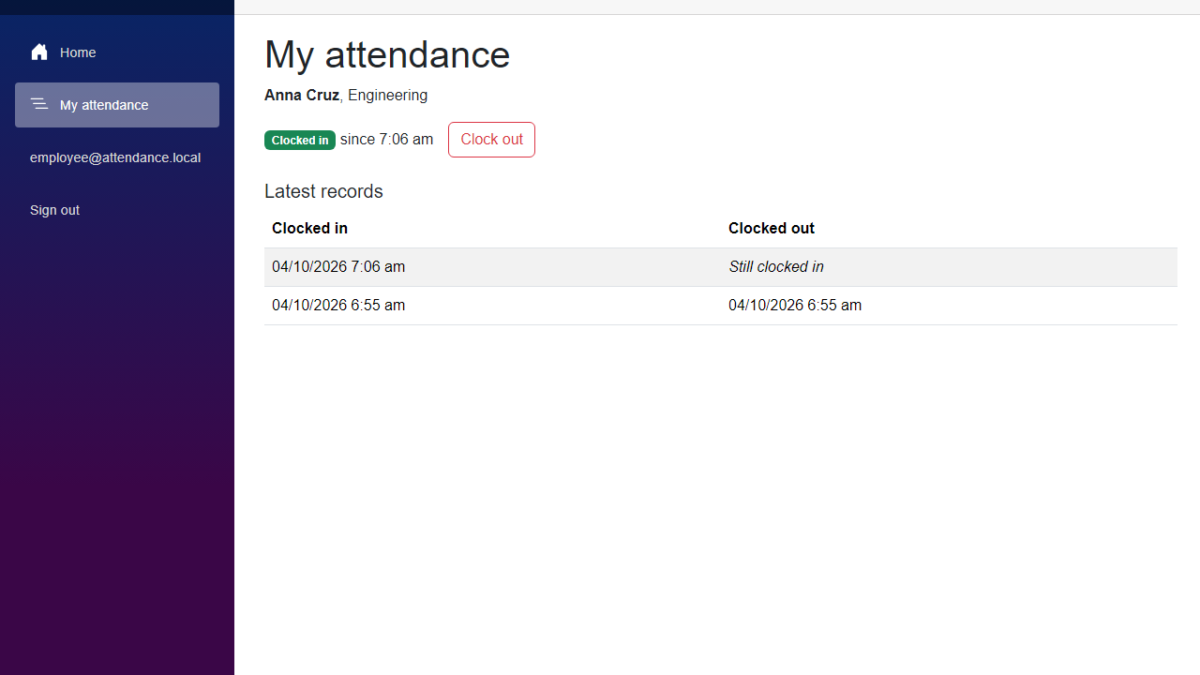
In this tutorial, we will add employee clock in to our Employee Attendance System, so employees can clock themselves in and out. We will link a signed-in user to an employee record, add API routes that only work with the employee of the signed-in user, and build a My attendance page. A manager can still clock anybody in and out, but an employee can only see and change their own attendance. I used Claude Code to generate the code again, and I will show what we decided before keeping it.
Table of Contents
This is part of the Employee Attendance System series:
- Project Setup
- SQL Server with Entity Framework Core
- Employee Management with Blazor Forms
- Blazor Authentication and Roles
- Clock In and Clock Out
- Employee Clock In Without a Manager (this article)
What We're Building
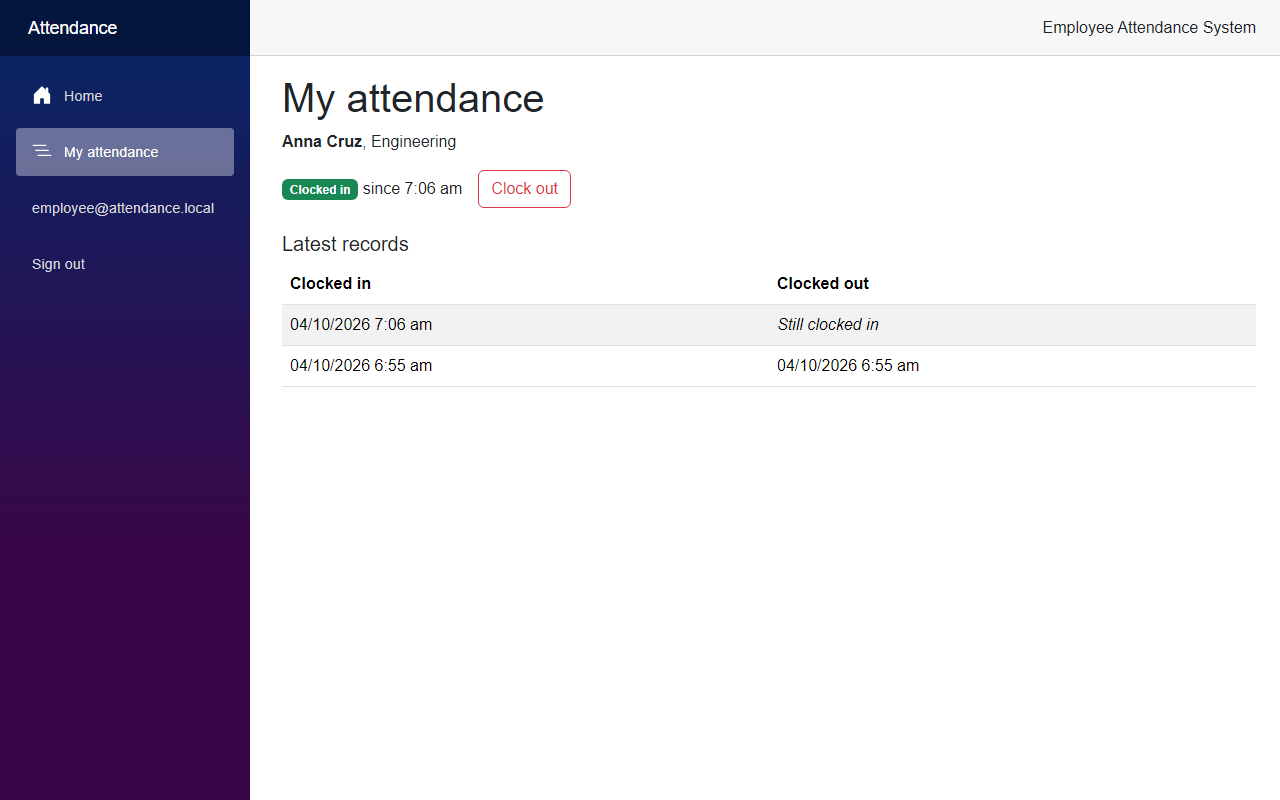
By the end of this article, an employee signs in, opens a page called My attendance, and clocks in with one click. The page shows their own status and their latest records, and nobody else's.
Now let's see how we built it.
Before We Start
Before we start, make sure you have the following installed:
- .NET 10 SDK (I used 10.0.401)
- SQL Server LocalDB, or the SQL Server instance you used in the previous articles
- Claude Code
We do not add any NuGet packages and we do not add a migration in this article.
Starting Point
After the previous article, a manager can clock employees in and out. Employees can sign in, but their account has nothing to do with an employee record. The app does not know that the user employee@attendance.local is Anna Cruz, so an employee has no page of their own, and the attendance routes are closed to them.
The Goal
- Link a signed-in user to one employee record
- Add API routes that always use the employee of the signed-in user
- Keep the other attendance routes for managers only
- Add a My attendance page with the status, a Clock in or Clock out button, and the latest records
- Show the menu link only to users who are linked to an employee
- Test that an employee cannot reach anyone else's attendance
Building It with AI
Step 1 – Link a user to an employee
I asked Claude Code to let employees clock themselves in, and I told it the rule: an employee can only see and change their own attendance. That means the API has to know which employee the signed-in user is.
I asked Claude for a plan first, and it listed two ways. We could create our own user class with an EmployeeId column, or we could store the employee id as a claim on the user. A claim is a small piece of information about the user, and ASP.NET Core Identity already puts the claims of a user in the token. I chose the claim. It does not need a migration, and we do not have to change the Identity setup from the authentication article.
First, the name of the claim. We keep it in one place, like the role names.
src/FreeCodeSpot.Attendance.Application/Security/AttendanceClaims.cs
namespace FreeCodeSpot.Attendance.Application.Security;

/// <summary>
/// The names of the custom claims a signed-in user carries. The claim ties the
/// user to the employee record whose attendance they may see and change.
/// </summary>
public static class AttendanceClaims
{
    public const string EmployeeId = "employee_id";
}
The seeder creates the two demo users, so it is also the place where we link them. It looks for the employee by email, and the emails come from the settings, like the other seed values. Open SeedUsersOptions.cs.
src/FreeCodeSpot.Attendance.Infrastructure/Identity/SeedUsersOptions.cs
namespace FreeCodeSpot.Attendance.Infrastructure.Identity;

/// <summary>
/// The demo accounts created on startup in development. The password is read
/// from configuration so it never appears in code. A roster email links the
/// account to the employee with that email; leave it empty for no link.
/// </summary>
public sealed class SeedUsersOptions
{
    public const string SectionName = "SeedUsers";

    public string ManagerEmail { get; set; } = "";
    public string EmployeeEmail { get; set; } = "";
    public string ManagerRosterEmail { get; set; } = "";
    public string EmployeeRosterEmail { get; set; } = "";
    public string Password { get; set; } = "";
}
The settings link the demo manager to Regie Baquero, and the demo employee to Anna Cruz. Both are in the roster that the first migration seeded.
src/FreeCodeSpot.Attendance.Api/appsettings.json
{
  "ConnectionStrings": {
    "AttendanceDb": "Server=(localdb)\\MSSQLLocalDB;Database=FreeCodeSpotAttendance;Trusted_Connection=True;TrustServerCertificate=True"
  },
  "SeedUsers": {
    "ManagerEmail": "manager@attendance.local",
    "EmployeeEmail": "employee@attendance.local",
    "ManagerRosterEmail": "regie@freecodespot.local",
    "EmployeeRosterEmail": "anna@freecodespot.local"
  },
  "Logging": {
    "LogLevel": {
      "Default": "Information",
      "Microsoft.AspNetCore": "Warning"
    }
  },
  "AllowedHosts": "*"
}
Now the seeder. It gets a new method, and EnsureUserAsync calls it at the end.
src/FreeCodeSpot.Attendance.Infrastructure/Identity/IdentitySeeder.cs
        await LinkToEmployeeAsync(userManager, employees, user, rosterEmail);
    }

    /// <summary>
    /// Stores the id of the employee as a claim on the user. Identity puts the
    /// claims of a user in the bearer token, so the API knows whose attendance
    /// the caller may use without asking the request.
    /// </summary>
    private static async Task LinkToEmployeeAsync(
        UserManager<IdentityUser> userManager,
        IEmployeeRepository employees,
        IdentityUser user,
        string rosterEmail)
    {
        if (string.IsNullOrWhiteSpace(rosterEmail))
        {
            return;
        }

        var roster = await employees.GetAllAsync(includeInactive: true);
        var employee = roster.FirstOrDefault(e => string.Equals(e.Email, rosterEmail, StringComparison.OrdinalIgnoreCase))
            ?? throw new InvalidOperationException($"No employee has the email {rosterEmail}. Check the SeedUsers settings.");

        var value = employee.Id.ToString(CultureInfo.InvariantCulture);
        var current = (await userManager.GetClaimsAsync(user))
            .Where(claim => claim.Type == AttendanceClaims.EmployeeId)
            .ToList();

        if (current.Count == 1 && current[0].Value == value)
        {
            return;
        }

        if (current.Count > 0)
        {
            Check(await userManager.RemoveClaimsAsync(user, current));
        }

        Check(await userManager.AddClaimAsync(user, new Claim(AttendanceClaims.EmployeeId, value)));
    }
If the link is already there, the method does nothing, so you can start the API as many times as you want. If the claim points to another employee, it is replaced. The seeder runs when the API starts in development, so your existing demo users get the claim the next time you start the API.
Step 2 – Look up the attendance of one employee
Now the employee needs something to look at. We add a record that holds the status and the latest records of one employee.
src/FreeCodeSpot.Attendance.Application/Attendance/MyAttendance.cs
using FreeCodeSpot.Attendance.Domain.Attendance;

namespace FreeCodeSpot.Attendance.Application.Attendance;

/// <summary>
/// What an employee sees about themselves: whether they are clocked in, and
/// their latest records, newest first.
/// </summary>
public sealed record MyAttendance(
    EmployeeAttendanceStatus Status,
    IReadOnlyList<AttendanceRecord> RecentRecords);
The repository gets one new method that returns the latest records of an employee, newest first. First the interface:
src/FreeCodeSpot.Attendance.Application/Attendance/IAttendanceRepository.cs
    /// <summary>The latest records of one employee, newest first, open or closed.</summary>
    Task<IReadOnlyList<AttendanceRecord>> GetRecentRecordsAsync(int employeeId, int count, CancellationToken cancellationToken = default);
And the EF Core version:
src/FreeCodeSpot.Attendance.Infrastructure/Attendance/EfAttendanceRepository.cs
    public async Task<IReadOnlyList<AttendanceRecord>> GetRecentRecordsAsync(int employeeId, int count, CancellationToken cancellationToken = default) =>
        await db.AttendanceRecords
            .AsNoTracking()
            .Where(record => record.EmployeeId == employeeId)
            .OrderByDescending(record => record.ClockInUtc)
            .Take(count)
            .ToListAsync(cancellationToken);
Then the service. We do not need new clock in and clock out rules, because an employee follows the same rules as everybody else. We only need the method that puts the status and the records together.
src/FreeCodeSpot.Attendance.Application/Attendance/AttendanceService.cs
    public const int DefaultRecentCount = 5;

    // ... unrelated code omitted

    /// <summary>
    /// Returns the status and latest records of one employee, or null when the
    /// employee does not exist. The caller decides which employee: the API takes
    /// the id from the signed-in user, never from the request.
    /// </summary>
    public async Task<MyAttendance?> GetMyAttendanceAsync(
        int employeeId,
        int recentCount = DefaultRecentCount,
        CancellationToken cancellationToken = default)
    {
        var employee = await employees.GetByIdAsync(employeeId, cancellationToken);
        if (employee is null)
        {
            return null;
        }

        var open = await attendance.GetOpenRecordAsync(employeeId, cancellationToken);
        var recent = await attendance.GetRecentRecordsAsync(employeeId, recentCount, cancellationToken);

        return new MyAttendance(
            new EmployeeAttendanceStatus(employee.Id, employee.FullName, employee.Department, open?.ClockInUtc),
            recent);
    }
The service takes the employee id as a parameter. It does not know about claims or tokens, so it does not care where the id came from. That is the job of the API.
Step 3 – Add the routes for employee clock in
The API needs a rule that says "this user is linked to an employee". We add a policy that checks for the claim. The name goes next to the manager policy.
src/FreeCodeSpot.Attendance.Api/Auth/Policies.cs
    public const string ManagerOnly = "ManagerOnly";
    public const string HasEmployeeRecord = "HasEmployeeRecord";
In Program.cs, we register it next to the manager policy.
src/FreeCodeSpot.Attendance.Api/Program.cs
builder.Services.AddAuthorizationBuilder()
    .AddPolicy(Policies.ManagerOnly, policy => policy.RequireRole(Roles.Manager))
    .AddPolicy(Policies.HasEmployeeRecord, policy => policy
        .RequireAuthenticatedUser()
        .RequireClaim(AttendanceClaims.EmployeeId));
Now the routes. They are in their own group, /api/attendance/me, and not inside the manager group. A group that is inside another group inherits its rules, and we do not want the manager policy on these routes.
src/FreeCodeSpot.Attendance.Api/Endpoints/MyAttendanceEndpoints.cs
using System.Globalization;
using System.Security.Claims;
using FreeCodeSpot.Attendance.Api.Auth;
using FreeCodeSpot.Attendance.Application.Attendance;
using FreeCodeSpot.Attendance.Application.Security;
using FreeCodeSpot.Attendance.Domain.Attendance;

namespace FreeCodeSpot.Attendance.Api.Endpoints;

/// <summary>
/// Maps the routes a signed-in user uses for their own attendance. The employee
/// comes from the employee_id claim in the token and never from the request, so
/// there is nothing in the URL that could point at somebody else.
/// </summary>
public static class MyAttendanceEndpoints
{
    public static IEndpointRouteBuilder MapMyAttendanceEndpoints(this IEndpointRouteBuilder app)
    {
        var group = app.MapGroup("/api/attendance/me")
            .WithTags("My attendance")
            .RequireAuthorization(Policies.HasEmployeeRecord);

        group.MapGet("/", async (ClaimsPrincipal user, AttendanceService attendance, CancellationToken cancellationToken) =>
            {
                var mine = await attendance.GetMyAttendanceAsync(GetEmployeeId(user), cancellationToken: cancellationToken);
                return mine is null ? Results.NotFound() : Results.Ok(mine);
            })
            .WithName("GetMyAttendance")
            .Produces<MyAttendance>()
            .Produces(StatusCodes.Status404NotFound);

        group.MapPost("/clock-in", async (ClaimsPrincipal user, AttendanceService attendance, CancellationToken cancellationToken) =>
                AttendanceEndpoints.ToResult(await attendance.ClockInAsync(GetEmployeeId(user), cancellationToken)))
            .WithName("ClockInMyself")
            .Produces<AttendanceRecord>()
            .ProducesProblem(StatusCodes.Status409Conflict)
            .Produces(StatusCodes.Status404NotFound);

        group.MapPost("/clock-out", async (ClaimsPrincipal user, AttendanceService attendance, CancellationToken cancellationToken) =>
                AttendanceEndpoints.ToResult(await attendance.ClockOutAsync(GetEmployeeId(user), cancellationToken)))
            .WithName("ClockOutMyself")
            .Produces<AttendanceRecord>()
            .ProducesProblem(StatusCodes.Status409Conflict)
            .Produces(StatusCodes.Status404NotFound);

        return app;
    }

    // The policy has already checked that the claim exists. A value that is not a number
    // would mean the token was built wrongly, so it is treated as an employee that does not exist.
    private static int GetEmployeeId(ClaimsPrincipal user) =>
        int.TryParse(user.FindFirstValue(AttendanceClaims.EmployeeId), CultureInfo.InvariantCulture, out var id) ? id : 0;
}
This is the important part of the article. The employee id comes from the employee_id claim of the token, in GetEmployeeId, and not from the URL or the body. There is nothing in the request that an employee could change to reach a colleague. The me routes also reuse AttendanceEndpoints.ToResult, so we changed that method from private to internal, and the refusals are exactly the same as in the manager routes.
We register the new routes in Program.cs, right after the manager routes.
src/FreeCodeSpot.Attendance.Api/Program.cs
app.MapAttendanceEndpoints();
app.MapMyAttendanceEndpoints();
The Web app also needs to know who the user is. We add the employee id to the answer of /auth/me.
src/FreeCodeSpot.Attendance.Api/Auth/AuthEndpoints.cs
        group.MapGet("/me", (ClaimsPrincipal user) =>
                Results.Ok(new CurrentUser(
                    user.FindFirstValue(ClaimTypes.Email) ?? user.Identity?.Name ?? "",
                    user.FindAll(ClaimTypes.Role).Select(claim => claim.Value).Order().ToList(),
                    int.TryParse(user.FindFirstValue(AttendanceClaims.EmployeeId), out var employeeId) ? employeeId : null)))
The record has a new EmployeeId value that is null when the user is not linked:
public sealed record CurrentUser(string Email, IReadOnlyList<string> Roles, int? EmployeeId = null);Step 4 – Build the My attendance page
The Web app gets the employee id from /auth/me when the user signs in, and keeps it in the sign-in cookie, like the roles. Open SignedInUser.cs.
src/FreeCodeSpot.Attendance.Web/Security/SignedInUser.cs
using System.Security.Claims;
using Microsoft.AspNetCore.Authentication.Cookies;

namespace FreeCodeSpot.Attendance.Web.Security;

/// <summary>
/// Who signed in, what they may do, which employee they are, and the API token that proves it. The token
/// travels in a claim so it lives inside the encrypted sign-in cookie and never
/// reaches the browser in the clear.
/// </summary>
public sealed record SignedInUser(
    string Email,
    IReadOnlyList<string> Roles,
    int? EmployeeId,
    string AccessToken,
    TimeSpan ExpiresIn)
{
    public const string AccessTokenClaim = "access_token";
    public const string EmployeeIdClaim = "employee_id";

    public ClaimsPrincipal ToPrincipal()
    {
        var claims = new List<Claim>
        {
            new(ClaimTypes.Name, Email),
            new(AccessTokenClaim, AccessToken),
        };
        claims.AddRange(Roles.Select(role => new Claim(ClaimTypes.Role, role)));

        // The employee this user is linked to. Pages use it to decide who gets My attendance.
        if (EmployeeId is { } employeeId)
        {
            claims.Add(new Claim(EmployeeIdClaim, employeeId.ToString()));
        }

        return new ClaimsPrincipal(new ClaimsIdentity(claims, CookieAuthenticationDefaults.AuthenticationScheme));
    }
}
AuthApiClient passes the value on. Only two lines change:
src/FreeCodeSpot.Attendance.Web/Services/AuthApiClient.cs
        return new SignedInUser(me.Email, me.Roles, me.EmployeeId, token.AccessToken, TimeSpan.FromSeconds(token.ExpiresIn));
    }

    private sealed record TokenResponse(string AccessToken, long ExpiresIn);

    private sealed record MeResponse(string Email, string[] Roles, int? EmployeeId);
Now the Web app needs the same policy as the API, so it can decide who sees the page and the menu link. The Web app keeps its own policy name, like it keeps its own role names.
src/FreeCodeSpot.Attendance.Web/Security/AppPolicies.cs
namespace FreeCodeSpot.Attendance.Web.Security;

/// <summary>Names of the authorization policies the pages and the menu use.</summary>
public static class AppPolicies
{
    /// <summary>The signed-in user is linked to an employee record.</summary>
    public const string HasEmployeeRecord = "HasEmployeeRecord";
}
src/FreeCodeSpot.Attendance.Web/Program.cs
builder.Services.AddAuthorization(options =>
{
    options.AddPolicy(AppPolicies.HasEmployeeRecord, policy => policy
        .RequireAuthenticatedUser()
        .RequireClaim(SignedInUser.EmployeeIdClaim));
});
The page needs a model for what the API returns.
src/FreeCodeSpot.Attendance.Web/Models/MyAttendance.cs
namespace FreeCodeSpot.Attendance.Web.Models;

/// <summary>
/// The signed-in user's own attendance as the API returns it: the status, and
/// the latest records, newest first.
/// </summary>
public record MyAttendance(EmployeeAttendanceStatus Status, IReadOnlyList<AttendanceEntry> RecentRecords);

/// <summary>One clock-in, and the clock-out that closed it. ClockOutUtc is null while it is open.</summary>
public record AttendanceEntry(int Id, DateTimeOffset ClockInUtc, DateTimeOffset? ClockOutUtc);
And three new methods in AttendanceApiClient. They have no id, because the API takes it from the token.
src/FreeCodeSpot.Attendance.Web/Services/AttendanceApiClient.cs
    /// <summary>The signed-in user's own status and latest records. The API knows who they are from the token.</summary>
    public async Task<MyAttendance?> GetMineAsync(CancellationToken cancellationToken = default)
    {
        await httpClient.UseSignedInUserAsync(authenticationStateProvider);

        return await httpClient.GetFromJsonAsync<MyAttendance>("api/attendance/me", cancellationToken);
    }

    public Task<ClockResult> ClockInMyselfAsync(CancellationToken cancellationToken = default) =>
        PostAsync("api/attendance/me/clock-in", cancellationToken);

    public Task<ClockResult> ClockOutMyselfAsync(CancellationToken cancellationToken = default) =>
        PostAsync("api/attendance/me/clock-out", cancellationToken);
Now the page. The class is called MyAttendancePage, because MyAttendance is already the name of the model.
src/FreeCodeSpot.Attendance.Web/Components/Pages/MyAttendancePage.razor
@page "/my-attendance"
@rendermode InteractiveServer
@attribute [Authorize(Policy = AppPolicies.HasEmployeeRecord)]
@using FreeCodeSpot.Attendance.Web.Models
@using FreeCodeSpot.Attendance.Web.Services
@inject AttendanceApiClient AttendanceApi

<PageTitle>My attendance</PageTitle>

<h1>My attendance</h1>

@if (message is not null)
{
    <div class="alert alert-warning" role="alert">@message</div>
}

@if (loadFailed)
{
    <div class="alert alert-danger" role="alert">
        Your attendance could not be loaded. Check that the attendance API is running, then reload the page.
    </div>
}
else if (mine is null)
{
    <p><em>Loading your attendance...</em></p>
}
else
{
    <p>
        <strong>@mine.Status.FullName</strong>, @mine.Status.Department
    </p>

    <div class="d-flex align-items-center gap-3 mb-4">
        @if (mine.Status.ClockedInSinceUtc is { } since)
        {
            <span><span class="badge text-bg-success">Clocked in</span> since @since.ToLocalTime().ToString("t")</span>
            <button class="btn btn-outline-danger" @onclick="ClockOutAsync">Clock out</button>
        }
        else
        {
            <span class="badge text-bg-secondary">Not clocked in</span>
            <button class="btn btn-primary" @onclick="ClockInAsync">Clock in</button>
        }
    </div>

    <h2 class="h5">Latest records</h2>

    @if (mine.RecentRecords.Count == 0)
    {
        <p><em>You have no records yet.</em></p>
    }
    else
    {
        <table class="table table-striped align-middle">
            <thead>
                <tr>
                    <th scope="col">Clocked in</th>
                    <th scope="col">Clocked out</th>
                </tr>
            </thead>
            <tbody>
                @foreach (var record in mine.RecentRecords)
                {
                    <tr>
                        <td>@record.ClockInUtc.ToLocalTime().ToString("g")</td>
                        <td>
                            @if (record.ClockOutUtc is { } clockOut)
                            {
                                @clockOut.ToLocalTime().ToString("g")
                            }
                            else
                            {
                                <em>Still clocked in</em>
                            }
                        </td>
                    </tr>
                }
            </tbody>
        </table>
    }
}

@code {
    private MyAttendance? mine;
    private bool loadFailed;
    private string? message;

    protected override Task OnInitializedAsync() => LoadAsync();

    private async Task LoadAsync()
    {
        try
        {
            mine = await AttendanceApi.GetMineAsync();
            loadFailed = mine is null;
        }
        catch (HttpRequestException)
        {
            loadFailed = true;
        }
    }

    private Task ClockInAsync() => RunAsync(AttendanceApi.ClockInMyselfAsync);

    private Task ClockOutAsync() => RunAsync(AttendanceApi.ClockOutMyselfAsync);

    // A refusal usually means the status changed somewhere else, so the page is reloaded either way.
    private async Task RunAsync(Func<CancellationToken, Task<ClockResult>> action)
    {
        try
        {
            var result = await action(CancellationToken.None);
            message = result.Succeeded ? null : result.Message;
        }
        catch (HttpRequestException)
        {
            message = "The change could not be saved. Check that the attendance API is running, then try again.";
        }

        await LoadAsync();
    }
}
The page is protected by the HasEmployeeRecord policy, so a user who is not linked to an employee gets the access denied page. After every click, the page loads the data again, even when the API refused, like the manager page does.
Last, the menu link. It uses the same policy, so it only shows for linked users. Put this block above the signed-in block in NavMenu.razor:
src/FreeCodeSpot.Attendance.Web/Components/Layout/NavMenu.razor
<AuthorizeView Policy="@AppPolicies.HasEmployeeRecord">
    <div class="nav-item px-3">
        <NavLink class="nav-link" href="my-attendance">
            <span class="bi bi-list-nested-nav-menu" aria-hidden="true"></span> My attendance
        </NavLink>
    </div>
</AuthorizeView>
The home page also gets a line that points to the page, for linked users:
src/FreeCodeSpot.Attendance.Web/Components/Pages/Home.razor
<AuthorizeView Policy="@AppPolicies.HasEmployeeRecord">
    <p>Open <a href="my-attendance">My attendance</a> to clock in and out and to see your latest records.</p>
</AuthorizeView>
Step 5 – Add the tests
I asked Claude to test two things: the lookup in the service, and that the API keeps every user inside their own attendance. First, three of the unit tests for the lookup, with the fake repository from the previous article:
tests/FreeCodeSpot.Attendance.UnitTests/Attendance/AttendanceServiceTests.cs
    [Fact]
    public async Task GetMyAttendance_ShowsOnlyTheRecordsOfThatEmployee()
    {
        store.Records.Add(new AttendanceRecord(1, Anna.Id, Morning, Morning.AddHours(8)));
        store.Records.Add(new AttendanceRecord(2, Marco.Id, Morning, Morning.AddHours(7)));

        var mine = await CreateService(Anna, Marco).GetMyAttendanceAsync(Anna.Id);

        Assert.Equal("Anna Cruz", mine!.Status.FullName);
        Assert.Equal([Anna.Id], mine.RecentRecords.Select(record => record.EmployeeId));
    }

    [Fact]
    public async Task GetMyAttendance_ReturnsTheLatestRecordsFirstAndNoMoreThanAsked()
    {
        for (var day = 0; day < 4; day++)
        {
            store.Records.Add(new AttendanceRecord(day + 1, Anna.Id, Morning.AddDays(day), Morning.AddDays(day).AddHours(8)));
        }

        var mine = await CreateService(Anna).GetMyAttendanceAsync(Anna.Id, recentCount: 3);

        Assert.Equal([Morning.AddDays(3), Morning.AddDays(2), Morning.AddDays(1)], mine!.RecentRecords.Select(record => record.ClockInUtc));
    }

    [Fact]
    public async Task GetMyAttendance_ReturnsNullForAnUnknownEmployee()
    {
        var mine = await CreateService(Anna).GetMyAttendanceAsync(99);

        Assert.Null(mine);
    }
The other two check that a clocked in employee shows the clock-in time, and that an employee with only closed records is not clocked in.
For the API tests, every test needs its own employee and its own user, so the clock-in state of one test never changes another. We add a method to the test factory that creates both and returns a client that is signed in as that user.
tests/FreeCodeSpot.Attendance.IntegrationTests/AttendanceApiFactory.cs
    public async Task<(HttpClient Client, Employee Employee)> CreateLinkedEmployeeClientAsync()
    {
        using var scope = Services.CreateScope();
        var employees = scope.ServiceProvider.GetRequiredService<EmployeeService>();

        var email = $"{Guid.NewGuid():N}@test.local";
        var created = await employees.CreateAsync(new EmployeeDetails("Joy Mendoza", "Finance", email));
        var employee = created.Employee!;

        await CreateUserAsync(scope, email, employee.Id);
        return (await CreateSignedInClientAsync(email), employee);
    }
The factory also has a method for a user who is not linked to an employee. Now the tests. These are the two that matter most:
tests/FreeCodeSpot.Attendance.IntegrationTests/Attendance/MyAttendanceEndpointsTests.cs
    [Fact]
    public async Task EachUserOnlySeesTheirOwnAttendance()
    {
        var (first, _) = await factory.CreateLinkedEmployeeClientAsync();
        var (second, _) = await factory.CreateLinkedEmployeeClientAsync();
        await first.PostAsync("/api/attendance/me/clock-in", null);

        var mine = await second.GetFromJsonAsync<MyAttendance>("/api/attendance/me");

        Assert.Null(mine!.Status.ClockedInSinceUtc);
        Assert.Empty(mine.RecentRecords);
    }

    [Fact]
    public async Task AnEmployeeCannotClockInAColleague()
    {
        var (client, _) = await factory.CreateLinkedEmployeeClientAsync();
        var (_, colleague) = await factory.CreateLinkedEmployeeClientAsync();

        var response = await client.PostAsync($"/api/attendance/{colleague.Id}/clock-in", null);

        Assert.Equal(HttpStatusCode.Forbidden, response.StatusCode);
        using var manager = await factory.CreateSignedInClientAsync(AttendanceApiFactory.ManagerEmail);
        var status = (await manager.GetFromJsonAsync<List<EmployeeAttendanceStatus>>("/api/attendance"))!;
        Assert.Null(status.Single(item => item.EmployeeId == colleague.Id).ClockedInSinceUtc);
    }
The second test does not stop at the 403. It asks the manager's roster, to check that the colleague is still not clocked in. The class has eight more tests. They cover the own status, a clock-in and a clock-out as the employee, the 409 for a second clock-in, the 403 for the whole roster, the 403 for a user without a linked employee, a linked manager who can use the same routes, and the 401 without a token. The two tests of /auth/me also check the employee ids of the demo users now.
Run all the tests:
dotnet testAll 37 unit tests and 52 integration tests passed. Five unit tests and ten integration tests are new.
Reviewing the Generated Code
Most of the generated code was fine. These are the decisions I checked, and the limits.
A claim and not a new user class. A custom user class with an EmployeeId column has a foreign key, which is nice. But it means changing every place where we use IdentityUser, plus a migration, and that is close to redoing the authentication from the earlier article. With a claim, nothing in the database stops two users from pointing at the same employee. Employees are never deleted, so a link can never point at an employee that is gone.
The employee id never comes from the request. The me routes have no id in the URL and no id in the body. I think this is the safest way to write them, because there is nothing to check.
There is no screen to link users to employees. The link only exists for the two demo users, because the seeder creates it. A real application needs a page, or an import, where somebody links a user to an employee. I did not build that, because it is a feature on its own.
A token that was created before the link does not have the claim. The token is created when the user signs in. A user who signed in before the seeder added the claim has to sign in again. This is also true for the sign-in cookie of the Web app.
A manager who is linked to an employee can use both. The demo manager is linked to Regie Baquero, so the manager also has My attendance. The manager routes still work as before.
An inactive employee is still refused. If the linked employee is deactivated, the clock-in answers with the same refusal as for a manager. They can still clock out if they were clocked in, like in the previous article.
Only the latest five records. The page shows five records, newest first. It is not a history. You cannot go back to last month.
Two small compile errors. The fake repository in the unit tests had to get the new method, and the test factory needed a using for Employee. The compiler told me, and the fixes were one line each.
Seeing It in Action
Now let's run the employee attendance system. You do not need a migration this time. Start the API first and the Web app after that, in two terminals:
cd src/FreeCodeSpot.Attendance.Api
dotnet run --launch-profile https
cd src/FreeCodeSpot.Attendance.Web
dotnet run --launch-profile httpsWhen the API starts, the seeder adds the link to your two demo users. Sign in as employee@attendance.local. There is no Employees link in the menu, but there is a new one, My attendance:
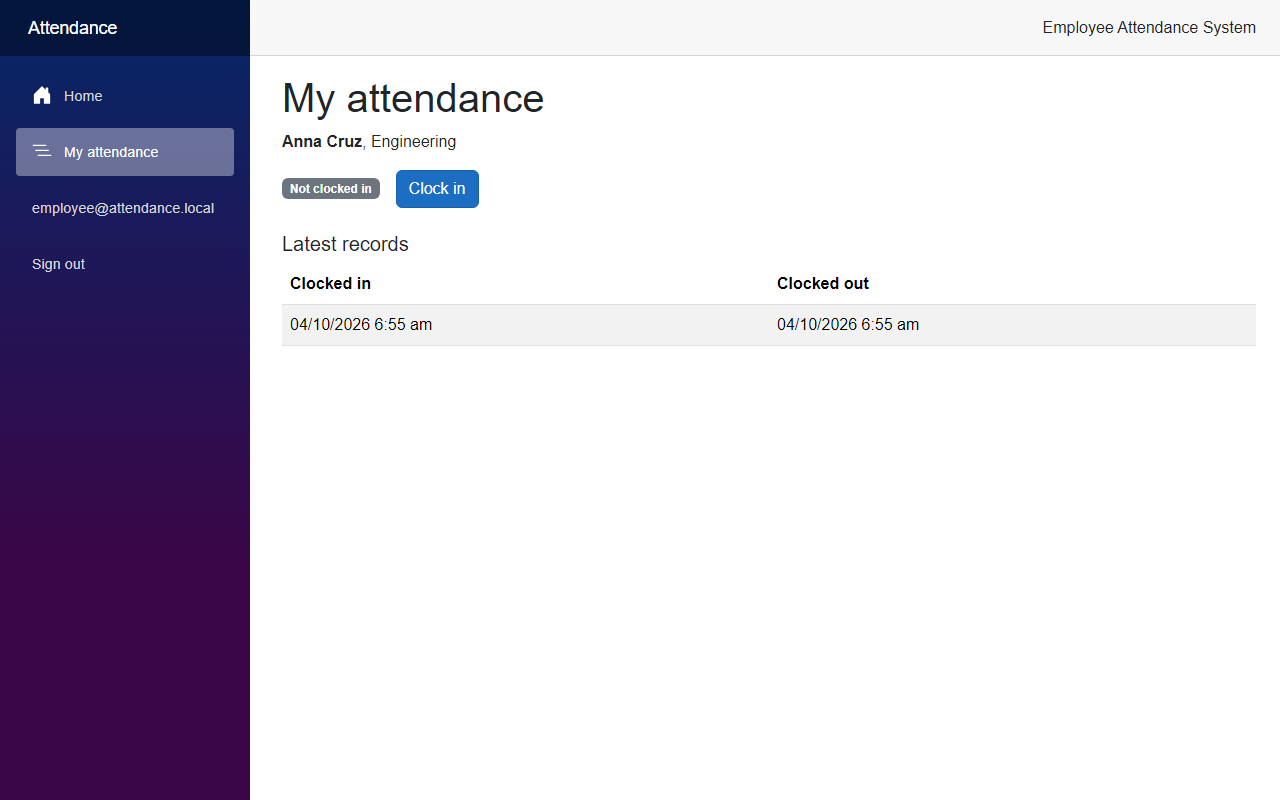
Click Clock in. The status changes, and a new record shows at the top of the list:
What if the employee types the address of the manager page? Open https://localhost:7098/attendance:
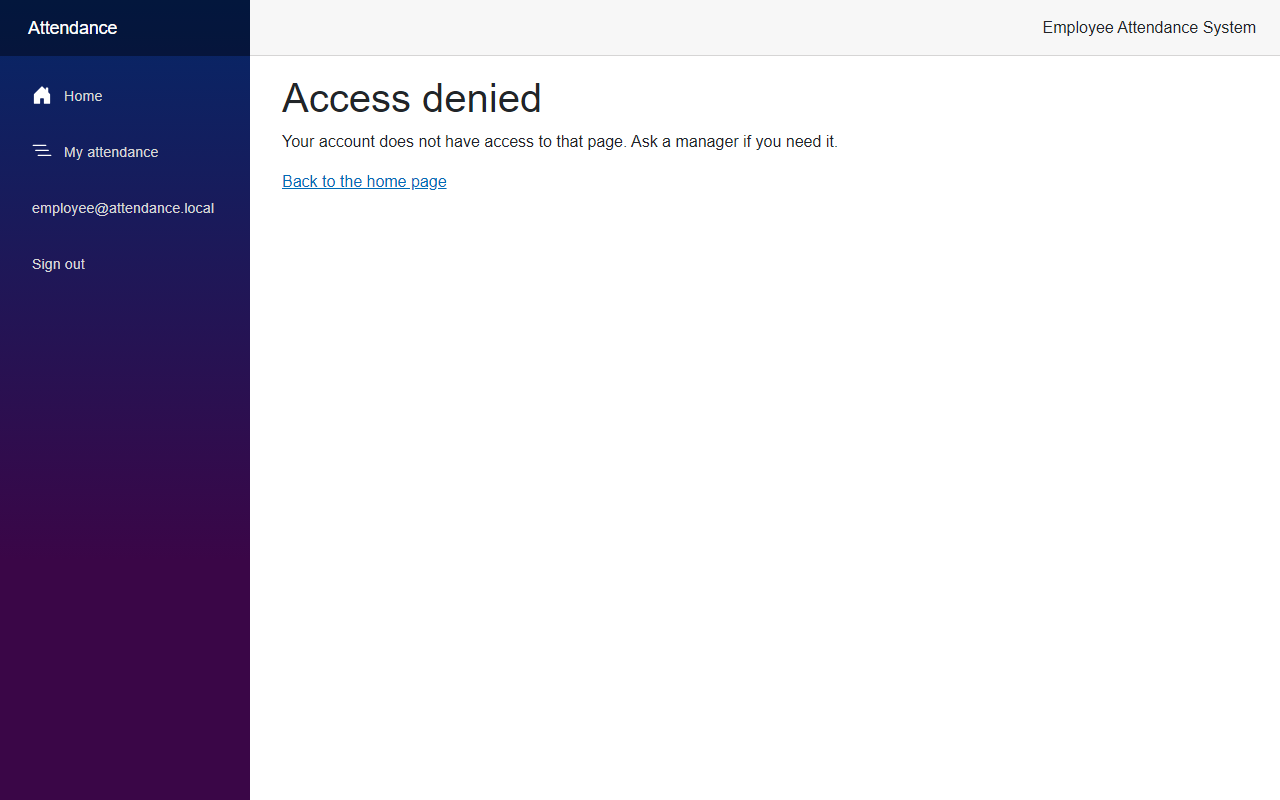
Now sign out, and sign in as manager@attendance.local. The manager has the same pages as before, plus My attendance, because the demo manager is linked to Regie Baquero. Open Clock in and out:
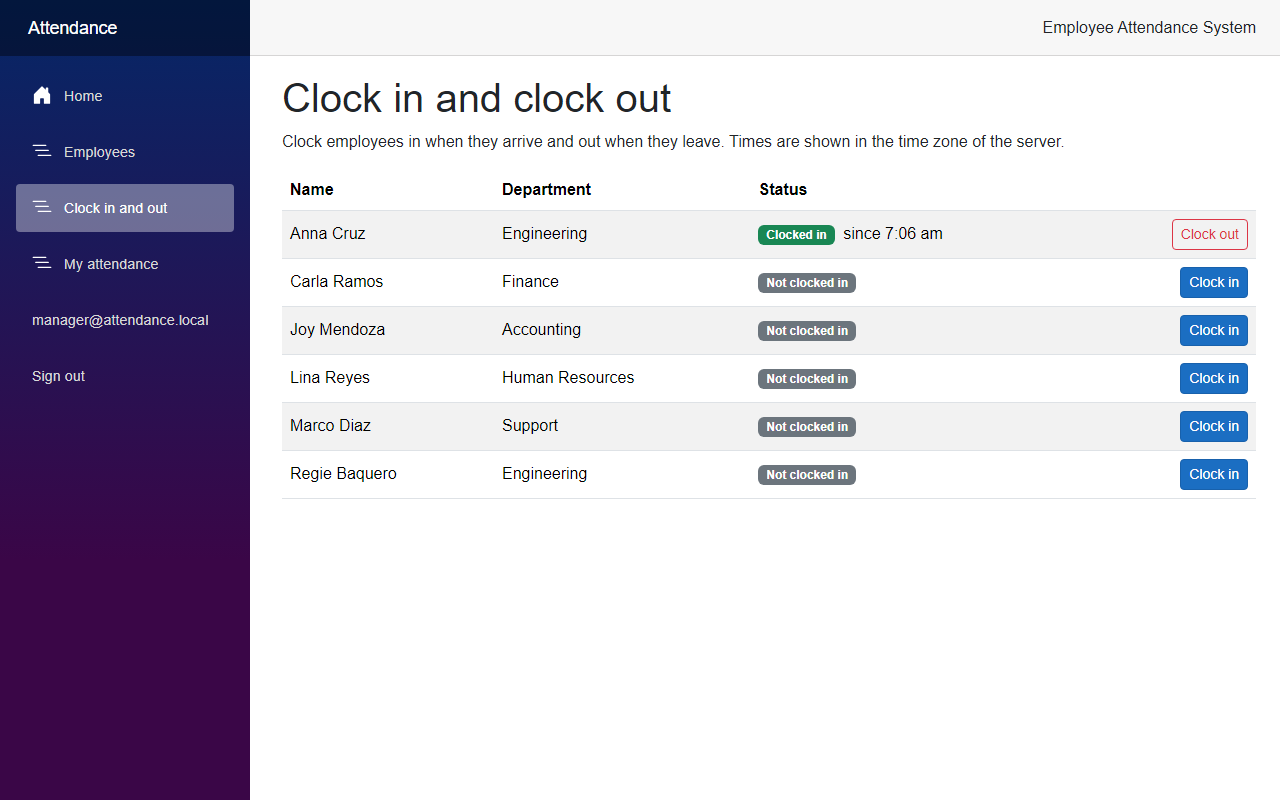
The API shows the same rules. /auth/me now tells who the user is, with the employee id:
{"email":"employee@attendance.local","roles":["Employee"],"employeeId":2}With the token of the employee, GET /api/attendance/me returns Anna's own data:
{"status":{"employeeId":2,"fullName":"Anna Cruz","department":"Engineering","clockedInSinceUtc":null},"recentRecords":[{"id":1,"employeeId":2,"clockInUtc":"2026-10-03T22:55:40.3015603+00:00","clockOutUtc":"2026-10-03T22:55:46.9559718+00:00","isOpen":false}]}And with the same token, a clock-in for another employee, or the roster of everyone, is refused:
curl -k -i -X POST https://localhost:7020/api/attendance/3/clock-in -H "Authorization: Bearer <accessToken>"HTTP/1.1 403 ForbiddenThe roster at GET /api/attendance answered 403 too.
Project Structure
These are the files this article added or changed.
src/
  FreeCodeSpot.Attendance.Application/
    Security/AttendanceClaims.cs                       added
    Attendance/MyAttendance.cs                         added
    Attendance/AttendanceService.cs                    changed
    Attendance/IAttendanceRepository.cs                changed
  FreeCodeSpot.Attendance.Infrastructure/
    Attendance/EfAttendanceRepository.cs               changed
    Identity/IdentitySeeder.cs                         changed
    Identity/SeedUsersOptions.cs                       changed
  FreeCodeSpot.Attendance.Api/
    Auth/AuthEndpoints.cs                              changed
    Auth/Policies.cs                                   changed
    Endpoints/AttendanceEndpoints.cs                   changed
    Endpoints/MyAttendanceEndpoints.cs                 added
    Program.cs                                         changed
    appsettings.json                                   changed
  FreeCodeSpot.Attendance.Web/
    Components/Layout/NavMenu.razor                    changed
    Components/Pages/Home.razor                        changed
    Components/Pages/MyAttendancePage.razor            added
    Models/MyAttendance.cs                             added
    Security/AppPolicies.cs                            added
    Security/SignedInUser.cs                           changed
    Services/AttendanceApiClient.cs                    changed
    Services/AuthApiClient.cs                          changed
    Program.cs                                         changed
tests/
  FreeCodeSpot.Attendance.UnitTests/
    Attendance/AttendanceServiceTests.cs               changed
  FreeCodeSpot.Attendance.IntegrationTests/
    Attendance/MyAttendanceEndpointsTests.cs           added
    Auth/AuthEndpointsTests.cs                         changed
    AttendanceApiFactory.cs                            changed
Source Code
You can find the complete source code for this tutorial on GitHub. The code is tagged article-006 so it stays exactly as described here.
Summary
In this tutorial, we let employees clock themselves in and out in the Employee Attendance System. We linked each signed-in user to an employee with a claim, added API routes that take the employee from the token, and built a My attendance page. We also tested that an employee cannot reach the attendance of anybody else.
