
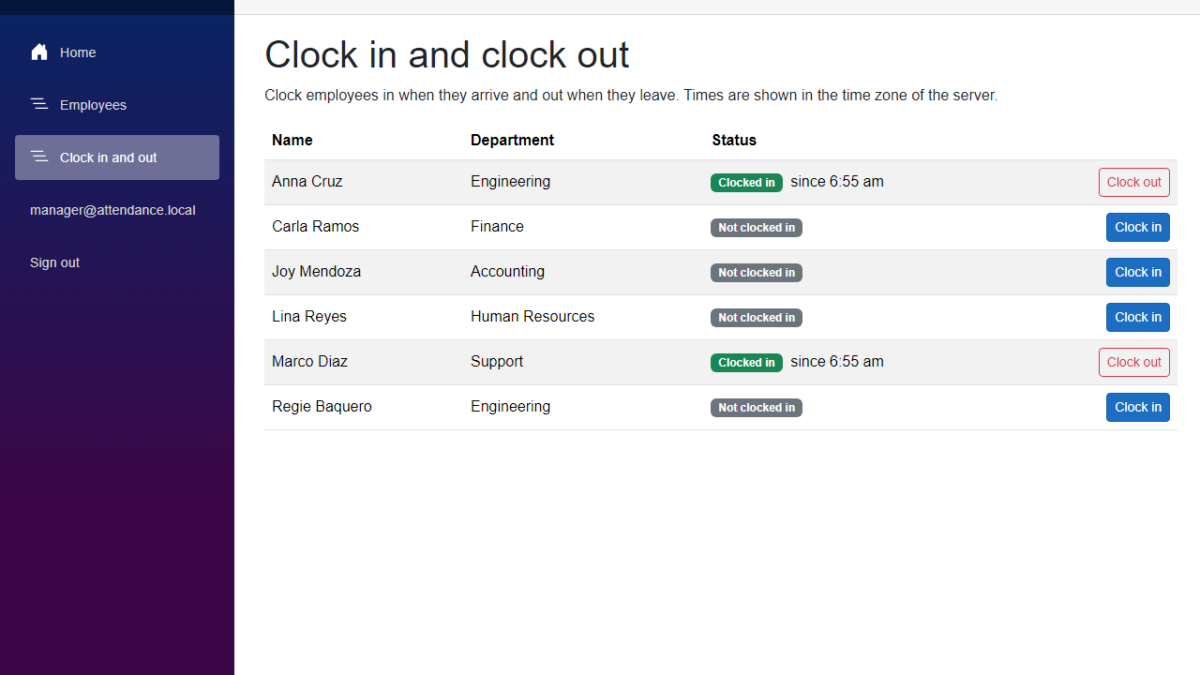
In this tutorial, we will add clock in and clock out to our Employee Attendance System. We will save every clock-in and clock-out in SQL Server, add the rules that stop a clock-in or clock-out that makes no sense, and build a Blazor page where a manager can clock employees in and out. I used Claude Code to generate the code again, and I will show what we decided before keeping it.
Table of Contents
This is part of the Employee Attendance System series:
- Project Setup
- SQL Server with Entity Framework Core
- Employee Management with Blazor Forms
- Blazor Authentication and Roles
- Clock In and Clock Out (this article)
What We're Building
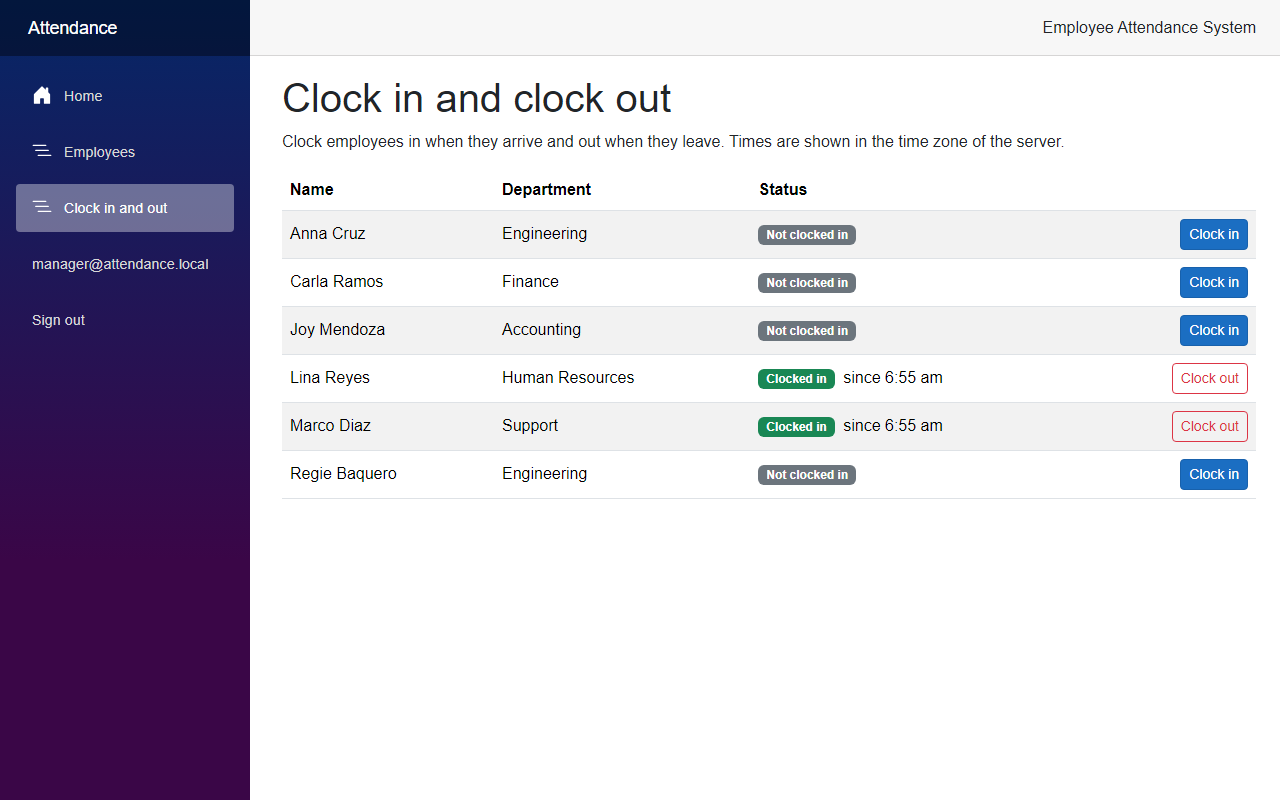
By the end of this article, a manager can open a new page, see who is clocked in, and clock employees in and out with one click.
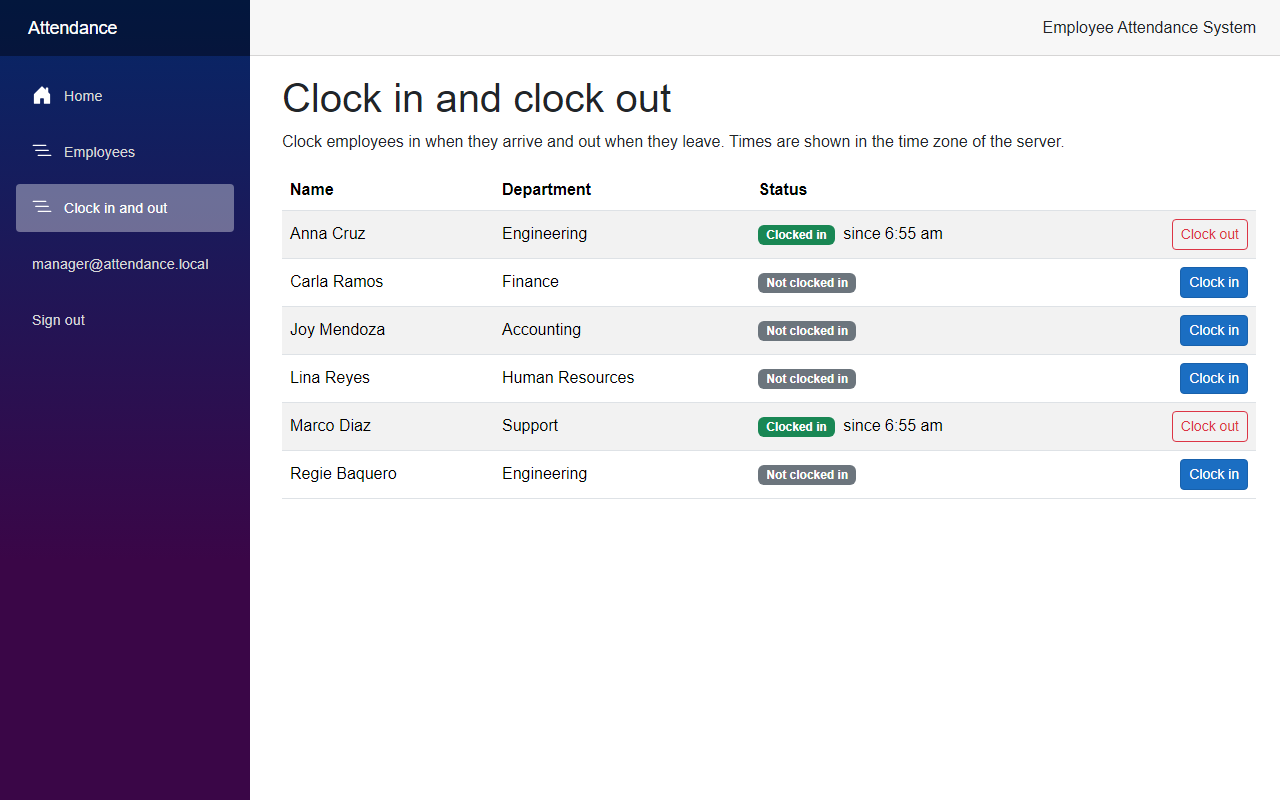
Now let's see how we built it.
Before We Start
Before we start, make sure you have the following installed:
- .NET 10 SDK (I used 10.0.401)
- SQL Server LocalDB, or the SQL Server instance you used in the previous articles
- The EF Core command-line tools (I used 10.0.12)
- Claude Code
We do not add any new NuGet packages in this article.
Starting Point
After the previous article, users sign in, and only managers can open the Employees pages or call the employee endpoints. The app knows who the employees are, but it does not know when they come to work. There is nothing that records a clock-in.
The Goal
- Add an
AttendanceRecordthat stores when an employee clocked in and out - Add a migration for the new table, with a rule in the database that an employee can only have one open record
- Put the clock in and clock out rules in one service
- Add API endpoints to clock in, clock out and list who is clocked in
- Add a Blazor page for managers, and a link in the menu
- Test the rules and the endpoints
Building It with AI
Step 1 – Add the AttendanceRecord
I asked Claude Code to add clock in and clock out to the project. I gave it three rules up front. An employee cannot clock in twice in a row. An employee cannot clock out without being clocked in. And a clock-out that is already done cannot be done again.
We start with the record that stores one stretch of work. Create AttendanceRecord.cs in the Domain project.
src/FreeCodeSpot.Attendance.Domain/Attendance/AttendanceRecord.cs
namespace FreeCodeSpot.Attendance.Domain.Attendance;

/// <summary>
/// One stretch of work: when an employee clocked in and, once they have, when
/// they clocked out. A record without a clock-out time is open. Times are UTC.
/// </summary>
public record AttendanceRecord(int Id, int EmployeeId, DateTimeOffset ClockInUtc, DateTimeOffset? ClockOutUtc = null)
{
    public bool IsOpen => ClockOutUtc is null;
}
A record that has no clock-out time is open. This is how we know who is clocked in right now, so we do not need a separate flag. The times are DateTimeOffset values in UTC, so the stored times do not depend on the time zone of the server.
Step 2 – Create the table and the migration
Now let's map the record to a table. Create AttendanceRecordConfiguration.cs next to the employee configuration.
src/FreeCodeSpot.Attendance.Infrastructure/Persistence/Configurations/AttendanceRecordConfiguration.cs
using FreeCodeSpot.Attendance.Domain.Attendance;
using FreeCodeSpot.Attendance.Domain.Employees;
using Microsoft.EntityFrameworkCore;
using Microsoft.EntityFrameworkCore.Metadata.Builders;

namespace FreeCodeSpot.Attendance.Infrastructure.Persistence.Configurations;

/// <summary>
/// Maps AttendanceRecord to the AttendanceRecords table. The unique index only
/// covers rows without a clock-out time, so an employee can have many closed
/// records but never two open ones.
/// </summary>
public sealed class AttendanceRecordConfiguration : IEntityTypeConfiguration<AttendanceRecord>
{
    public void Configure(EntityTypeBuilder<AttendanceRecord> builder)
    {
        builder.ToTable("AttendanceRecords");

        builder.HasKey(record => record.Id);

        builder.Property(record => record.ClockInUtc)
            .IsRequired();

        // Employees are never deleted, so a record can never lose its employee.
        builder.HasOne<Employee>()
            .WithMany()
            .HasForeignKey(record => record.EmployeeId)
            .OnDelete(DeleteBehavior.Restrict);

        builder.HasIndex(record => record.EmployeeId)
            .IsUnique()
            .HasFilter("[ClockOutUtc] IS NULL")
            .HasDatabaseName("IX_AttendanceRecords_OneOpenRecordPerEmployee");
    }
}
The last part is the one to look at. It is a unique index on EmployeeId, but only for the rows where ClockOutUtc is empty. An employee can have as many closed records as they want, but the database will not allow a second open one. We still check the rule in the service, because that gives a good message. The index is the backup for the case where two requests arrive at the same moment, and both pass the check.
We also add the table to the DbContext. ApplyConfigurationsFromAssembly finds the new configuration by itself, so we only need the DbSet.
src/FreeCodeSpot.Attendance.Infrastructure/Persistence/AttendanceDbContext.cs
    public DbSet<Employee> Employees => Set<Employee>();

    public DbSet<AttendanceRecord> AttendanceRecords => Set<AttendanceRecord>();
Now create the migration and apply it:
dotnet ef migrations add AddAttendanceRecords --project src/FreeCodeSpot.Attendance.Infrastructure --startup-project src/FreeCodeSpot.Attendance.Api
dotnet ef database update --project src/FreeCodeSpot.Attendance.Infrastructure --startup-project src/FreeCodeSpot.Attendance.Api
I opened the generated migration before applying it. It only creates the AttendanceRecords table with the foreign key to Employees and the filtered index. It does not touch the other tables.
Step 3 – Add the repository
The Application project owns the contract for the storage, like it does for the employees. Create IAttendanceRepository.cs.
src/FreeCodeSpot.Attendance.Application/Attendance/IAttendanceRepository.cs
using FreeCodeSpot.Attendance.Domain.Attendance;

namespace FreeCodeSpot.Attendance.Application.Attendance;

/// <summary>
/// Storage for attendance records. The Application layer owns this contract,
/// like it does for the roster.
/// </summary>
public interface IAttendanceRepository
{
    /// <summary>Every record that has no clock-out time yet.</summary>
    Task<IReadOnlyList<AttendanceRecord>> GetOpenRecordsAsync(CancellationToken cancellationToken = default);

    Task<AttendanceRecord?> GetOpenRecordAsync(int employeeId, CancellationToken cancellationToken = default);

    /// <summary>
    /// Saves a new record. Returns null when the employee already has an open
    /// record, which the database refuses even if two requests arrive together.
    /// </summary>
    Task<AttendanceRecord?> TryAddAsync(AttendanceRecord record, CancellationToken cancellationToken = default);

    Task UpdateAsync(AttendanceRecord record, CancellationToken cancellationToken = default);
}
TryAddAsync returns null when the database refuses the new record. That is how the service finds out that somebody else clocked the employee in a moment earlier, without knowing anything about SQL Server.
Here is the EF Core version in the Infrastructure project.
src/FreeCodeSpot.Attendance.Infrastructure/Attendance/EfAttendanceRepository.cs
using FreeCodeSpot.Attendance.Application.Attendance;
using FreeCodeSpot.Attendance.Domain.Attendance;
using FreeCodeSpot.Attendance.Infrastructure.Persistence;
using Microsoft.Data.SqlClient;
using Microsoft.EntityFrameworkCore;

namespace FreeCodeSpot.Attendance.Infrastructure.Attendance;

/// <summary>
/// Stores attendance records in SQL Server through EF Core. Like the employee
/// repository, nothing stays tracked between calls.
/// </summary>
public sealed class EfAttendanceRepository(AttendanceDbContext db) : IAttendanceRepository
{
    // SQL Server error numbers for a duplicate key in a unique index.
    private const int UniqueIndexViolation = 2601;
    private const int UniqueConstraintViolation = 2627;

    public async Task<IReadOnlyList<AttendanceRecord>> GetOpenRecordsAsync(CancellationToken cancellationToken = default) =>
        await db.AttendanceRecords
            .AsNoTracking()
            .Where(record => record.ClockOutUtc == null)
            .ToListAsync(cancellationToken);

    public Task<AttendanceRecord?> GetOpenRecordAsync(int employeeId, CancellationToken cancellationToken = default) =>
        db.AttendanceRecords
            .AsNoTracking()
            .FirstOrDefaultAsync(
                record => record.EmployeeId == employeeId && record.ClockOutUtc == null,
                cancellationToken);

    public async Task<AttendanceRecord?> TryAddAsync(AttendanceRecord record, CancellationToken cancellationToken = default)
    {
        db.AttendanceRecords.Add(record);

        try
        {
            await db.SaveChangesAsync(cancellationToken);
            return record;
        }
        catch (DbUpdateException exception) when (IsDuplicateOpenRecord(exception))
        {
            return null;
        }
        finally
        {
            db.Entry(record).State = EntityState.Detached;
        }
    }

    public async Task UpdateAsync(AttendanceRecord record, CancellationToken cancellationToken = default)
    {
        db.AttendanceRecords.Update(record);
        await db.SaveChangesAsync(cancellationToken);
        db.Entry(record).State = EntityState.Detached;
    }

    private static bool IsDuplicateOpenRecord(DbUpdateException exception) =>
        exception.InnerException is SqlException { Number: UniqueIndexViolation or UniqueConstraintViolation };
}
The catch only handles the two SQL Server error numbers for a duplicate key (2601 and 2627). Any other database error still goes up as an exception. Like in the employee repository, we detach the record after saving, so the context never keeps it tracked.
We register the repository in AddInfrastructure(), next to the employee repository.
src/FreeCodeSpot.Attendance.Infrastructure/DependencyInjection.cs
        services.AddScoped<IEmployeeRepository, EfEmployeeRepository>();
        services.AddScoped<IAttendanceRepository, EfAttendanceRepository>();
Step 4 – Put the clock in and clock out rules in AttendanceService
Now the part that matters most. The service returns a result that says what happened, so the API can turn it into a status code, and the page can show the message.
src/FreeCodeSpot.Attendance.Application/Attendance/AttendanceResult.cs
using FreeCodeSpot.Attendance.Domain.Attendance;

namespace FreeCodeSpot.Attendance.Application.Attendance;

public enum AttendanceOutcome
{
    Success,
    NotFound,
    Conflict
}

/// <summary>
/// The result of a clock-in or clock-out. The API turns it into a status code.
/// Message says why a request was refused, in words a person can read.
/// </summary>
public sealed record AttendanceResult(AttendanceOutcome Outcome, AttendanceRecord? Record, string? Message)
{
    public static AttendanceResult Success(AttendanceRecord record) => new(AttendanceOutcome.Success, record, null);

    public static AttendanceResult NotFound() => new(AttendanceOutcome.NotFound, null, null);

    public static AttendanceResult Conflict(string message) => new(AttendanceOutcome.Conflict, null, message);
}
The page needs a list of employees with their current state, so we also add a small record for that.
src/FreeCodeSpot.Attendance.Application/Attendance/EmployeeAttendanceStatus.cs
namespace FreeCodeSpot.Attendance.Application.Attendance;

/// <summary>
/// An employee and whether they are clocked in right now. ClockedInSinceUtc is
/// null when they are not.
/// </summary>
public sealed record EmployeeAttendanceStatus(
    int EmployeeId,
    string FullName,
    string Department,
    DateTimeOffset? ClockedInSinceUtc);
And here is the service.
src/FreeCodeSpot.Attendance.Application/Attendance/AttendanceService.cs
using FreeCodeSpot.Attendance.Application.Employees;
using FreeCodeSpot.Attendance.Domain.Attendance;

namespace FreeCodeSpot.Attendance.Application.Attendance;

/// <summary>
/// The clock-in and clock-out use cases. Every rule about when an employee may
/// clock in or out lives here so it can be unit tested without a database. The
/// clock comes from the TimeProvider, so tests can decide what time it is.
/// </summary>
public sealed class AttendanceService(
    IAttendanceRepository attendance,
    IEmployeeRepository employees,
    TimeProvider timeProvider)
{
    /// <summary>
    /// Returns the active employees ordered by name, each with their clock-in
    /// time when they are clocked in. An employee who was deactivated while
    /// clocked in stays on the list until they clock out.
    /// </summary>
    public async Task<IReadOnlyList<EmployeeAttendanceStatus>> GetStatusAsync(
        CancellationToken cancellationToken = default)
    {
        var roster = await employees.GetAllAsync(includeInactive: true, cancellationToken);
        var open = await attendance.GetOpenRecordsAsync(cancellationToken);
        var clockedInSince = open.ToDictionary(record => record.EmployeeId, record => record.ClockInUtc);

        return roster
            .Where(employee => employee.IsActive || clockedInSince.ContainsKey(employee.Id))
            .OrderBy(employee => employee.FullName, StringComparer.OrdinalIgnoreCase)
            .Select(employee => new EmployeeAttendanceStatus(
                employee.Id,
                employee.FullName,
                employee.Department,
                clockedInSince.TryGetValue(employee.Id, out var since) ? since : null))
            .ToList();
    }

    public async Task<AttendanceResult> ClockInAsync(int employeeId, CancellationToken cancellationToken = default)
    {
        var employee = await employees.GetByIdAsync(employeeId, cancellationToken);
        if (employee is null)
        {
            return AttendanceResult.NotFound();
        }

        if (!employee.IsActive)
        {
            return AttendanceResult.Conflict($"{employee.FullName} is inactive and cannot clock in.");
        }

        var alreadyClockedIn = AttendanceResult.Conflict($"{employee.FullName} is already clocked in.");

        if (await attendance.GetOpenRecordAsync(employeeId, cancellationToken) is not null)
        {
            return alreadyClockedIn;
        }

        var added = await attendance.TryAddAsync(
            new AttendanceRecord(0, employeeId, timeProvider.GetUtcNow()),
            cancellationToken);

        // Null means another request clocked this employee in between our check and our insert.
        return added is null ? alreadyClockedIn : AttendanceResult.Success(added);
    }

    public async Task<AttendanceResult> ClockOutAsync(int employeeId, CancellationToken cancellationToken = default)
    {
        var employee = await employees.GetByIdAsync(employeeId, cancellationToken);
        if (employee is null)
        {
            return AttendanceResult.NotFound();
        }

        // An inactive employee can still clock out, so nobody stays clocked in forever.
        var open = await attendance.GetOpenRecordAsync(employeeId, cancellationToken);
        if (open is null)
        {
            return AttendanceResult.Conflict($"{employee.FullName} is not clocked in.");
        }

        var closed = open with { ClockOutUtc = timeProvider.GetUtcNow() };
        await attendance.UpdateAsync(closed, cancellationToken);

        return AttendanceResult.Success(closed);
    }
}
A few things to notice here.
- The service asks a
TimeProviderfor the time, and does not callDateTimeOffset.UtcNow. In the API we registerTimeProvider.System. In the unit tests we give it a clock that we control, so we can check the exact times. - There is no separate rule for a clock-out that is already done. After a clock-out, the employee has no open record, so it is the same as an employee who never clocked in, and both get the message "is not clocked in".
- An inactive employee cannot clock in, but can clock out. If a manager deactivates someone who is still clocked in, they would otherwise stay clocked in forever.
Step 5 – Add the API endpoints
We use the same pattern as the employee endpoints. All the routes are in one group that needs a manager. Create AttendanceEndpoints.cs.
src/FreeCodeSpot.Attendance.Api/Endpoints/AttendanceEndpoints.cs
using FreeCodeSpot.Attendance.Api.Auth;
using FreeCodeSpot.Attendance.Application.Attendance;
using FreeCodeSpot.Attendance.Domain.Attendance;

namespace FreeCodeSpot.Attendance.Api.Endpoints;

/// <summary>
/// Maps the attendance routes. Only managers can use them.
/// </summary>
public static class AttendanceEndpoints
{
    public static IEndpointRouteBuilder MapAttendanceEndpoints(this IEndpointRouteBuilder app)
    {
        var group = app.MapGroup("/api/attendance")
            .WithTags("Attendance")
            .RequireAuthorization(Policies.ManagerOnly);

        group.MapGet("/", async (AttendanceService attendance, CancellationToken cancellationToken) =>
                Results.Ok(await attendance.GetStatusAsync(cancellationToken)))
            .WithName("GetAttendanceStatus")
            .Produces<IReadOnlyList<EmployeeAttendanceStatus>>();

        group.MapPost("/{employeeId:int}/clock-in", async (int employeeId, AttendanceService attendance, CancellationToken cancellationToken) =>
                ToResult(await attendance.ClockInAsync(employeeId, cancellationToken)))
            .WithName("ClockIn")
            .Produces<AttendanceRecord>()
            .ProducesProblem(StatusCodes.Status409Conflict)
            .Produces(StatusCodes.Status404NotFound);

        group.MapPost("/{employeeId:int}/clock-out", async (int employeeId, AttendanceService attendance, CancellationToken cancellationToken) =>
                ToResult(await attendance.ClockOutAsync(employeeId, cancellationToken)))
            .WithName("ClockOut")
            .Produces<AttendanceRecord>()
            .ProducesProblem(StatusCodes.Status409Conflict)
            .Produces(StatusCodes.Status404NotFound);

        return app;
    }

    private static IResult ToResult(AttendanceResult result) =>
        result.Outcome switch
        {
            AttendanceOutcome.Success => Results.Ok(result.Record),
            AttendanceOutcome.NotFound => Results.NotFound(),
            _ => Results.Problem(result.Message, statusCode: StatusCodes.Status409Conflict)
        };
}
I decided that clock in and clock out use the employee id in the route, and not the id of a record. An employee has at most one open record, so the id of the employee is enough, and nobody needs to know a record id. A refusal returns 409 Conflict, and the reason is in the detail of the response, so the page can show it as it is.
Now register the service and the endpoints in Program.cs.
src/FreeCodeSpot.Attendance.Api/Program.cs
builder.Services.AddScoped<EmployeeService>();
builder.Services.AddScoped<AttendanceService>();
builder.Services.AddSingleton(TimeProvider.System);

// ... unrelated code omitted

app.MapAuthEndpoints();
app.MapEmployeeEndpoints();
app.MapAttendanceEndpoints();
Step 6 – Build the Blazor page
The Web app needs a client for the new routes. Both API clients have to send the token of the signed-in user, so I moved the code that does that out of EmployeeApiClient, into an extension method. Otherwise the third client would have copied it again.
src/FreeCodeSpot.Attendance.Web/Services/HttpClientSignedInUserExtensions.cs
using System.Net.Http.Headers;
using FreeCodeSpot.Attendance.Web.Security;
using Microsoft.AspNetCore.Components.Authorization;

namespace FreeCodeSpot.Attendance.Web.Services;

public static class HttpClientSignedInUserExtensions
{
    /// <summary>
    /// Puts the API token of the signed-in user in the Authorization header, or
    /// clears the header when nobody is signed in. The API clients call this
    /// before every request.
    /// </summary>
    public static async Task UseSignedInUserAsync(
        this HttpClient httpClient,
        AuthenticationStateProvider authenticationStateProvider)
    {
        var state = await authenticationStateProvider.GetAuthenticationStateAsync();
        var token = state.User.FindFirst(SignedInUser.AccessTokenClaim)?.Value;

        httpClient.DefaultRequestHeaders.Authorization =
            token is null ? null : new AuthenticationHeaderValue("Bearer", token);
    }
}
In EmployeeApiClient, the private method that did this is now one line:
src/FreeCodeSpot.Attendance.Web/Services/EmployeeApiClient.cs
private Task UseSignedInUserAsync() => httpClient.UseSignedInUserAsync(authenticationStateProvider);The page uses its own copy of the status record, like the Employees page has its own Employee model. Add it to the Models folder, and a small result type that holds the message of a refusal.
src/FreeCodeSpot.Attendance.Web/Models/EmployeeAttendanceStatus.cs
namespace FreeCodeSpot.Attendance.Web.Models;

/// <summary>
/// An employee and whether they are clocked in, as the API returns it.
/// ClockedInSinceUtc is null when the employee is not clocked in.
/// </summary>
public record EmployeeAttendanceStatus(int EmployeeId, string FullName, string Department, DateTimeOffset? ClockedInSinceUtc);
src/FreeCodeSpot.Attendance.Web/Services/ClockResult.cs
namespace FreeCodeSpot.Attendance.Web.Services;

/// <summary>
/// What happened when the Web app asked the API to clock an employee in or out.
/// Message holds the reason when the API refused.
/// </summary>
public sealed record ClockResult(bool Succeeded, string? Message)
{
    public static ClockResult Done { get; } = new(true, null);

    public static ClockResult Refused(string message) => new(false, message);
}
Now the client.
src/FreeCodeSpot.Attendance.Web/Services/AttendanceApiClient.cs
using System.Net;
using System.Net.Http.Json;
using FreeCodeSpot.Attendance.Web.Models;
using Microsoft.AspNetCore.Components.Authorization;

namespace FreeCodeSpot.Attendance.Web.Services;

/// <summary>
/// Calls the attendance routes of the API with the token of the signed-in user.
/// </summary>
public sealed class AttendanceApiClient(HttpClient httpClient, AuthenticationStateProvider authenticationStateProvider)
{
    public async Task<IReadOnlyList<EmployeeAttendanceStatus>> GetStatusAsync(CancellationToken cancellationToken = default)
    {
        await httpClient.UseSignedInUserAsync(authenticationStateProvider);

        var status = await httpClient.GetFromJsonAsync<List<EmployeeAttendanceStatus>>("api/attendance", cancellationToken);
        return status ?? [];
    }

    public Task<ClockResult> ClockInAsync(int employeeId, CancellationToken cancellationToken = default) =>
        PostAsync($"api/attendance/{employeeId}/clock-in", cancellationToken);

    public Task<ClockResult> ClockOutAsync(int employeeId, CancellationToken cancellationToken = default) =>
        PostAsync($"api/attendance/{employeeId}/clock-out", cancellationToken);

    private async Task<ClockResult> PostAsync(string route, CancellationToken cancellationToken)
    {
        await httpClient.UseSignedInUserAsync(authenticationStateProvider);

        using var response = await httpClient.PostAsync(route, content: null, cancellationToken);
        if (response.IsSuccessStatusCode)
        {
            return ClockResult.Done;
        }

        if (response.StatusCode == HttpStatusCode.NotFound)
        {
            return ClockResult.Refused("That employee could not be found.");
        }

        if (response.StatusCode == HttpStatusCode.Conflict)
        {
            // The API explains the refusal in the detail of its problem response.
            var problem = await response.Content.ReadFromJsonAsync<ProblemResponse>(cancellationToken);
            return ClockResult.Refused(problem?.Detail ?? "The request was refused.");
        }

        // Anything else is unexpected. Let the page show its error message.
        response.EnsureSuccessStatusCode();
        return ClockResult.Done;
    }

    /// <summary>The part of the API's problem response the page shows.</summary>
    private sealed record ProblemResponse(string? Detail);
}
On a 409, the client reads the detail from the problem response and returns it as the message. We register the client in Program.cs of the Web project, in the same way as the other two:
src/FreeCodeSpot.Attendance.Web/Program.cs
builder.Services.AddHttpClient<AttendanceApiClient>(client =>
{
    client.BaseAddress = new Uri(apiBaseUrl);
});
Now the page. It needs a manager, like the Employees pages.
src/FreeCodeSpot.Attendance.Web/Components/Pages/Attendance.razor
@page "/attendance"
@rendermode InteractiveServer
@attribute [Authorize(Roles = AppRoles.Manager)]
@using FreeCodeSpot.Attendance.Web.Models
@using FreeCodeSpot.Attendance.Web.Services
@inject AttendanceApiClient AttendanceApi

<PageTitle>Clock in and clock out</PageTitle>

<h1>Clock in and clock out</h1>

<p>Clock employees in when they arrive and out when they leave. Times are shown in the time zone of the server.</p>

@if (message is not null)
{
    <div class="alert alert-warning" role="alert">@message</div>
}

@if (loadFailed)
{
    <div class="alert alert-danger" role="alert">
        The attendance list could not be loaded. Check that the attendance API is running, then reload the page.
    </div>
}
else if (employees is null)
{
    <p><em>Loading the employees...</em></p>
}
else if (employees.Count == 0)
{
    <p><em>There are no active employees.</em></p>
}
else
{
    <table class="table table-striped align-middle">
        <thead>
            <tr>
                <th scope="col">Name</th>
                <th scope="col">Department</th>
                <th scope="col">Status</th>
                <th scope="col"><span class="visually-hidden">Actions</span></th>
            </tr>
        </thead>
        <tbody>
            @foreach (var employee in employees)
            {
                <tr>
                    <td>@employee.FullName</td>
                    <td>@employee.Department</td>
                    <td>
                        @if (employee.ClockedInSinceUtc is { } since)
                        {
                            <span class="badge text-bg-success">Clocked in</span>
                            <span class="ms-1">since @since.ToLocalTime().ToString("t")</span>
                        }
                        else
                        {
                            <span class="badge text-bg-secondary">Not clocked in</span>
                        }
                    </td>
                    <td class="text-end">
                        @if (employee.ClockedInSinceUtc is null)
                        {
                            <button class="btn btn-sm btn-primary" @onclick="() => ClockInAsync(employee.EmployeeId)">Clock in</button>
                        }
                        else
                        {
                            <button class="btn btn-sm btn-outline-danger" @onclick="() => ClockOutAsync(employee.EmployeeId)">Clock out</button>
                        }
                    </td>
                </tr>
            }
        </tbody>
    </table>
}

@code {
    private IReadOnlyList<EmployeeAttendanceStatus>? employees;
    private bool loadFailed;
    private string? message;

    protected override Task OnInitializedAsync() => LoadAsync();

    private async Task LoadAsync()
    {
        try
        {
            employees = await AttendanceApi.GetStatusAsync();
            loadFailed = false;
        }
        catch (HttpRequestException)
        {
            loadFailed = true;
        }
    }

    private Task ClockInAsync(int employeeId) => RunAsync(() => AttendanceApi.ClockInAsync(employeeId));

    private Task ClockOutAsync(int employeeId) => RunAsync(() => AttendanceApi.ClockOutAsync(employeeId));

    // A refusal usually means someone else changed the status first, so the list is reloaded either way.
    private async Task RunAsync(Func<Task<ClockResult>> action)
    {
        try
        {
            var result = await action();
            message = result.Succeeded ? null : result.Message;
        }
        catch (HttpRequestException)
        {
            message = "The change could not be saved. Check that the attendance API is running, then try again.";
        }

        await LoadAsync();
    }
}
After every click, the page loads the list again, even when the API refused the request. A refusal usually means that somebody else changed the status first, so the fresh list shows the real state.
Last, add the link to the menu, for managers only. Put this next to the Employees link in NavMenu.razor:
src/FreeCodeSpot.Attendance.Web/Components/Layout/NavMenu.razor
<AuthorizeView Roles="@AppRoles.Manager">
    <div class="nav-item px-3">
        <NavLink class="nav-link" href="attendance">
            <span class="bi bi-list-nested-nav-menu" aria-hidden="true"></span> Clock in and out
        </NavLink>
    </div>
</AuthorizeView>
Step 7 – Add the tests
I asked Claude to test every rule in the service with a fake clock and fake repositories, and to test the endpoints and the index against SQL Server. First, three of the unit tests. The FakeClock starts at 8:00 UTC.
tests/FreeCodeSpot.Attendance.UnitTests/Attendance/AttendanceServiceTests.cs
    [Fact]
    public async Task ClockIn_IsRefusedWhenTheEmployeeIsAlreadyClockedIn()
    {
        var service = CreateService(Anna);
        await service.ClockInAsync(Anna.Id);

        var result = await service.ClockInAsync(Anna.Id);

        Assert.Equal(AttendanceOutcome.Conflict, result.Outcome);
        Assert.Equal("Anna Cruz is already clocked in.", result.Message);
        Assert.Single(store.Records);
    }

    [Fact]
    public async Task ClockOut_ClosesTheOpenRecordAtTheCurrentTime()
    {
        var service = CreateService(Anna);
        await service.ClockInAsync(Anna.Id);
        clock.Now = Morning.AddHours(8).AddMinutes(30);

        var result = await service.ClockOutAsync(Anna.Id);

        Assert.Equal(AttendanceOutcome.Success, result.Outcome);
        Assert.Equal(Morning, result.Record!.ClockInUtc);
        Assert.Equal(Morning.AddHours(8).AddMinutes(30), result.Record.ClockOutUtc);
        Assert.False(result.Record.IsOpen);
    }

    [Fact]
    public async Task ClockIn_IsRefusedWhenTheDatabaseFindsAnotherOpenRecord()
    {
        store.RefuseInserts = true;

        var result = await CreateService(Anna).ClockInAsync(Anna.Id);

        Assert.Equal(AttendanceOutcome.Conflict, result.Outcome);
        Assert.Equal("Anna Cruz is already clocked in.", result.Message);
    }
The last one makes the fake repository behave like the database does when another request wins. The other tests in the class cover an inactive employee, an unknown employee, a new record after a clock-out, a second clock-out, a clock-out for an employee who was deactivated while clocked in, and the status list.
The integration tests call the real API with the manager token. Every test creates its own employee, so the clocked-in state of one test never changes another test. This one checks the refusal and its message:
tests/FreeCodeSpot.Attendance.IntegrationTests/Attendance/AttendanceEndpointsTests.cs
    [Fact]
    public async Task ClockIn_Returns409WhenTheEmployeeIsAlreadyClockedIn()
    {
        var employee = await CreateEmployeeAsync();
        await client.PostAsync($"/api/attendance/{employee.Id}/clock-in", null);

        var response = await client.PostAsync($"/api/attendance/{employee.Id}/clock-in", null);

        Assert.Equal(HttpStatusCode.Conflict, response.StatusCode);
        var problem = await response.Content.ReadFromJsonAsync<ProblemDetails>();
        Assert.Equal($"{employee.FullName} is already clocked in.", problem!.Detail);
    }
The class also checks the 404 for an unknown employee, the 401 without a token and the 403 for an employee. The most useful test is the one for the index. It runs the repository against the real SQL Server test database and adds a second open record for the same employee:
tests/FreeCodeSpot.Attendance.IntegrationTests/Attendance/EfAttendanceRepositoryTests.cs
    [Fact]
    public async Task TryAdd_ReturnsNullWhenTheEmployeeAlreadyHasAnOpenRecord()
    {
        var employeeId = await NewEmployeeIdAsync();
        await repository.TryAddAsync(new AttendanceRecord(0, employeeId, Morning));

        var second = await repository.TryAddAsync(new AttendanceRecord(0, employeeId, Morning.AddMinutes(1)));

        Assert.Null(second);
    }
This test also shows that the repository recognizes the error that SQL Server really raises for a duplicate. Now run all the tests:
dotnet testAll 32 unit tests and 42 integration tests passed. Fourteen tests of each kind are new.
Reviewing the Generated Code
This time I did not find a bug in the generated code. The build had no warnings, and all the tests passed the first time I ran them. These are the decisions I checked, and the limits.
Only managers can clock people in. Nothing connects a signed-in user to an employee yet, so the API cannot know whose record somebody is trying to change. Letting any signed-in user call these endpoints would mean that any employee could clock in or out any colleague. We use the same manager policy as the roster. That makes the page something a manager runs for the team.
The rule is in two places on purpose. The service checks for an open record first, so the user gets a clear message. The unique index catches the rare case where two requests pass that check together. Only one insert wins, and the other one gets the same message. The service alone would not be enough, and the index alone would give a database error.
One message for two refusals. I started with three rules, but a clock-out that is already done and a clock-out without a clock-in are the same state: there is no open record. We kept one message.
An inactive employee can still clock out. I decided this on purpose, and a unit test covers it. The list also keeps an inactive employee until they clock out.
The times use the time zone of the server. The database stores UTC. The page shows the time with ToLocalTime(), and in an interactive Blazor Server page that runs on the server, so you see the time zone of the server, not the browser. On your own machine it is the same, and the page says so in its text.
The token code moved out of the client. The employee client had its own private method for the token. A second client needed it, so I moved it to one extension method.
Two clock-outs at the exact same moment are not handled. Both requests can find the same open record, and the second one saves its time over the first. Nothing breaks, but the clock-out time would be the later one. I did not add a concurrency check for this.
Records can not be corrected. If someone forgets to clock out, the record stays open. There is no page to edit a record.
Seeing It in Action
Now let's run the employee attendance system. If you have not applied the new migration yet, run dotnet ef database update from the repository root first, with the same options as in Step 2. Then start the API first and the Web app after that, in two terminals:
cd src/FreeCodeSpot.Attendance.Api
dotnet run --launch-profile https
cd src/FreeCodeSpot.Attendance.Web
dotnet run --launch-profile httpsSign in as the manager and click Clock in and out in the menu:
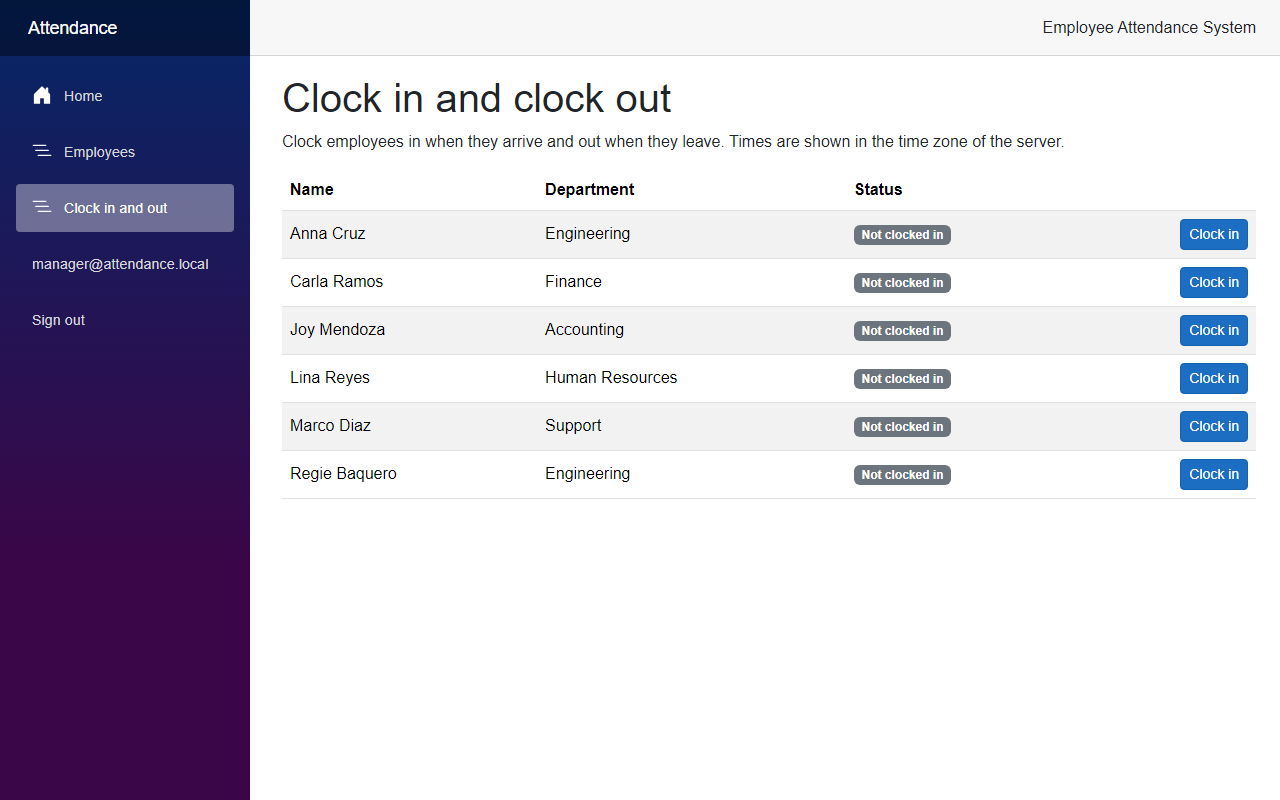
Click Clock in on Anna Cruz and on Marco Diaz. Both rows change, and each one shows the time and a Clock out button, like in the screenshot at the beginning of the article.
Now let's try a refusal. I clocked Lina Reyes in through the API while this page was still open, so the page still showed her with a Clock in button. Then I clicked it:
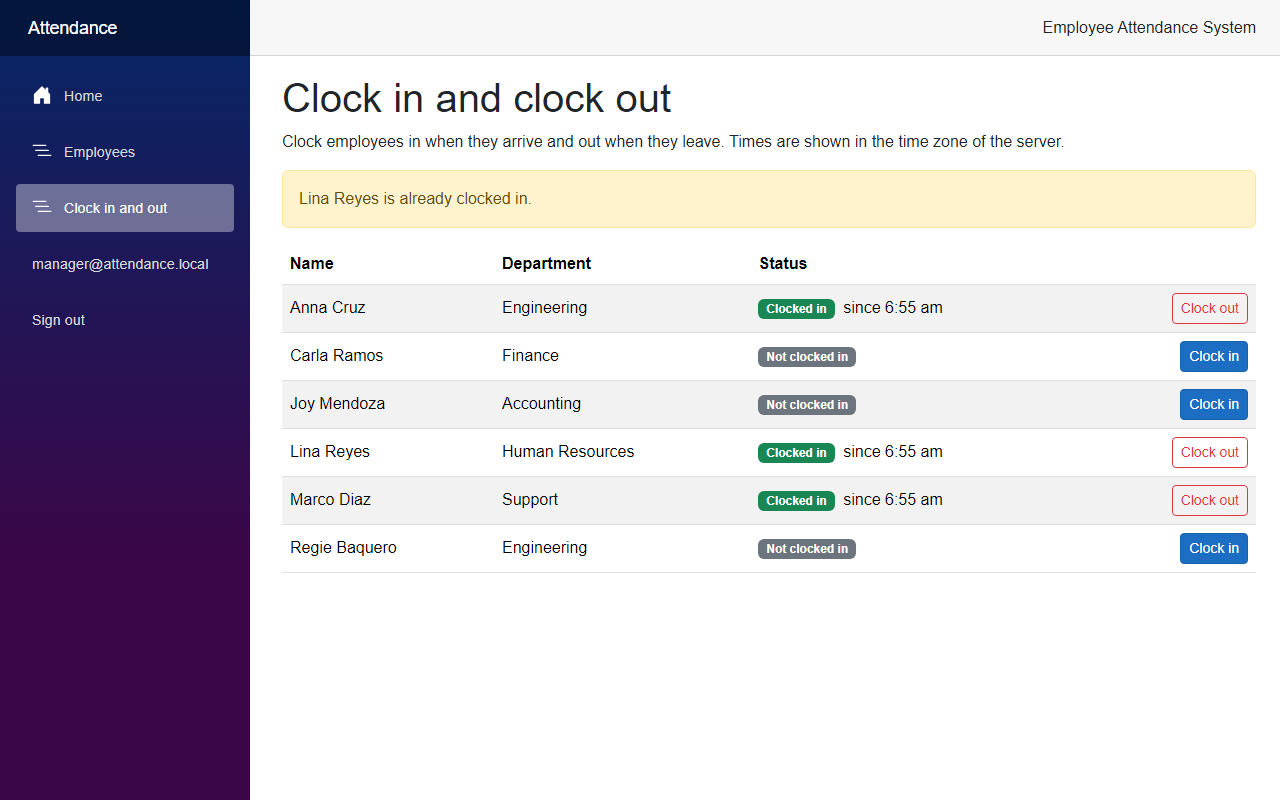
Next, click Clock out on Anna Cruz:
The API shows the same rules. I signed in as the manager with curl to get a token, and used it for these calls with the id of an employee. First, a clock-in:
curl -k -i -X POST https://localhost:7020/api/attendance/1/clock-in -H "Authorization: Bearer <accessToken>"HTTP/1.1 200 OK
{"id":4,"employeeId":1,"clockInUtc":"2026-10-03T22:56:00.5237808+00:00","clockOutUtc":null,"isOpen":true}The same call again is refused:
HTTP/1.1 409 Conflict
{"type":"https://tools.ietf.org/html/rfc9110#section-15.5.10","title":"Conflict","status":409,"detail":"Regie Baquero is already clocked in."}
Then a clock-out closes the record, and a second one is refused:
HTTP/1.1 200 OK
{"id":4,"employeeId":1,"clockInUtc":"2026-10-03T22:56:00.5237808+00:00","clockOutUtc":"2026-10-03T22:56:00.7061276+00:00","isOpen":false}
HTTP/1.1 409 Conflict
{"type":"https://tools.ietf.org/html/rfc9110#section-15.5.10","title":"Conflict","status":409,"detail":"Regie Baquero is not clocked in."}With the token of employee@attendance.local, the same clock-in answered 403, and an employee id that does not exist answered 404.
Project Structure
These are the files this article added or changed.
src/
  FreeCodeSpot.Attendance.Domain/
    Attendance/AttendanceRecord.cs                     added
  FreeCodeSpot.Attendance.Application/
    Attendance/AttendanceService.cs                    added
    Attendance/AttendanceResult.cs                     added
    Attendance/EmployeeAttendanceStatus.cs             added
    Attendance/IAttendanceRepository.cs                added
  FreeCodeSpot.Attendance.Infrastructure/
    Attendance/EfAttendanceRepository.cs               added
    Persistence/AttendanceDbContext.cs                 changed
    Persistence/Configurations/AttendanceRecordConfiguration.cs  added
    Persistence/Migrations/                            added AddAttendanceRecords (2 files), snapshot changed
    DependencyInjection.cs                             changed
  FreeCodeSpot.Attendance.Api/
    Endpoints/AttendanceEndpoints.cs                   added
    Program.cs                                         changed
  FreeCodeSpot.Attendance.Web/
    Components/Layout/NavMenu.razor                    changed
    Components/Pages/Attendance.razor                  added
    Models/EmployeeAttendanceStatus.cs                 added
    Services/AttendanceApiClient.cs                    added
    Services/ClockResult.cs                            added
    Services/HttpClientSignedInUserExtensions.cs       added
    Services/EmployeeApiClient.cs                      changed
    Program.cs                                         changed
tests/
  FreeCodeSpot.Attendance.UnitTests/
    Attendance/AttendanceServiceTests.cs               added
  FreeCodeSpot.Attendance.IntegrationTests/
    Attendance/AttendanceEndpointsTests.cs             added
    Attendance/EfAttendanceRepositoryTests.cs          added
Source Code
You can find the complete source code for this tutorial on GitHub. The code is tagged article-005 so it stays exactly as described here.
Summary
In this tutorial, we added clock in and clock out to the Employee Attendance System. Managers can clock employees in and out from a Blazor page, the rules refuse a double clock-in or a clock-out without a clock-in, and the database allows only one open record per employee. We tested the rules with a fake clock, and the endpoints and the index against SQL Server.
