
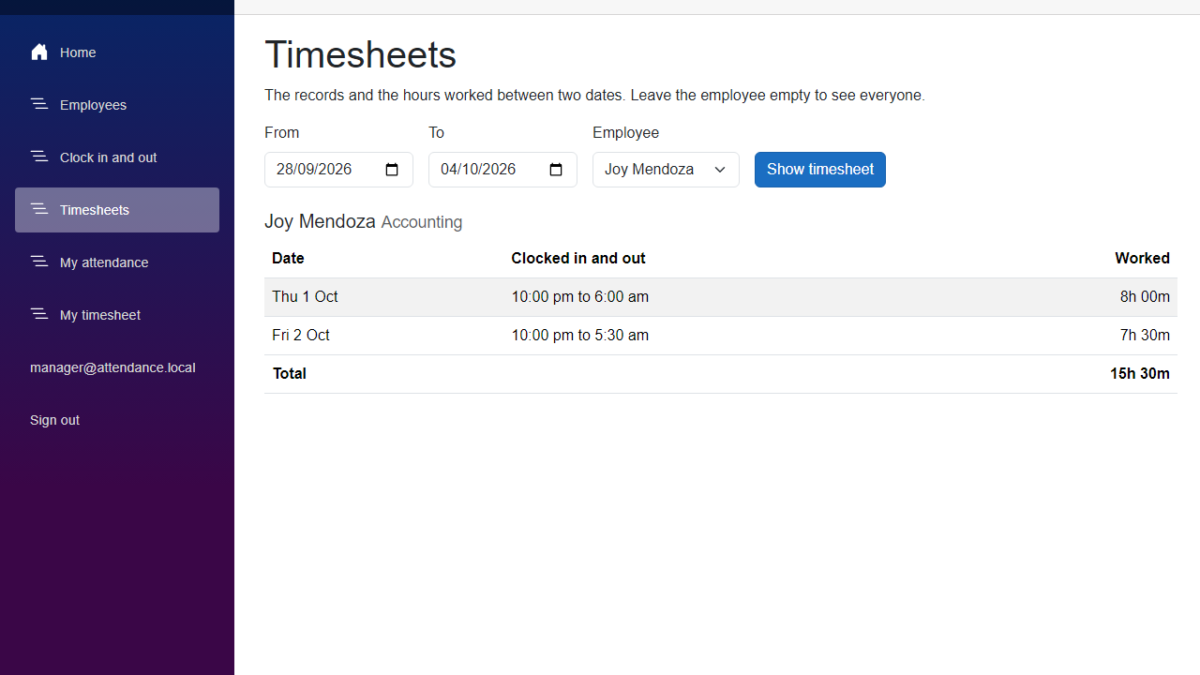
In this tutorial, we will add an attendance timesheet to our Employee Attendance System. A manager will be able to pick two dates and an employee, and see the clock-in and clock-out records for those days with the hours worked. An employee will be able to see their own timesheet. We will use EF Core and LINQ to read the records, and we will work out the days and the hours in a service that we can test. I used Claude Code to generate the code again, and I will show what we decided and what went wrong before we kept it.
Table of Contents
This is part of the Employee Attendance System series:
- Project Setup
- SQL Server with Entity Framework Core
- Employee Management with Blazor Forms
- Blazor Authentication and Roles
- Clock In and Clock Out
- Employee Clock In Without a Manager
- Attendance Timesheets (this article)
What We're Building
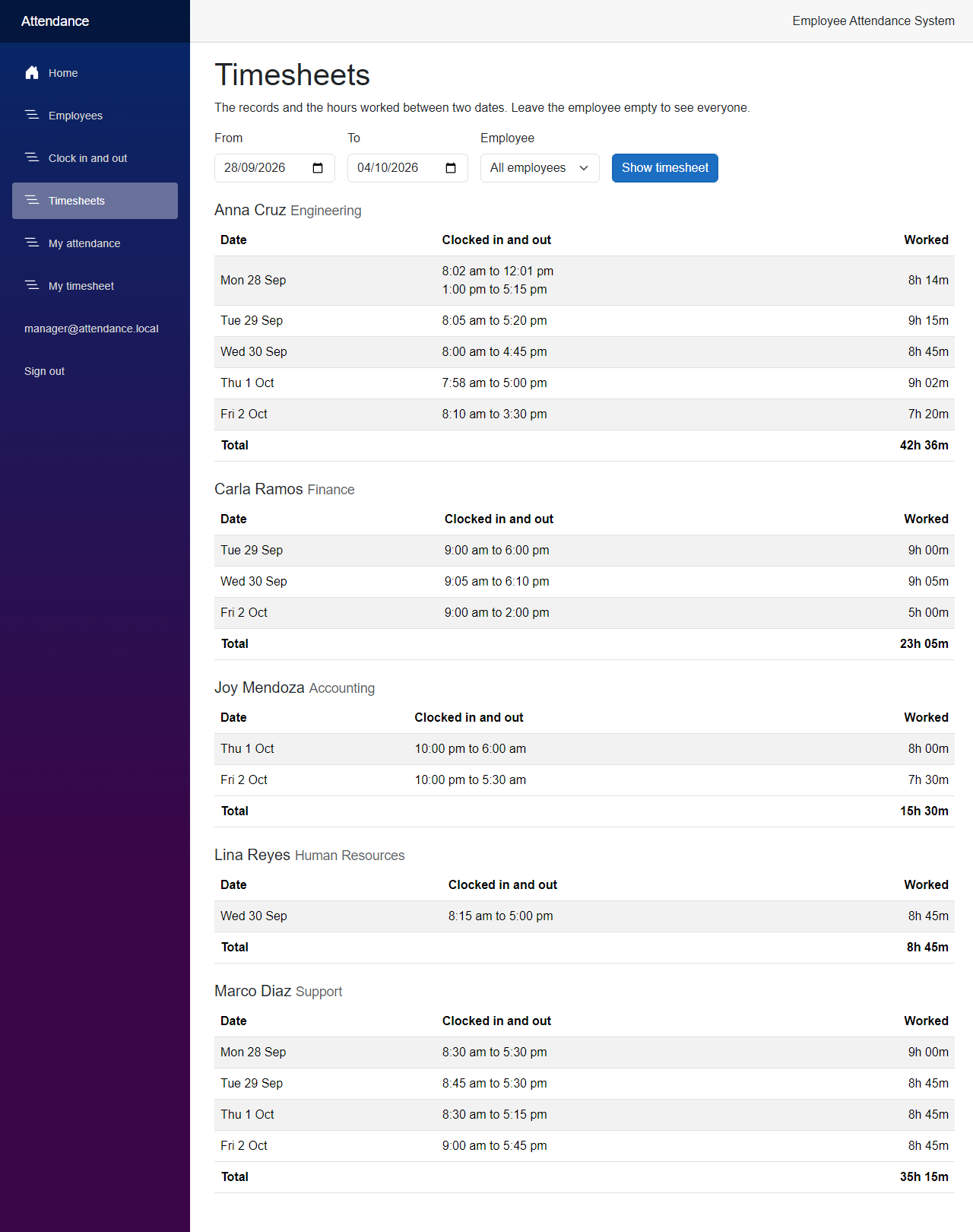
By the end of this article, a manager can open a Timesheets page and see who worked when, and for how long.
Now let's see how we built it.
Before We Start
Before we start, make sure you have the following installed:
- .NET 10 SDK (I used 10.0.401)
- SQL Server LocalDB, or the SQL Server instance you used in the previous articles
- The EF Core command-line tools (I used 10.0.12)
- Claude Code
We do not add any new NuGet packages in this article.
Starting Point
After the previous article, employees can clock in and out, and managers can do it for them. The records are in the AttendanceRecords table, but there is nothing to look at them. The My attendance page only shows the latest five records, and nobody can see the hours.
The Goal
- Let the user pick a range of dates, and for a manager, one employee or everyone
- Show the records of every day with the hours worked, and a total
- Decide in one place what a day is, because the records are stored in UTC
- Read the records with a query that filters by date and employee in SQL Server
- Let employees see their own timesheet and nobody else's
- Test the days, the hours and the rules for the range
Building It with AI
Step 1 – Decide what a day is
I asked Claude Code to add history and timesheets. Before it wrote any code, we had to answer three questions, because the records only have a clock-in and a clock-out time in UTC.
- Which time zone decides what day it is? A clock-in at 8 am in Manila is 0:00 UTC, which is the same day. But a clock-in at 6 am in Manila is 22:00 UTC the evening before. If we used UTC days, that employee would appear on the wrong day. We use a time zone from the settings, and when the setting is empty, the time zone of the server.
- What about a record that runs past midnight? A night shift from 10 pm to 6 am touches two days. We count the whole record on the day of the clock-in. It is one simple rule, and a night shift stays in one piece.
- What about a record that is still open? We list it, marked as still clocked in, but we do not count it in the totals. A total that changes every minute would be confusing.
The time zone goes in appsettings.json.
src/FreeCodeSpot.Attendance.Api/appsettings.json
{
  "ConnectionStrings": {
    "AttendanceDb": "Server=(localdb)\\MSSQLLocalDB;Database=FreeCodeSpotAttendance;Trusted_Connection=True;TrustServerCertificate=True"
  },
  "SeedUsers": {
    "ManagerEmail": "manager@attendance.local",
    "EmployeeEmail": "employee@attendance.local",
    "ManagerRosterEmail": "regie@freecodespot.local",
    "EmployeeRosterEmail": "anna@freecodespot.local"
  },
  "Attendance": {
    "TimeZoneId": ""
  },
  "Logging": {
    "LogLevel": {
      "Default": "Information",
      "Microsoft.AspNetCore": "Warning"
    }
  },
  "AllowedHosts": "*"
}
You can use a name like Asia/Manila. In Program.cs, we turn the setting into a TimeZoneInfo, and register it, together with the service we are going to write.
src/FreeCodeSpot.Attendance.Api/Program.cs
builder.Services.AddSingleton(TimeProvider.System);

// A day on a timesheet is a day in this time zone. Without a setting, it is the time zone of the server.
var timeZoneId = builder.Configuration["Attendance:TimeZoneId"];
builder.Services.AddSingleton(string.IsNullOrWhiteSpace(timeZoneId)
    ? TimeZoneInfo.Local
    : TimeZoneInfo.FindSystemTimeZoneById(timeZoneId));
builder.Services.AddScoped<TimesheetService>();
Step 2 – Add the types of a timesheet
Now the shapes of the data. The first one is a record that holds one attendance record together with the name of the employee. The database query will fill it directly, so we never load whole entities that we do not need.
src/FreeCodeSpot.Attendance.Application/Timesheets/TimesheetRecord.cs
namespace FreeCodeSpot.Attendance.Application.Timesheets;

/// <summary>
/// One attendance record together with the employee it belongs to. The database
/// query projects straight into this, so the service never loads whole entities.
/// </summary>
public sealed record TimesheetRecord(
    int EmployeeId,
    string FullName,
    string Department,
    int RecordId,
    DateTimeOffset ClockInUtc,
    DateTimeOffset? ClockOutUtc);
The timesheet that we return to the caller is a tree: a timesheet has employees, an employee has days, and a day has entries.
src/FreeCodeSpot.Attendance.Application/Timesheets/Timesheet.cs
namespace FreeCodeSpot.Attendance.Application.Timesheets;

/// <summary>
/// The attendance of one or more employees between two dates, both included.
/// The dates are days in the time zone named by TimeZoneId.
/// </summary>
public sealed record Timesheet(
    DateOnly From,
    DateOnly To,
    string TimeZoneId,
    IReadOnlyList<EmployeeTimesheet> Employees);

/// <summary>One employee's days in the range, and the time they worked in total.</summary>
public sealed record EmployeeTimesheet(
    int EmployeeId,
    string FullName,
    string Department,
    IReadOnlyList<TimesheetDay> Days,
    TimeSpan TotalWorked);

/// <summary>One day with its records. Worked adds up the closed records only.</summary>
public sealed record TimesheetDay(
    DateOnly Date,
    IReadOnlyList<TimesheetEntry> Entries,
    TimeSpan Worked);

/// <summary>One record. Duration is null while the employee is still clocked in.</summary>
public sealed record TimesheetEntry(
    int RecordId,
    DateTimeOffset ClockInUtc,
    DateTimeOffset? ClockOutUtc,
    TimeSpan? Duration);
The timesheet also carries the name of the time zone, because the days are days in that zone, and the page has to show the times in the same zone. The service returns a result that says what happened, like the other services in this series.
src/FreeCodeSpot.Attendance.Application/Timesheets/TimesheetResult.cs
namespace FreeCodeSpot.Attendance.Application.Timesheets;

public enum TimesheetOutcome
{
    Success,
    NotFound,
    Invalid
}

/// <summary>
/// The result of a timesheet request. Errors is keyed by parameter name, like the
/// validation errors of the employee forms.
/// </summary>
public sealed record TimesheetResult(
    TimesheetOutcome Outcome,
    Timesheet? Timesheet,
    IReadOnlyDictionary<string, string[]> Errors)
{
    private static readonly IReadOnlyDictionary<string, string[]> NoErrors = new Dictionary<string, string[]>();

    public static TimesheetResult Success(Timesheet timesheet) => new(TimesheetOutcome.Success, timesheet, NoErrors);

    public static TimesheetResult NotFound() => new(TimesheetOutcome.NotFound, null, NoErrors);

    public static TimesheetResult Invalid(IReadOnlyDictionary<string, string[]> errors) =>
        new(TimesheetOutcome.Invalid, null, errors);
}
Step 3 – Read the records with LINQ
The reading is in its own contract, so it stays apart from the repository that changes the records.
src/FreeCodeSpot.Attendance.Application/Timesheets/ITimesheetRepository.cs
namespace FreeCodeSpot.Attendance.Application.Timesheets;

/// <summary>
/// Read-only queries for timesheets. They live apart from IAttendanceRepository,
/// which changes records, so the two can grow without getting in each other's way.
/// </summary>
public interface ITimesheetRepository
{
    /// <summary>
    /// Records that were clocked in from fromUtc up to, but not including, toUtc,
    /// for one employee or for everyone, ordered by employee name and clock-in time.
    /// </summary>
    Task<IReadOnlyList<TimesheetRecord>> GetRecordsAsync(
        DateTimeOffset fromUtc,
        DateTimeOffset toUtc,
        int? employeeId,
        CancellationToken cancellationToken = default);
}
Here is the EF Core version. This is the LINQ part of the article.
src/FreeCodeSpot.Attendance.Infrastructure/Timesheets/EfTimesheetRepository.cs
using FreeCodeSpot.Attendance.Application.Timesheets;
using FreeCodeSpot.Attendance.Infrastructure.Persistence;
using Microsoft.EntityFrameworkCore;

namespace FreeCodeSpot.Attendance.Infrastructure.Timesheets;

/// <summary>
/// Reads timesheet records from SQL Server. The filter on the dates and the
/// employee runs in the database, and only the columns of TimesheetRecord are
/// returned, joined with the employee name. The ordering comes before the select,
/// because EF Core cannot translate an ordering on the members of the projected record.
/// </summary>
public sealed class EfTimesheetRepository(AttendanceDbContext db) : ITimesheetRepository
{
    public async Task<IReadOnlyList<TimesheetRecord>> GetRecordsAsync(
        DateTimeOffset fromUtc,
        DateTimeOffset toUtc,
        int? employeeId,
        CancellationToken cancellationToken = default) =>
        await (
            from record in db.AttendanceRecords.AsNoTracking()
            join employee in db.Employees on record.EmployeeId equals employee.Id
            where record.ClockInUtc >= fromUtc && record.ClockInUtc < toUtc
            where employeeId == null || record.EmployeeId == employeeId
            orderby employee.FullName, record.ClockInUtc
            select new TimesheetRecord(
                employee.Id,
                employee.FullName,
                employee.Department,
                record.Id,
                record.ClockInUtc,
                record.ClockOutUtc))
            .ToListAsync(cancellationToken);
}
Three things happen in SQL Server. The where lines keep only the records clocked in between the two times, and for one employee when an id is given. The join brings the name and the department of the employee. And the select returns only the columns that TimesheetRecord needs, so the query does not read the other columns of the employee. The start of the range is included and the end is not. This way, one range can start where the last one ended, without counting a record twice.
I wrote this query in the query syntax, with from, join and orderby, and the first version did not look like this. I show the reason in the review section.
The new query filters on the employee and the clock-in time, so we add an index for exactly these two columns. Open AttendanceRecordConfiguration.cs.
src/FreeCodeSpot.Attendance.Infrastructure/Persistence/Configurations/AttendanceRecordConfiguration.cs
        // Timesheets ask for the records of an employee between two times.
        builder.HasIndex(record => new { record.EmployeeId, record.ClockInUtc })
            .HasDatabaseName("IX_AttendanceRecords_EmployeeId_ClockInUtc");
Now create the migration and apply it, and register the repository in AddInfrastructure().
dotnet ef migrations add AddAttendanceRecordClockInIndex --project src/FreeCodeSpot.Attendance.Infrastructure --startup-project src/FreeCodeSpot.Attendance.Api
dotnet ef database update --project src/FreeCodeSpot.Attendance.Infrastructure --startup-project src/FreeCodeSpot.Attendance.Api
src/FreeCodeSpot.Attendance.Infrastructure/DependencyInjection.cs
        services.AddScoped<IAttendanceRepository, EfAttendanceRepository>();
        services.AddScoped<ITimesheetRepository, EfTimesheetRepository>();
The migration only creates the index. It does not change any table.
Step 4 – Build the attendance timesheet: days and hours
The query gives us rows. The service turns them into days and hours. We do this in the service and not in the query, because a day depends on the time zone, and SQL Server does not know our TimeZoneInfo. In the service, we can also test it with a fake clock and a fake time zone.
src/FreeCodeSpot.Attendance.Application/Timesheets/TimesheetService.cs
using FreeCodeSpot.Attendance.Application.Employees;

namespace FreeCodeSpot.Attendance.Application.Timesheets;

/// <summary>
/// Builds timesheets. The database does the filtering by date and employee. The
/// grouping into days and the hours are worked out here, because a day depends on
/// the time zone, and that is easier to test in code than in a query.
/// </summary>
public sealed class TimesheetService(
    ITimesheetRepository timesheets,
    IEmployeeRepository employees,
    TimeProvider timeProvider,
    TimeZoneInfo timeZone)
{
    public const int MaxDays = 31;
    public const int DefaultDays = 7;

    /// <summary>
    /// Returns the records clocked in between two days, both included. Without a
    /// range it returns the last seven days, today included. A record that runs
    /// past midnight counts on the day it was clocked in.
    /// </summary>
    public async Task<TimesheetResult> GetTimesheetAsync(
        DateOnly? from,
        DateOnly? to,
        int? employeeId,
        CancellationToken cancellationToken = default)
    {
        var last = to ?? Today();
        var first = from ?? last.AddDays(1 - DefaultDays);

        var errors = Validate(first, last);
        if (errors.Count > 0)
        {
            return TimesheetResult.Invalid(errors);
        }

        if (employeeId is { } id && await employees.GetByIdAsync(id, cancellationToken) is null)
        {
            return TimesheetResult.NotFound();
        }

        var records = await timesheets.GetRecordsAsync(
            StartOfDayUtc(first),
            StartOfDayUtc(last.AddDays(1)),
            employeeId,
            cancellationToken);

        return TimesheetResult.Success(new Timesheet(first, last, timeZone.Id, Group(records)));
    }

    private List<EmployeeTimesheet> Group(IReadOnlyList<TimesheetRecord> records) =>
        records
            .GroupBy(record => record.EmployeeId)
            .Select(employeeRecords =>
            {
                var days = employeeRecords
                    .GroupBy(record => DayOf(record.ClockInUtc))
                    .OrderBy(day => day.Key)
                    .Select(day =>
                    {
                        var entries = day
                            .OrderBy(record => record.ClockInUtc)
                            .Select(record => new TimesheetEntry(
                                record.RecordId,
                                record.ClockInUtc,
                                record.ClockOutUtc,
                                record.ClockOutUtc - record.ClockInUtc))
                            .ToList();

                        return new TimesheetDay(day.Key, entries, Total(entries.Select(entry => entry.Duration)));
                    })
                    .ToList();

                var employee = employeeRecords.First();
                return new EmployeeTimesheet(
                    employee.EmployeeId,
                    employee.FullName,
                    employee.Department,
                    days,
                    Total(days.Select(day => (TimeSpan?)day.Worked)));
            })
            .OrderBy(employee => employee.FullName, StringComparer.OrdinalIgnoreCase)
            .ToList();

    // Records that are still open have no duration, so they add nothing to a total.
    private static TimeSpan Total(IEnumerable<TimeSpan?> durations) =>
        TimeSpan.FromTicks(durations.Sum(duration => duration?.Ticks ?? 0));

    private static Dictionary<string, string[]> Validate(DateOnly first, DateOnly last)
    {
        var errors = new Dictionary<string, string[]>();

        if (last < first)
            errors["To"] = ["The end date must not be before the start date."];
        else if (last.DayNumber - first.DayNumber + 1 > MaxDays)
            errors["To"] = [$"The range can be at most {MaxDays} days."];

        return errors;
    }

    private DateOnly Today() => DayOf(timeProvider.GetUtcNow());

    private DateOnly DayOf(DateTimeOffset utc) =>
        DateOnly.FromDateTime(TimeZoneInfo.ConvertTime(utc, timeZone).DateTime);

    // Midnight of a day in the time zone, as a UTC time. A few zones skip midnight when
    // the clocks change, so a midnight that does not exist moves to the hour after it.
    private DateTimeOffset StartOfDayUtc(DateOnly day)
    {
        var midnight = day.ToDateTime(TimeOnly.MinValue);
        if (timeZone.IsInvalidTime(midnight))
        {
            midnight = midnight.AddHours(1);
        }

        return new DateTimeOffset(TimeZoneInfo.ConvertTimeToUtc(midnight, timeZone), TimeSpan.Zero);
    }
}
There is a lot here, so let's go through it.
GetTimesheetAsyncfirst works out the range. Without dates, it takes the last seven days, today included. Then it checks the range: the end cannot be before the start, and a range can be at most 31 days. That keeps the result small, so we do not need paging.- Then it converts the two days to UTC times with
StartOfDayUtc, and asks the repository. The end of the range is the start of the day after the last day. Groupdoes the work in memory with LINQGroupBy. First by employee, then by day. The day of a record is the day of its clock-in in our time zone, which gives us the rule that a night shift counts on the day it started.- The duration of an entry is the clock-out minus the clock-in. For an open record this is
null, andTotaltreats a missing duration as zero, so it adds nothing.
Step 5 – Add the API routes
The manager route goes in the group of AttendanceEndpoints, so it needs a manager like the other routes of the group. All the query values are optional.
src/FreeCodeSpot.Attendance.Api/Endpoints/AttendanceEndpoints.cs
        // Without from and to, the last seven days. Without employeeId, every employee.
        group.MapGet("/timesheet", async (DateOnly? from, DateOnly? to, int? employeeId, TimesheetService timesheets, CancellationToken cancellationToken) =>
                ToResult(await timesheets.GetTimesheetAsync(from, to, employeeId, cancellationToken)))
            .WithName("GetTimesheet")
            .Produces<Timesheet>()
            .ProducesValidationProblem()
            .Produces(StatusCodes.Status404NotFound);
The result goes through a second ToResult method that knows the timesheet results. A bad range becomes a 400 with the message, and an unknown employee becomes a 404.
src/FreeCodeSpot.Attendance.Api/Endpoints/AttendanceEndpoints.cs
    internal static IResult ToResult(TimesheetResult result) =>
        result.Outcome switch
        {
            TimesheetOutcome.Success => Results.Ok(result.Timesheet),
            TimesheetOutcome.NotFound => Results.NotFound(),
            _ => Results.ValidationProblem(result.Errors.ToDictionary())
        };
The route for the signed-in user is in MyAttendanceEndpoints. It has no employeeId in the query. The id comes from the token, like in the previous article, so an employee cannot ask for somebody else.
src/FreeCodeSpot.Attendance.Api/Endpoints/MyAttendanceEndpoints.cs
        group.MapGet("/timesheet", async (DateOnly? from, DateOnly? to, ClaimsPrincipal user, TimesheetService timesheets, CancellationToken cancellationToken) =>
                AttendanceEndpoints.ToResult(await timesheets.GetTimesheetAsync(from, to, GetEmployeeId(user), cancellationToken)))
            .WithName("GetMyTimesheet")
            .Produces<Timesheet>()
            .ProducesValidationProblem()
            .Produces(StatusCodes.Status404NotFound);
Step 6 – Build the timesheet pages
The Web app keeps its own copy of the timesheet shape, like it does for the other models.
src/FreeCodeSpot.Attendance.Web/Models/Timesheet.cs
namespace FreeCodeSpot.Attendance.Web.Models;

/// <summary>
/// A timesheet as the API returns it. The days are days in the time zone named by
/// TimeZoneId, so the page shows the times in that zone too.
/// </summary>
public record Timesheet(DateOnly From, DateOnly To, string TimeZoneId, IReadOnlyList<EmployeeTimesheet> Employees);

public record EmployeeTimesheet(
    int EmployeeId,
    string FullName,
    string Department,
    IReadOnlyList<TimesheetDay> Days,
    TimeSpan TotalWorked);

public record TimesheetDay(DateOnly Date, IReadOnlyList<TimesheetEntry> Entries, TimeSpan Worked);

/// <summary>Duration is null while the employee is still clocked in.</summary>
public record TimesheetEntry(int RecordId, DateTimeOffset ClockInUtc, DateTimeOffset? ClockOutUtc, TimeSpan? Duration);
The client has two new methods. A date range that is too long comes back as a 400, and the client turns the messages into a text that the page can show.
src/FreeCodeSpot.Attendance.Web/Services/TimesheetResponse.cs
using FreeCodeSpot.Attendance.Web.Models;

namespace FreeCodeSpot.Attendance.Web.Services;

/// <summary>
/// What the API answered to a timesheet request: the timesheet, or the reason it
/// was refused, for example a range of dates that is too long.
/// </summary>
public sealed record TimesheetResponse(Timesheet? Timesheet, string? Message)
{
    public static TimesheetResponse Of(Timesheet timesheet) => new(timesheet, null);

    public static TimesheetResponse Refused(string message) => new(null, message);
}
src/FreeCodeSpot.Attendance.Web/Services/AttendanceApiClient.cs
    /// <summary>Without dates, the API answers with the last seven days.</summary>
    public Task<TimesheetResponse> GetTimesheetAsync(DateOnly? from, DateOnly? to, int? employeeId, CancellationToken cancellationToken = default) =>
        GetTimesheetAsync("api/attendance/timesheet", from, to, employeeId, cancellationToken);

    public Task<TimesheetResponse> GetMyTimesheetAsync(DateOnly? from, DateOnly? to, CancellationToken cancellationToken = default) =>
        GetTimesheetAsync("api/attendance/me/timesheet", from, to, employeeId: null, cancellationToken);
The private method behind them builds the query string and handles the 400. It is in the source code, and it follows the same pattern as the other methods of the client.
The hours are shown as 8h 14m, and not as 08:14:00. A small extension method does that.
src/FreeCodeSpot.Attendance.Web/Services/DurationFormat.cs
namespace FreeCodeSpot.Attendance.Web.Services;

public static class DurationFormat
{
    /// <summary>Shows a duration the way people say it, for example 7h 30m.</summary>
    public static string ToHoursAndMinutes(this TimeSpan duration) =>
        $"{(int)duration.TotalHours}h {duration.Minutes:00}m";
}
Both pages show a timesheet in the same way, so the table is a component of its own. It shows the times in the time zone that the API used.
src/FreeCodeSpot.Attendance.Web/Components/Timesheets/TimesheetTable.razor
@using FreeCodeSpot.Attendance.Web.Models
@using FreeCodeSpot.Attendance.Web.Services

@if (Timesheet.Employees.Count == 0)
{
    <p><em>There are no records between @Timesheet.From.ToString("d") and @Timesheet.To.ToString("d").</em></p>
}
else
{
    @foreach (var employee in Timesheet.Employees)
    {
        <h2 class="h5 mt-4">
            @employee.FullName
            <small class="text-body-secondary">@employee.Department</small>
        </h2>

        <table class="table table-striped align-middle">
            <thead>
                <tr>
                    <th scope="col">Date</th>
                    <th scope="col">Clocked in and out</th>
                    <th scope="col" class="text-end">Worked</th>
                </tr>
            </thead>
            <tbody>
                @foreach (var day in employee.Days)
                {
                    <tr>
                        <td class="text-nowrap">@day.Date.ToString("ddd d MMM")</td>
                        <td>
                            @foreach (var entry in day.Entries)
                            {
                                <div>
                                    @InZone(entry.ClockInUtc).ToString("t")
                                    to
                                    @if (entry.ClockOutUtc is { } clockOut)
                                    {
                                        @InZone(clockOut).ToString("t")
                                    }
                                    else
                                    {
                                        <em>still clocked in</em>
                                    }
                                </div>
                            }
                        </td>
                        <td class="text-end text-nowrap">@day.Worked.ToHoursAndMinutes()</td>
                    </tr>
                }
            </tbody>
            <tfoot>
                <tr>
                    <th scope="row" colspan="2">Total</th>
                    <th class="text-end text-nowrap">@employee.TotalWorked.ToHoursAndMinutes()</th>
                </tr>
            </tfoot>
        </table>
    }
}

@code {
    [Parameter, EditorRequired]
    public Timesheet Timesheet { get; set; } = default!;

    // The API decided the days in its own time zone, so the times are shown in that zone too.
    private TimeZoneInfo zone = TimeZoneInfo.Local;

    protected override void OnParametersSet()
    {
        try
        {
            zone = TimeZoneInfo.FindSystemTimeZoneById(Timesheet.TimeZoneId);
        }
        catch (TimeZoneNotFoundException)
        {
            zone = TimeZoneInfo.Local;
        }
    }

    private DateTime InZone(DateTimeOffset utc) => TimeZoneInfo.ConvertTime(utc, zone).DateTime;
}
Now the manager page. It needs a manager, and it has two dates, a list of employees and a button. When you open it, it asks the API without dates, and then fills the two date boxes with the range that came back.
src/FreeCodeSpot.Attendance.Web/Components/Pages/Timesheets.razor
@page "/timesheets"
@rendermode InteractiveServer
@attribute [Authorize(Roles = AppRoles.Manager)]
@using FreeCodeSpot.Attendance.Web.Components.Timesheets
@using FreeCodeSpot.Attendance.Web.Models
@using FreeCodeSpot.Attendance.Web.Services
@inject AttendanceApiClient AttendanceApi
@inject EmployeeApiClient EmployeeApi

<PageTitle>Timesheets</PageTitle>

<h1>Timesheets</h1>

<p>The records and the hours worked between two dates. Leave the employee empty to see everyone.</p>

<div class="row g-3 align-items-end mb-3">
    <div class="col-auto">
        <label for="from" class="form-label">From</label>
        <input id="from" type="date" class="form-control" @bind="from" @bind:format="yyyy-MM-dd" />
    </div>
    <div class="col-auto">
        <label for="to" class="form-label">To</label>
        <input id="to" type="date" class="form-control" @bind="to" @bind:format="yyyy-MM-dd" />
    </div>
    <div class="col-auto">
        <label for="employee" class="form-label">Employee</label>
        <select id="employee" class="form-select" @bind="employeeId">
            <option value="0">All employees</option>
            @foreach (var employee in employees)
            {
                <option value="@employee.Id">@employee.FullName</option>
            }
        </select>
    </div>
    <div class="col-auto">
        <button class="btn btn-primary" @onclick="LoadAsync">Show timesheet</button>
    </div>
</div>

@if (message is not null)
{
    <div class="alert alert-warning" role="alert">@message</div>
}

@if (loadFailed)
{
    <div class="alert alert-danger" role="alert">
        The timesheet could not be loaded. Check that the attendance API is running, then try again.
    </div>
}
else if (timesheet is not null)
{
    <TimesheetTable Timesheet="timesheet" />
}

@code {
    private IReadOnlyList<Employee> employees = [];
    private DateOnly? from;
    private DateOnly? to;
    private int employeeId;
    private Timesheet? timesheet;
    private string? message;
    private bool loadFailed;

    protected override async Task OnInitializedAsync()
    {
        try
        {
            employees = await EmployeeApi.GetEmployeesAsync(includeInactive: true);
        }
        catch (HttpRequestException)
        {
            loadFailed = true;
            return;
        }

        // Without dates, the API answers with the last seven days, and we show them in the inputs.
        await LoadAsync();
    }

    private async Task LoadAsync()
    {
        try
        {
            var response = await AttendanceApi.GetTimesheetAsync(from, to, employeeId == 0 ? null : employeeId);

            message = response.Message;
            loadFailed = false;
            if (response.Timesheet is { } result)
            {
                timesheet = result;
                from = result.From;
                to = result.To;
            }
        }
        catch (HttpRequestException)
        {
            loadFailed = true;
        }
    }
}
The employee page, MyTimesheetPage.razor, is the same page without the list of employees. It needs the same policy as My attendance, and it calls the other method of the client:
src/FreeCodeSpot.Attendance.Web/Components/Pages/MyTimesheetPage.razor
@page "/my-timesheet"
@rendermode InteractiveServer
@attribute [Authorize(Policy = AppPolicies.HasEmployeeRecord)]
var response = await AttendanceApi.GetMyTimesheetAsync(from, to);We also add two links to the menu. Timesheets is for managers, and My timesheet is for users who are linked to an employee. They use the same AuthorizeView blocks as the other links.
Step 7 – Add the tests
I asked Claude to test the service with a fake clock and a time zone that is eight hours ahead of UTC, so the days are different from the UTC days. First, three of the unit tests:
tests/FreeCodeSpot.Attendance.UnitTests/Timesheets/TimesheetServiceTests.cs
    [Fact]
    public async Task ARecordLandsOnItsDayInTheTimeZoneNotInUtc()
    {
        // 17:00 UTC on the 4th is 01:00 on the 5th in Plus8.
        var clockIn = new DateTimeOffset(2026, 10, 4, 17, 0, 0, TimeSpan.Zero);
        var service = CreateService(Record(Anna, 1, clockIn, clockIn.AddHours(8)));

        var result = await service.GetTimesheetAsync(Day(4), Day(5), Anna.Id);

        var day = Assert.Single(Assert.Single(result.Timesheet!.Employees).Days);
        Assert.Equal(Day(5), day.Date);
    }

    [Fact]
    public async Task ARecordThatRunsPastMidnightCountsOnTheDayItWasClockedIn()
    {
        // 22:00 on the 4th to 06:00 on the 5th in Plus8.
        var clockIn = new DateTimeOffset(2026, 10, 4, 14, 0, 0, TimeSpan.Zero);
        var service = CreateService(Record(Anna, 1, clockIn, clockIn.AddHours(8)));

        var result = await service.GetTimesheetAsync(Day(4), Day(5), Anna.Id);

        var day = Assert.Single(Assert.Single(result.Timesheet!.Employees).Days);
        Assert.Equal(Day(4), day.Date);
        Assert.Equal(TimeSpan.FromHours(8), day.Worked);
    }

    [Fact]
    public async Task AnOpenRecordIsListedButAddsNothingToTheTotals()
    {
        var clockIn = new DateTimeOffset(2026, 10, 5, 1, 0, 0, TimeSpan.Zero);
        var service = CreateService(Record(Anna, 1, clockIn, null));

        var result = await service.GetTimesheetAsync(Day(5), Day(5), Anna.Id);

        var anna = Assert.Single(result.Timesheet!.Employees);
        var entry = Assert.Single(Assert.Single(anna.Days).Entries);
        Assert.Null(entry.ClockOutUtc);
        Assert.Null(entry.Duration);
        Assert.Equal(TimeSpan.Zero, anna.TotalWorked);
    }
The fake source in this class filters and orders the rows like the SQL query does, so the service gets the same kind of rows from the fake as from the database. The class also tests the default range, the totals of days and of the range, the order of the employees, the filter for one employee, the end of the range, the two refusals for a bad range, and the unknown employee.
The integration tests run the API in UTC, and save the records with fixed times in the past, so they do not depend on today's date. This one checks the hours through the real routes:
tests/FreeCodeSpot.Attendance.IntegrationTests/Timesheets/TimesheetEndpointsTests.cs
    [Fact]
    public async Task Timesheet_ReturnsTheRecordsOfTheRangeWithTheirHours()
    {
        using var manager = await factory.CreateSignedInClientAsync(AttendanceApiFactory.ManagerEmail);
        var (_, employee) = await factory.CreateLinkedEmployeeClientAsync();
        await SaveAsync(employee.Id, FirstDay, FirstDay.AddHours(8).AddMinutes(30));
        await SaveAsync(employee.Id, FirstDay.AddDays(1), FirstDay.AddDays(1).AddHours(4));
        await SaveAsync(employee.Id, FirstDay.AddDays(10), FirstDay.AddDays(10).AddHours(8));

        var timesheet = await manager.GetFromJsonAsync<Timesheet>(
            $"/api/attendance/timesheet?from=2026-03-02&to=2026-03-03&employeeId={employee.Id}");

        var sheet = Assert.Single(timesheet!.Employees);
        Assert.Equal(employee.FullName, sheet.FullName);
        Assert.Equal([new DateOnly(2026, 3, 2), new DateOnly(2026, 3, 3)], sheet.Days.Select(day => day.Date));
        Assert.Equal(TimeSpan.FromHours(8).Add(TimeSpan.FromMinutes(30)), sheet.Days[0].Worked);
        Assert.Equal(TimeSpan.FromHours(12).Add(TimeSpan.FromMinutes(30)), sheet.TotalWorked);
        Assert.Equal("UTC", timesheet.TimeZoneId);
    }
The third record is ten days later and is not in the answer. The other tests check the 400 and 404 answers, the 403 for an employee on the manager route, the 401 without a token, and the timesheet of the signed-in employee. This is the one that matters for the rule "see only your own":
    [Fact]
    public async Task MyTimesheet_ShowsOnlyTheRecordsOfTheSignedInEmployee()
    {
        var (mine, me) = await factory.CreateLinkedEmployeeClientAsync();
        var (_, colleague) = await factory.CreateLinkedEmployeeClientAsync();
        await SaveAsync(me.Id, FirstDay, FirstDay.AddHours(8));
        await SaveAsync(colleague.Id, FirstDay, FirstDay.AddHours(6));

        var timesheet = await mine.GetFromJsonAsync<Timesheet>("/api/attendance/me/timesheet?from=2026-03-02&to=2026-03-02");

        var sheet = Assert.Single(timesheet!.Employees);
        Assert.Equal(me.Id, sheet.EmployeeId);
        Assert.Equal(TimeSpan.FromHours(8), sheet.TotalWorked);
    }
The query itself is tested against the real SQL Server test database, because a fake cannot tell us if EF Core can translate it. One of those tests checks the edges of the range:
tests/FreeCodeSpot.Attendance.IntegrationTests/Timesheets/EfTimesheetRepositoryTests.cs
    [Fact]
    public async Task TheStartOfTheRangeIsIncludedAndTheEndIsNot()
    {
        var (id, _) = await NewEmployeeAsync();
        await attendance.TryAddAsync(new AttendanceRecord(0, id, Start, Start.AddHours(1)));
        await attendance.TryAddAsync(new AttendanceRecord(0, id, Start.AddDays(1), Start.AddDays(1).AddHours(1)));

        var rows = await timesheets.GetRecordsAsync(Start, Start.AddDays(1), id);

        Assert.Equal(Start, Assert.Single(rows).ClockInUtc);
    }
Now run all the tests:
dotnet testAll 50 unit tests and 67 integration tests passed. Thirteen unit tests and fifteen integration tests are new. They did not all pass the first time, and I explain that in the next section.
Reviewing the Generated Code
Most of the generated code was fine, but one real problem came up, and I made a few decisions.
The first version of the query could not be translated. Claude's first version of EfTimesheetRepository used the method syntax. It joined the two tables, projected into TimesheetRecord, and then sorted the result with .OrderBy(row => row.FullName). The code compiled, and nine of the new integration tests failed with this error:
System.InvalidOperationException : The LINQ expression 'DbSet<AttendanceRecord>()
 ... ).FullName)' could not be translated. Either rewrite the query in a form that can be translated, or switch to client evaluation explicitly by inserting a call to 'AsEnumerable', 'AsAsyncEnumerable', 'ToList', or 'ToListAsync'.
EF Core could not turn an ordering on a member of the projected TimesheetRecord into SQL. The unit tests could not catch this, because their fake source does not use EF Core at all. Only the tests against the real database found it. We moved the orderby before the select, so the ordering is on the Employee and the AttendanceRecord, and we kept the query syntax. After that, all the tests passed.
The time zone is a setting, and the days follow it. Using UTC days would have been simpler, but an employee in Manila who clocks in at 6 am would be on the previous day. The setting is empty by default, and then the time zone of the server is used. The two apps should run on the same machine or have the same setting, because the page shows the times in the time zone that the API used, and it looks for it by name.
One more rule for the day. A record is counted on the day of its clock-in. A night shift is not split in two. This is the rule that I would explain to the people who read the timesheet.
Open records are listed, not counted. The page shows "still clocked in" for them. If you clock in and look at the timesheet at noon, the hours of the morning are not in the total yet.
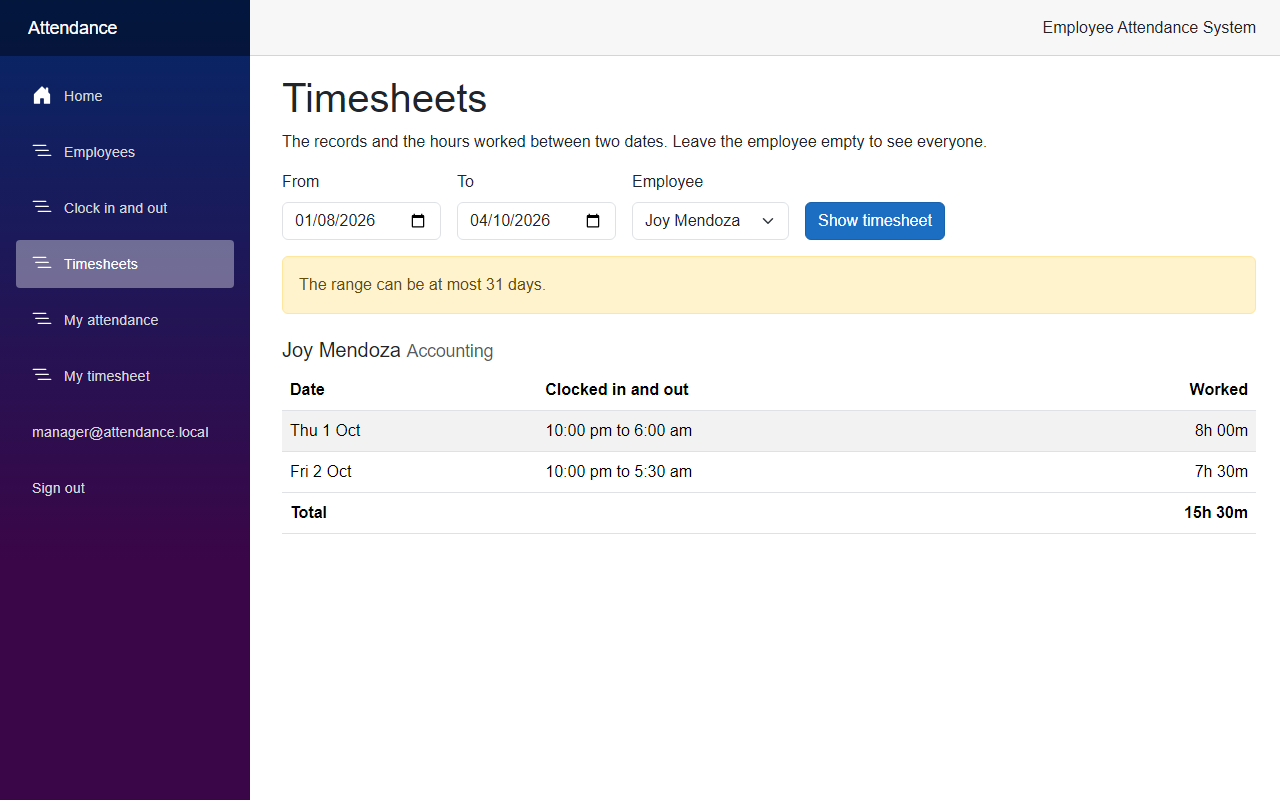
A range of 31 days at most. The check keeps the answer small, so we have no paging. The limit is a constant in the service.
Only employees with records are listed. An employee who did not clock in during the range is not in a manager's timesheet. This is not a report of absences.
The hours come as TimeSpan. In the JSON they look like 08:00:00, and when they are longer than a day, like 1.18:36:00 for 42 hours and 36 minutes. The Web app reads them back into a TimeSpan without any help.
The daylight saving gap is not tested. StartOfDayUtc moves a midnight that does not exist to the next hour, which happens in a few time zones. I did not write a test for it, because I had no time zone to test it with.
The index is not measured. The index matches the columns of the query, but the tables in this series are small, so I did not measure any difference.
The older pages still show the time of the server. My attendance and Clock in and out show times in the time zone of the server. Only the timesheets use the time zone of the API. On one machine this is the same.
Seeing It in Action
Now let's run the employee attendance system. Apply the new migration first, with the commands from Step 3, and then start the API and the Web app in two terminals:
cd src/FreeCodeSpot.Attendance.Api
dotnet run --launch-profile https
cd src/FreeCodeSpot.Attendance.Web
dotnet run --launch-profile httpsI needed a few days of records for the screenshots. I added them with a small program that is not part of the source code. It calls AttendanceService with a clock that is set to each time, so the records follow the same rules as the real ones. When I was done, I removed them from the database. You can clock in and out on a few days, or change the dates, to get something to look at.
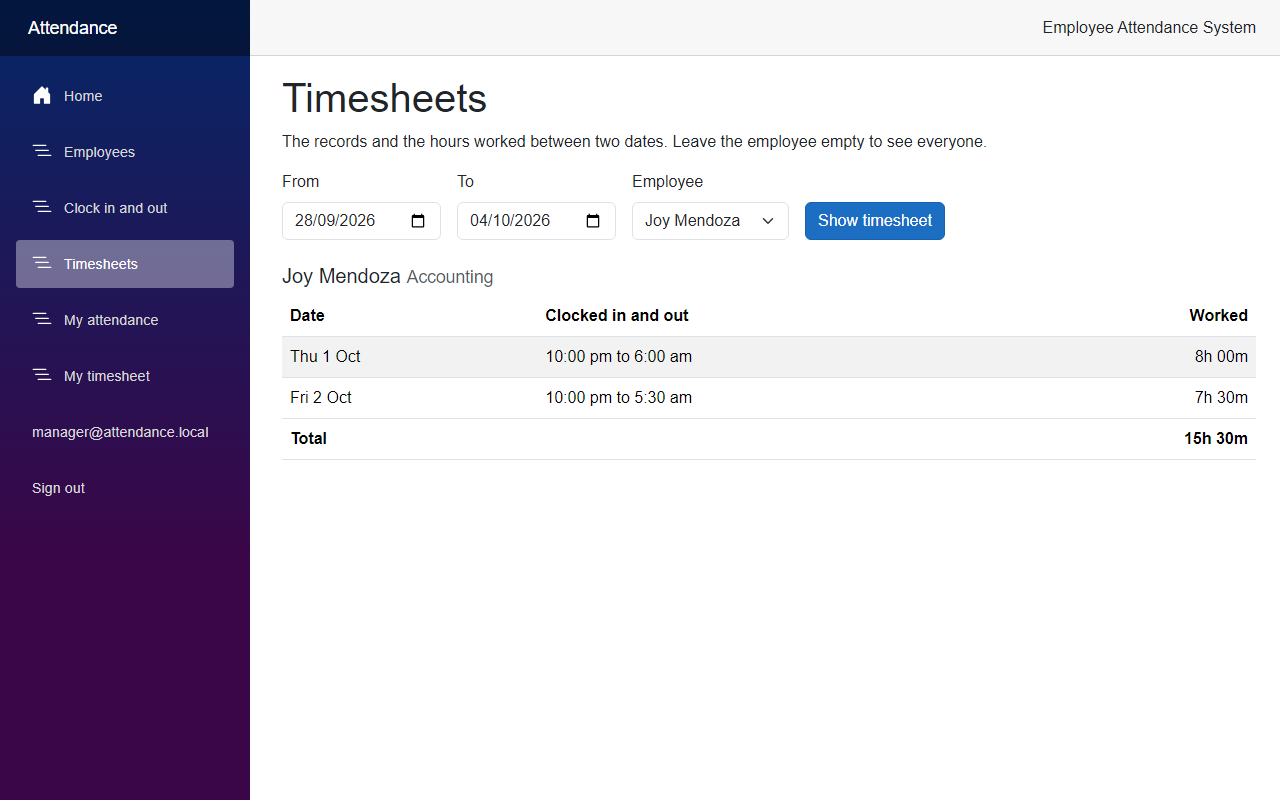
Sign in as the manager and open Timesheets. The page opens with the last seven days and everyone, as in the screenshot at the beginning of the article. Now pick an employee. Joy Mendoza works at night:
Next, ask for a range that is too long. Change the start date to 1 August and click Show timesheet:
Sign out and sign in as the employee. My timesheet shows the days of the employee who is linked to this user, and nobody else:
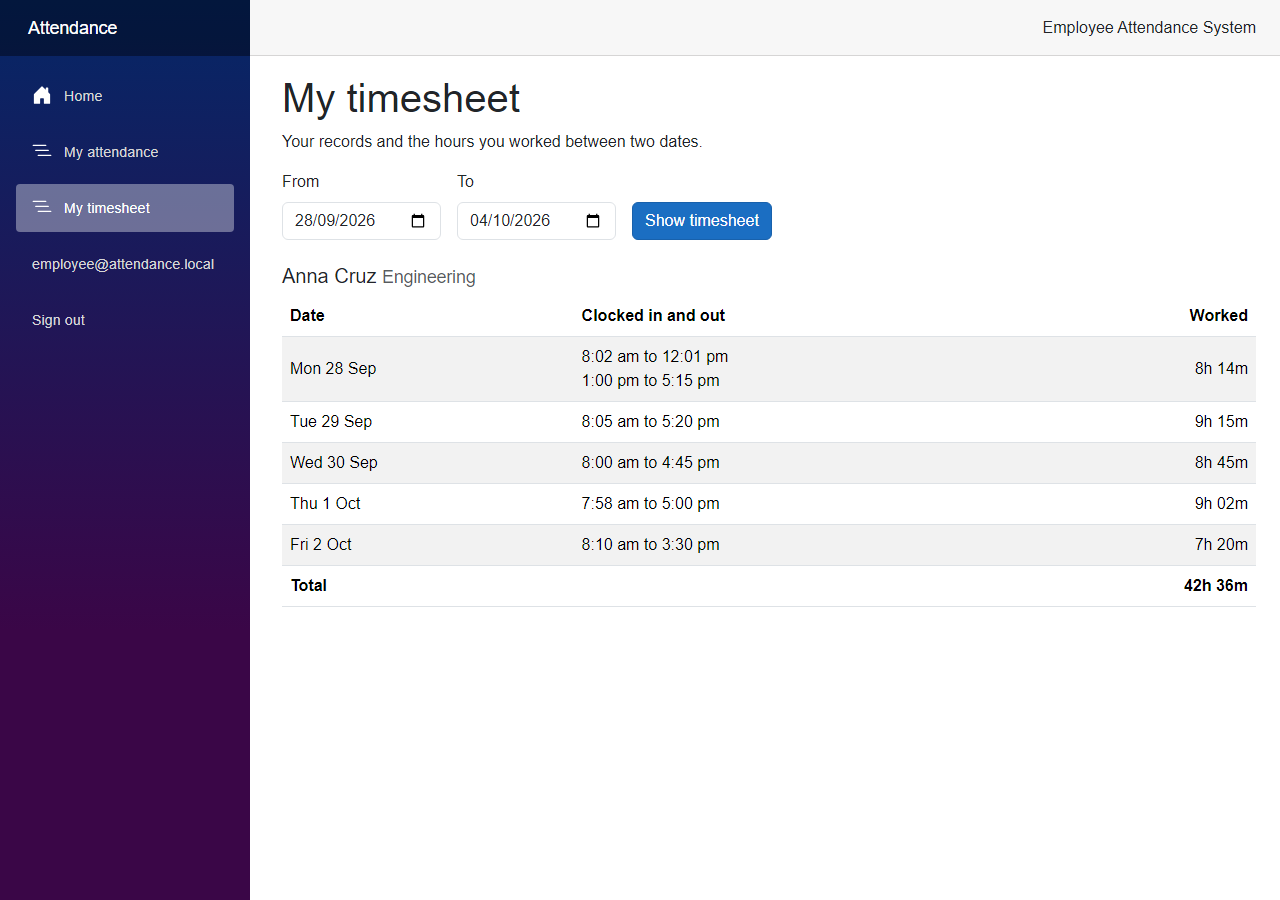
The API shows the same data. This is the answer for Joy, from 1 to 2 October, with the manager token:
curl -k "https://localhost:7020/api/attendance/timesheet?from=2026-10-01&to=2026-10-02&employeeId=7" -H "Authorization: Bearer <accessToken>"{"from":"2026-10-01","to":"2026-10-02","timeZoneId":"Singapore Standard Time","employees":[{"employeeId":7,"fullName":"Joy Mendoza","department":"Accounting","days":[{"date":"2026-10-01","entries":[{"recordId":19,"clockInUtc":"2026-10-01T14:00:00+00:00","clockOutUtc":"2026-10-01T22:00:00+00:00","duration":"08:00:00"}],"worked":"08:00:00"},{"date":"2026-10-02","entries":[{"recordId":20,"clockInUtc":"2026-10-02T14:00:00+00:00","clockOutUtc":"2026-10-02T21:30:00+00:00","duration":"07:30:00"}],"worked":"07:30:00"}],"totalWorked":"15:30:00"}]}The times are in UTC, and the days are in Singapore Standard Time, which is the time zone of my machine. The clock-in of 14:00 UTC is 10 pm on the same day there. A range that is too long is refused:
curl -k -i "https://localhost:7020/api/attendance/timesheet?from=2026-08-01&to=2026-10-04" -H "Authorization: Bearer <accessToken>"HTTP/1.1 400 Bad Request
{"type":"https://tools.ietf.org/html/rfc9110#section-15.5.1","title":"One or more validation errors occurred.","status":400,"errors":{"To":["The range can be at most 31 days."]}}With the token of the employee, the same manager route answered 403, and /api/attendance/me/timesheet returned only the timesheet of Anna Cruz.
Project Structure
These are the files this article added or changed.
src/
  FreeCodeSpot.Attendance.Application/
    Timesheets/ITimesheetRepository.cs                 added
    Timesheets/Timesheet.cs                            added
    Timesheets/TimesheetRecord.cs                      added
    Timesheets/TimesheetResult.cs                      added
    Timesheets/TimesheetService.cs                     added
  FreeCodeSpot.Attendance.Infrastructure/
    Timesheets/EfTimesheetRepository.cs                added
    Persistence/Configurations/AttendanceRecordConfiguration.cs  changed
    Persistence/Migrations/                            added AddAttendanceRecordClockInIndex (2 files), snapshot changed
    DependencyInjection.cs                             changed
  FreeCodeSpot.Attendance.Api/
    Endpoints/AttendanceEndpoints.cs                   changed
    Endpoints/MyAttendanceEndpoints.cs                 changed
    Program.cs                                         changed
    appsettings.json                                   changed
  FreeCodeSpot.Attendance.Web/
    Components/Layout/NavMenu.razor                    changed
    Components/Pages/Home.razor                        changed
    Components/Pages/MyTimesheetPage.razor             added
    Components/Pages/Timesheets.razor                  added
    Components/Timesheets/TimesheetTable.razor         added
    Models/Timesheet.cs                                added
    Services/AttendanceApiClient.cs                    changed
    Services/DurationFormat.cs                         added
    Services/TimesheetResponse.cs                      added
tests/
  FreeCodeSpot.Attendance.UnitTests/
    Timesheets/TimesheetServiceTests.cs                added
  FreeCodeSpot.Attendance.IntegrationTests/
    Timesheets/EfTimesheetRepositoryTests.cs           added
    Timesheets/TimesheetEndpointsTests.cs              added
    AttendanceApiFactory.cs                            changed
Source Code
You can find the complete source code for this tutorial on GitHub. The code is tagged article-007 so it stays exactly as described here.
Summary
In this tutorial, we added an attendance timesheet to the Employee Attendance System. Managers can see the records and the hours worked of anyone between two dates, and employees can see their own. We read the records with a LINQ query that filters in SQL Server, worked out the days and the hours in a service, and tested both with a fake time zone and a real database.
