
In this tutorial, we will add Excel to our Employee Attendance System, in both directions. A manager will be able to import employees from Excel, and to download the attendance report as a real .xlsx file. The import checks every row first and shows what is wrong with it, before anything is saved. We will use ClosedXML to read and write the files. I used Claude Code to generate the code again, and I will show what we decided and what went wrong before we kept it.
Table of Contents
This is part of the Employee Attendance System series:
- Project Setup
- SQL Server with Entity Framework Core
- Employee Management with Blazor Forms
- Blazor Authentication and Roles
- Clock In and Clock Out
- Employee Clock In Without a Manager
- Attendance Timesheets
- Attendance Reports
- Excel Import and Export (this article)
What We're Building
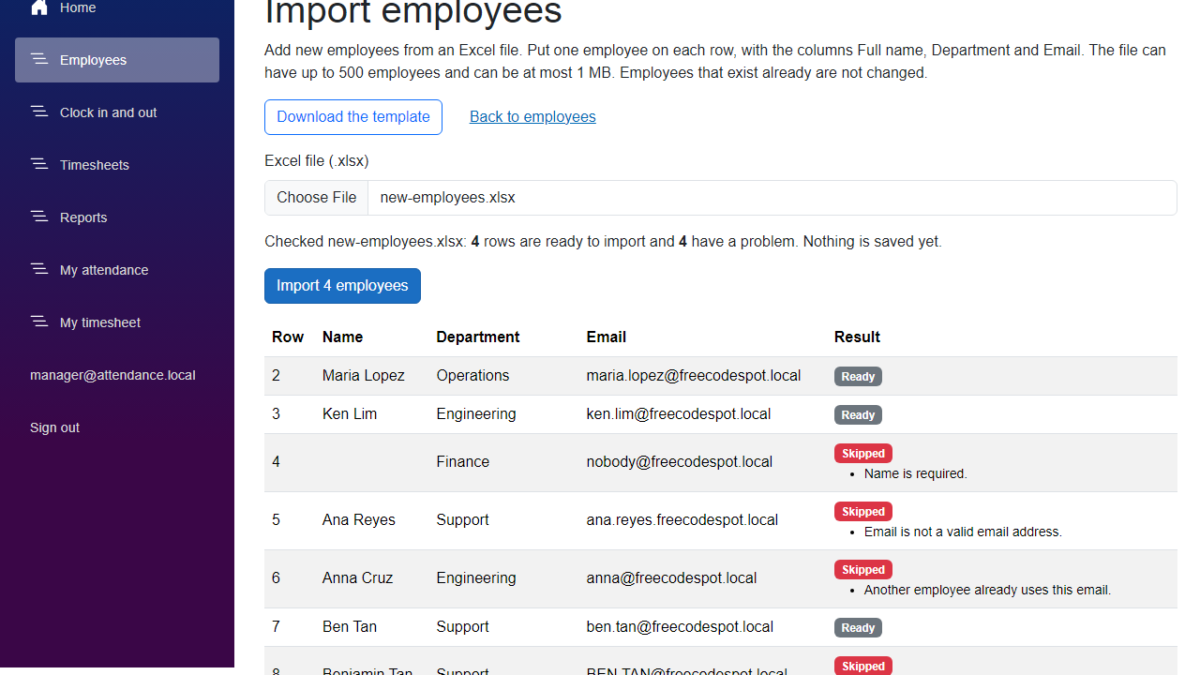
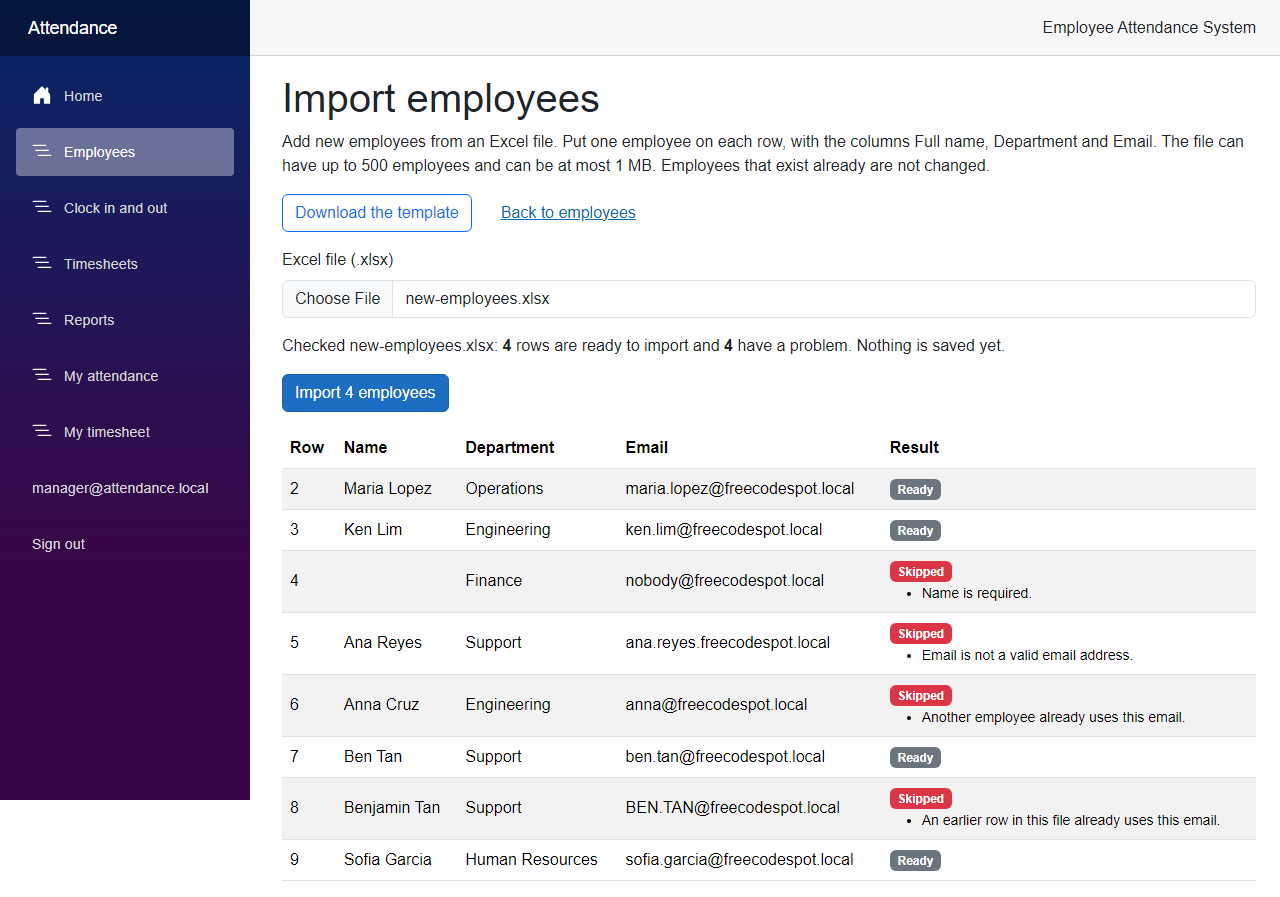
By the end of this article, a manager can open an Import employees page, choose an Excel file, and see which rows are ready to import and which ones have a problem. Nothing is saved until the manager clicks Import.
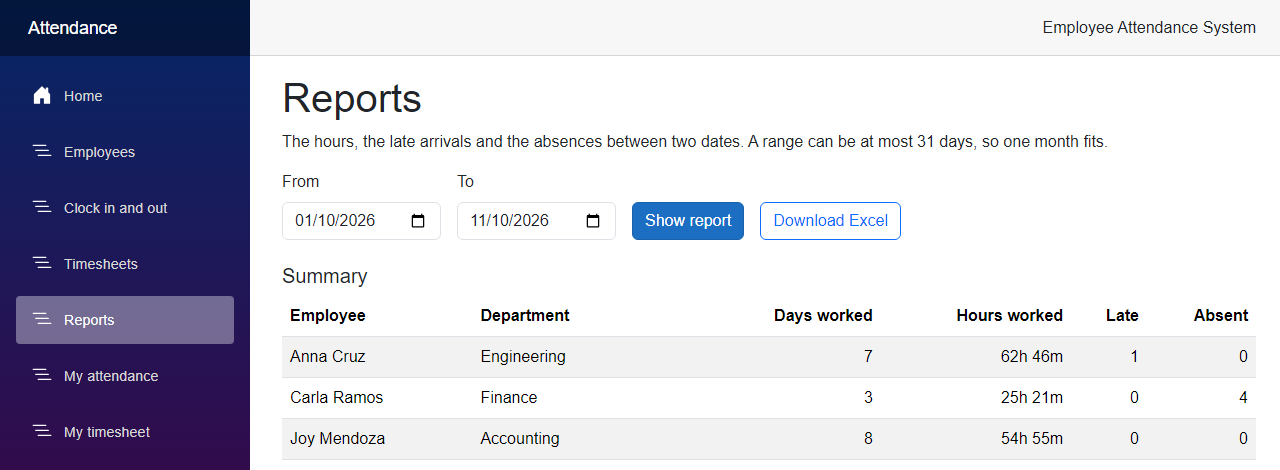
The Reports page also gets a Download Excel button, for the report of the range on the page.
Now let's see how we built it.
Before We Start
Before we start, make sure you have the following installed:
- .NET 10 SDK (I used 10.0.401)
- SQL Server LocalDB, or the SQL Server instance you used in the previous articles
- Claude Code
We add one NuGet package, ClosedXML 0.105.1, which has an MIT license. There is no new migration. You do not need Excel to follow the article, but you need something that opens an .xlsx file if you want to look at the downloads.
Starting Point
After the previous article, a manager can read the attendance report on a page, and add employees one by one with a form. There is no way to take the report out of the system, and no way to add twenty new employees without typing twenty forms.
The Goal
- Export the report of a range as an .xlsx file, with dates, times and hours that Excel can sort and add up
- Import new employees from an .xlsx file, with a preview before anything is saved
- Check every row with the rules of the Add employee form, and say which row has which problem
- Keep the Excel library out of the Application layer, so the rules can be tested with plain rows
- Let only managers use the routes
- Test the files by writing and reading real workbooks
Building It with AI
Step 1 – Decide what the files contain
I asked Claude Code to add Excel export and import. We answered a few questions before it wrote any code.
- Which library? We use ClosedXML, for writing and for reading. It has an MIT license, and one package does both, so we do not need a second package just to read.
- What does the export contain? The attendance report of the range, with four sheets: Summary, Late arrivals, Absences, and Records. Records has every clock-in and clock-out of the range.
- What does the import do? It adds new employees from the first sheet. The first row has the headers
Full name,DepartmentandEmail. It never changes an employee that exists already, so an email that is in the database is an error on that row. - What happens to a bad row? The rows that are fine are imported, and the others are skipped. The manager sees the reason for each skipped row. We do not cancel the whole file for one bad row.
- How big can a file be? At most 500 employees and 1 MB.
- Who can use it? Only managers, like the other pages and routes about the roster and the report.
Add the package to the Infrastructure project, which is the only project that knows about Excel:
dotnet add src/FreeCodeSpot.Attendance.Infrastructure package ClosedXML --version 0.105.1Step 2 – Export the report
The Application layer decides what goes in the file, and does not know how a workbook is written. It has a contract for the writer, like it has contracts for the repositories.
src/FreeCodeSpot.Attendance.Application/Reports/IReportWorkbook.cs
using FreeCodeSpot.Attendance.Application.Timesheets;

namespace FreeCodeSpot.Attendance.Application.Reports;

/// <summary>
/// Writes the report of a range, and the records behind it, to a workbook. Which
/// Excel library does the writing is the business of the class that implements this.
/// </summary>
public interface IReportWorkbook
{
    byte[] Create(AttendanceReport report, Timesheet records);
}
The service that calls the writer is small. It gets the report from ReportService, and the records behind it from TimesheetService, for the same range.
src/FreeCodeSpot.Attendance.Application/Reports/ReportExportService.cs
using FreeCodeSpot.Attendance.Application.Timesheets;

namespace FreeCodeSpot.Attendance.Application.Reports;

/// <summary>
/// Exports the attendance report. The range rules and the numbers are the ones of
/// ReportService, so the workbook and the Reports page can never disagree.
/// </summary>
public sealed class ReportExportService(ReportService reports, TimesheetService timesheets, IReportWorkbook workbook)
{
    public async Task<ReportExportResult> ExportAsync(
        DateOnly? from,
        DateOnly? to,
        CancellationToken cancellationToken = default)
    {
        var result = await reports.GetReportAsync(from, to, cancellationToken);
        if (result.Report is not { } report)
        {
            return ReportExportResult.Invalid(result.Errors);
        }

        // The report knows its own range now, even when the caller sent none.
        var records = await timesheets.GetTimesheetAsync(report.From, report.To, employeeId: null, cancellationToken);

        return ReportExportResult.Success(
            workbook.Create(report, records.Timesheet!),
            $"attendance-report-{report.From:yyyy-MM-dd}-to-{report.To:yyyy-MM-dd}.xlsx");
    }
}
The export uses the report of the previous article, so the workbook and the Reports page can never show different numbers. The result type, ReportExportResult, has the same shape as the other results of the series. It is in the source code.
Now the part that knows about Excel. This class goes in the Infrastructure project.
src/FreeCodeSpot.Attendance.Infrastructure/Excel/ExcelReportWorkbook.cs
using ClosedXML.Excel;
using FreeCodeSpot.Attendance.Application.Reports;
using FreeCodeSpot.Attendance.Application.Timesheets;

namespace FreeCodeSpot.Attendance.Infrastructure.Excel;

/// <summary>
/// Writes the attendance report as a real .xlsx workbook with ClosedXML. Dates, times and
/// hours are saved as values with a number format, not as text, so Excel can sort,
/// filter and add them up. Times are shown in the time zone the report used.
/// </summary>
public sealed class ExcelReportWorkbook(TimeZoneInfo timeZone) : IReportWorkbook
{
    private const string DateFormat = "yyyy-mm-dd";
    private const string TimeFormat = "hh:mm";
    private const string DateTimeFormat = "yyyy-mm-dd hh:mm";
    private const string HoursFormat = "[h]:mm";

    public byte[] Create(AttendanceReport report, Timesheet records)
    {
        using var workbook = new XLWorkbook();

        AddSummary(workbook.AddWorksheet("Summary"), report);
        AddLateArrivals(workbook.AddWorksheet("Late arrivals"), report);
        AddAbsences(workbook.AddWorksheet("Absences"), report);
        AddRecords(workbook.AddWorksheet("Records"), records);

        using var stream = new MemoryStream();
        workbook.SaveAs(stream);
        return stream.ToArray();
    }

    private static void AddSummary(IXLWorksheet sheet, AttendanceReport report)
    {
        WriteHeader(sheet, "Employee", "Department", "Days worked", "Hours worked", "Late", "Absent");

        var row = 2;
        foreach (var employee in report.Summary)
        {
            sheet.Cell(row, 1).Value = employee.FullName;
            sheet.Cell(row, 2).Value = employee.Department;
            sheet.Cell(row, 3).Value = employee.DaysWorked;
            sheet.Cell(row, 4).Value = employee.TotalWorked;
            sheet.Cell(row, 4).Style.NumberFormat.Format = HoursFormat;
            sheet.Cell(row, 5).Value = employee.LateCount;
            sheet.Cell(row, 6).Value = employee.AbsentCount;
            row++;
        }

        // A total row with real formulas, so the totals follow the cells if somebody edits them.
        if (report.Summary.Count > 0)
        {
            var last = row - 1;
            sheet.Cell(row, 1).Value = "Total";
            foreach (var column in new[] { 3, 4, 5, 6 })
            {
                var letter = XLHelper.GetColumnLetterFromNumber(column);
                sheet.Cell(row, column).FormulaA1 = $"SUM({letter}2:{letter}{last})";
            }

            sheet.Cell(row, 4).Style.NumberFormat.Format = HoursFormat;
            sheet.Row(row).Style.Font.Bold = true;
        }

        Finish(sheet, columns: 6, lastDataRow: row - (report.Summary.Count > 0 ? 1 : 0));
    }

    private void AddLateArrivals(IXLWorksheet sheet, AttendanceReport report)
    {
        WriteHeader(sheet, "Date", "Employee", "Department", "Clocked in", "Minutes late");

        var row = 2;
        foreach (var late in report.LateArrivals)
        {
            sheet.Cell(row, 1).Value = late.Date.ToDateTime(TimeOnly.MinValue);
            sheet.Cell(row, 1).Style.NumberFormat.Format = DateFormat;
            sheet.Cell(row, 2).Value = late.FullName;
            sheet.Cell(row, 3).Value = late.Department;
            sheet.Cell(row, 4).Value = InZone(late.ClockInUtc);
            sheet.Cell(row, 4).Style.NumberFormat.Format = TimeFormat;
            sheet.Cell(row, 5).Value = (int)late.Late.TotalMinutes;
            row++;
        }

        Finish(sheet, columns: 5, lastDataRow: row - 1);
    }

    private static void AddAbsences(IXLWorksheet sheet, AttendanceReport report)
    {
        WriteHeader(sheet, "Employee", "Department", "Date");

        // One row for each absent day, so the sheet can be filtered by employee or by date.
        var row = 2;
        foreach (var absent in report.Absences)
        {
            foreach (var date in absent.Dates)
            {
                sheet.Cell(row, 1).Value = absent.FullName;
                sheet.Cell(row, 2).Value = absent.Department;
                sheet.Cell(row, 3).Value = date.ToDateTime(TimeOnly.MinValue);
                sheet.Cell(row, 3).Style.NumberFormat.Format = DateFormat;
                row++;
            }
        }

        Finish(sheet, columns: 3, lastDataRow: row - 1);
    }

    private void AddRecords(IXLWorksheet sheet, Timesheet records)
    {
        WriteHeader(sheet, "Employee", "Department", "Date", "Clock in", "Clock out", "Hours");

        var row = 2;
        foreach (var employee in records.Employees)
        {
            foreach (var day in employee.Days)
            {
                foreach (var entry in day.Entries)
                {
                    sheet.Cell(row, 1).Value = employee.FullName;
                    sheet.Cell(row, 2).Value = employee.Department;
                    sheet.Cell(row, 3).Value = day.Date.ToDateTime(TimeOnly.MinValue);
                    sheet.Cell(row, 3).Style.NumberFormat.Format = DateFormat;
                    sheet.Cell(row, 4).Value = InZone(entry.ClockInUtc);
                    sheet.Cell(row, 4).Style.NumberFormat.Format = DateTimeFormat;

                    // A record that is still open has no clock-out time and no hours. The cells stay empty.
                    if (entry.ClockOutUtc is { } clockOut && entry.Duration is { } duration)
                    {
                        sheet.Cell(row, 5).Value = InZone(clockOut);
                        sheet.Cell(row, 5).Style.NumberFormat.Format = DateTimeFormat;
                        sheet.Cell(row, 6).Value = duration;
                        sheet.Cell(row, 6).Style.NumberFormat.Format = HoursFormat;
                    }

                    row++;
                }
            }
        }

        Finish(sheet, columns: 6, lastDataRow: row - 1);
    }

    private static void WriteHeader(IXLWorksheet sheet, params string[] names)
    {
        for (var column = 0; column < names.Length; column++)
        {
            sheet.Cell(1, column + 1).Value = names[column];
        }

        var header = sheet.Range(1, 1, 1, names.Length);
        header.Style.Font.Bold = true;
        header.Style.Fill.BackgroundColor = XLColor.LightGray;
        sheet.SheetView.FreezeRows(1);
    }

    // The filter covers the header and the data, but not the total row.
    private static void Finish(IXLWorksheet sheet, int columns, int lastDataRow)
    {
        sheet.Range(1, 1, lastDataRow, columns).SetAutoFilter();
        sheet.Columns(1, columns).AdjustToContents();
    }

    private DateTime InZone(DateTimeOffset utc) => TimeZoneInfo.ConvertTime(utc, timeZone).DateTime;
}
A few things in this class matter if you want the file to be useful in Excel.
- Dates, times and hours are saved as values, not as text. A date is a
DateTimewith the formatyyyy-mm-dd, and the hours are aTimeSpanwith the format[h]:mm. The square brackets keep the hours from starting again at 24, so 62 hours is shown as62:46. - The times are converted to the time zone of the report, like on the Reports page. The
TimeZoneInfocomes from the constructor. - The Summary sheet ends with a total row of
SUMformulas, so the totals follow the cells if somebody edits them. The filter stops above this row. - A record that is still open has no clock-out time and no hours. The two cells stay empty.
- Every sheet has a bold header row that stays on top when you scroll, and a filter. The Absences sheet has one row for each absent day, so you can filter it by employee or by date.
Register the writer in AddInfrastructure(), and the service in Program.cs of the API.
src/FreeCodeSpot.Attendance.Infrastructure/DependencyInjection.cs
        services.AddScoped<IReportWorkbook, ExcelReportWorkbook>();
        services.AddSingleton<IEmployeeSpreadsheet, ExcelEmployeeSpreadsheet>();
src/FreeCodeSpot.Attendance.Api/Program.cs
builder.Services.AddScoped<ReportService>();
builder.Services.AddScoped<ReportExportService>();
builder.Services.AddScoped<EmployeeImportService>();
The route goes in ReportEndpoints, in the same group, so it needs a manager like the report route. It takes the same from and to, and a range that is too long is a 400 like before.
src/FreeCodeSpot.Attendance.Api/Endpoints/ReportEndpoints.cs
        // The same report as a real .xlsx file, with the records behind it.
        group.MapGet("/export", async (DateOnly? from, DateOnly? to, ReportExportService export, CancellationToken cancellationToken) =>
            {
                var result = await export.ExportAsync(from, to, cancellationToken);
                return result.Outcome == ReportOutcome.Success
                    ? Results.File(result.Content!, ExcelFile.ContentType, result.FileName)
                    : Results.ValidationProblem(result.Errors.ToDictionary());
            })
            .WithName("ExportAttendanceReport")
            .Produces(StatusCodes.Status200OK, contentType: ExcelFile.ContentType)
            .ProducesValidationProblem();
ExcelFile.ContentType is a constant in the Application project with the content type of an .xlsx file. The browser gets the file name from the Content-Disposition header, for example attendance-report-2026-10-01-to-2026-10-11.xlsx.
Step 3 – Import employees from Excel
Now the import. We start with the contract of the reader, and the row it returns.
src/FreeCodeSpot.Attendance.Application/Employees/Import/IEmployeeSpreadsheet.cs
namespace FreeCodeSpot.Attendance.Application.Employees.Import;

/// <summary>
/// Reads and writes the .xlsx file of the employee import. The Application layer owns this
/// contract, so the rules of the import can be tested with plain rows and without an
/// Excel library.
/// </summary>
public interface IEmployeeSpreadsheet
{
    /// <summary>Reads the employees from the first sheet of a workbook.</summary>
    EmployeeSheetReadResult Read(Stream xlsx);

    /// <summary>A workbook with the three column headers and no employees, ready to be filled in.</summary>
    byte[] CreateTemplate();
}
src/FreeCodeSpot.Attendance.Application/Employees/Import/EmployeeImportRow.cs
namespace FreeCodeSpot.Attendance.Application.Employees.Import;

/// <summary>
/// One row of the uploaded sheet, as the reader found it. RowNumber is the row number
/// in the spreadsheet, so a message can tell the user where to look. The values can be
/// empty, because nobody checked them yet.
/// </summary>
public sealed record EmployeeImportRow(int RowNumber, string? FullName, string? Department, string? Email);

/// <summary>
/// The rows of a sheet, or the reason the sheet could not be read, for example a file
/// that is not a workbook or has no Email column.
/// </summary>
public sealed record EmployeeSheetReadResult(IReadOnlyList<EmployeeImportRow> Rows, string? Error)
{
    public static EmployeeSheetReadResult Of(IReadOnlyList<EmployeeImportRow> rows) => new(rows, null);

    public static EmployeeSheetReadResult Failed(string error) => new([], error);
}
A row keeps its row number in the spreadsheet. The messages use it, so the manager knows where to look in the file. The values can be null, because nobody has checked them yet.
The service checks each row with the same rules as the Add employee form. We do not copy those rules. EmployeeService already has them in a private method, so we add a small public method that runs the rules and saves nothing.
src/FreeCodeSpot.Attendance.Application/Employees/EmployeeService.cs
    /// <summary>
    /// Checks the rules for a new employee and saves nothing. The result is keyed by field name,
    /// and is empty when the details are fine. The import uses it to check a row before it saves.
    /// </summary>
    public async Task<IReadOnlyDictionary<string, string[]>> CheckNewAsync(
        EmployeeDetails details,
        CancellationToken cancellationToken = default) =>
        (await ValidateAsync(details, exceptId: null, cancellationToken)).Errors;
Now the service of the import. The report that it returns has a row result for each row, with the messages.
src/FreeCodeSpot.Attendance.Application/Employees/Import/EmployeeImportReport.cs
namespace FreeCodeSpot.Attendance.Application.Employees.Import;

/// <summary>
/// What happened to one row. Errors is empty when the row is fine. EmployeeId is set
/// only after the row was really imported.
/// </summary>
public sealed record ImportRowResult(
    int RowNumber,
    string FullName,
    string Department,
    string Email,
    IReadOnlyList<string> Errors,
    int? EmployeeId)
{
    public bool IsValid => Errors.Count == 0;
}

/// <summary>
/// The rows of an upload and what happened to each of them. Saved is false for a preview,
/// where nothing was written, and true after an import.
/// </summary>
public sealed record EmployeeImportReport(bool Saved, IReadOnlyList<ImportRowResult> Rows)
{
    public int ValidCount => Rows.Count(row => row.IsValid);

    public int InvalidCount => Rows.Count - ValidCount;
}

public enum EmployeeImportOutcome
{
    Success,
    InvalidFile
}

/// <summary>
/// The result of a preview or an import. A file that cannot be used at all, for example
/// a file with no Email column, is InvalidFile with the reason in Error.
/// </summary>
public sealed record EmployeeImportResult(
    EmployeeImportOutcome Outcome,
    EmployeeImportReport? Report,
    string? Error)
{
    public static EmployeeImportResult Success(EmployeeImportReport report) =>
        new(EmployeeImportOutcome.Success, report, null);

    public static EmployeeImportResult InvalidFile(string error) =>
        new(EmployeeImportOutcome.InvalidFile, null, error);
}
src/FreeCodeSpot.Attendance.Application/Employees/Import/EmployeeImportService.cs
namespace FreeCodeSpot.Attendance.Application.Employees.Import;

/// <summary>
/// Imports new employees from a spreadsheet. Every row goes through the same rules as the
/// Add employee form, because the service asks EmployeeService to check and to create.
/// A preview checks the rows and saves nothing. An import saves the rows that are fine and
/// skips the others, and the report says why.
/// </summary>
public sealed class EmployeeImportService(EmployeeService employees, IEmployeeSpreadsheet spreadsheet)
{
    public const int MaxRows = 500;
    public const long MaxFileBytes = 1024 * 1024;

    public byte[] CreateTemplate() => spreadsheet.CreateTemplate();

    /// <summary>Checks every row and saves nothing.</summary>
    public Task<EmployeeImportResult> PreviewAsync(Stream file, CancellationToken cancellationToken = default) =>
        RunAsync(file, save: false, cancellationToken);

    /// <summary>Saves the rows that are fine, and skips the rows that are not.</summary>
    public Task<EmployeeImportResult> ImportAsync(Stream file, CancellationToken cancellationToken = default) =>
        RunAsync(file, save: true, cancellationToken);

    private async Task<EmployeeImportResult> RunAsync(Stream file, bool save, CancellationToken cancellationToken)
    {
        var sheet = spreadsheet.Read(file);
        if (sheet.Error is not null)
        {
            return EmployeeImportResult.InvalidFile(sheet.Error);
        }

        if (sheet.Rows.Count == 0)
        {
            return EmployeeImportResult.InvalidFile("The file has no employees below the column headers.");
        }

        if (sheet.Rows.Count > MaxRows)
        {
            return EmployeeImportResult.InvalidFile($"The file can have at most {MaxRows} employees.");
        }

        // The database only knows the employees that exist. A second row with the same email
        // in the same file has to be caught here.
        var emailsOfValidRows = new HashSet<string>(StringComparer.OrdinalIgnoreCase);
        var rows = new List<ImportRowResult>();

        foreach (var row in sheet.Rows)
        {
            var details = new EmployeeDetails(
                row.FullName?.Trim() ?? string.Empty,
                row.Department?.Trim() ?? string.Empty,
                row.Email?.Trim() ?? string.Empty);

            var errors = (await employees.CheckNewAsync(details, cancellationToken))
                .Values
                .SelectMany(messages => messages)
                .ToList();

            if (errors.Count == 0 && emailsOfValidRows.Contains(details.Email))
            {
                errors.Add("An earlier row in this file already uses this email.");
            }

            int? employeeId = null;
            if (errors.Count == 0)
            {
                emailsOfValidRows.Add(details.Email);

                if (save)
                {
                    var created = await employees.CreateAsync(details, cancellationToken);
                    if (created.Outcome == EmployeeOutcome.Success)
                    {
                        employeeId = created.Employee!.Id;
                    }
                    else
                    {
                        // Someone added the same email between the check and the save.
                        errors.AddRange(created.Errors.Values.SelectMany(messages => messages));
                    }
                }
            }

            rows.Add(new ImportRowResult(row.RowNumber, details.FullName, details.Department, details.Email, errors, employeeId));
        }

        return EmployeeImportResult.Success(new EmployeeImportReport(save, rows));
    }
}
Let's go through it.
PreviewAsyncandImportAsyncrun the same code. The only difference is thesaveflag. This is why the preview shows exactly what the import will do.- A file that cannot be used at all is
InvalidFilewith a reason. That is a file with no employees, with more than 500, or one that the reader refuses. - For each row,
CheckNewAsyncruns the rules of the form. That covers the missing name, department and email, the lengths, the format of the email, and an email that an employee has already. - The database does not know about the other rows of the same file, so the service keeps the emails of the valid rows it has seen. A second row with the same email is an error. Only valid rows go in this set, so a bad first row does not block a good second row with the same email.
- When
saveis true, a valid row goes throughCreateAsync, which checks the rules again and saves. If somebody added the same email a moment ago, the row is skipped with the message, and the rest of the file goes on.
Now the reader. This class is the only place that reads Excel for the import, and it goes in the Infrastructure project, next to the writer.
src/FreeCodeSpot.Attendance.Infrastructure/Excel/ExcelEmployeeSpreadsheet.cs
using ClosedXML.Excel;
using FreeCodeSpot.Attendance.Application.Employees.Import;

namespace FreeCodeSpot.Attendance.Infrastructure.Excel;

/// <summary>
/// Reads the employee import sheet and writes its template with ClosedXML. The first sheet
/// is the one that counts. The first row has the headers, in any order, and other columns
/// are ignored. Rows with nothing in the three columns are skipped, so a few empty rows at
/// the end of a sheet do no harm.
/// </summary>
public sealed class ExcelEmployeeSpreadsheet : IEmployeeSpreadsheet
{
    private const string FullNameHeader = "Full name";
    private const string DepartmentHeader = "Department";
    private const string EmailHeader = "Email";

    public EmployeeSheetReadResult Read(Stream xlsx)
    {
        XLWorkbook workbook;
        try
        {
            workbook = new XLWorkbook(xlsx);
        }
        catch (Exception)
        {
            // ClosedXML throws a different exception for each way a file can be broken.
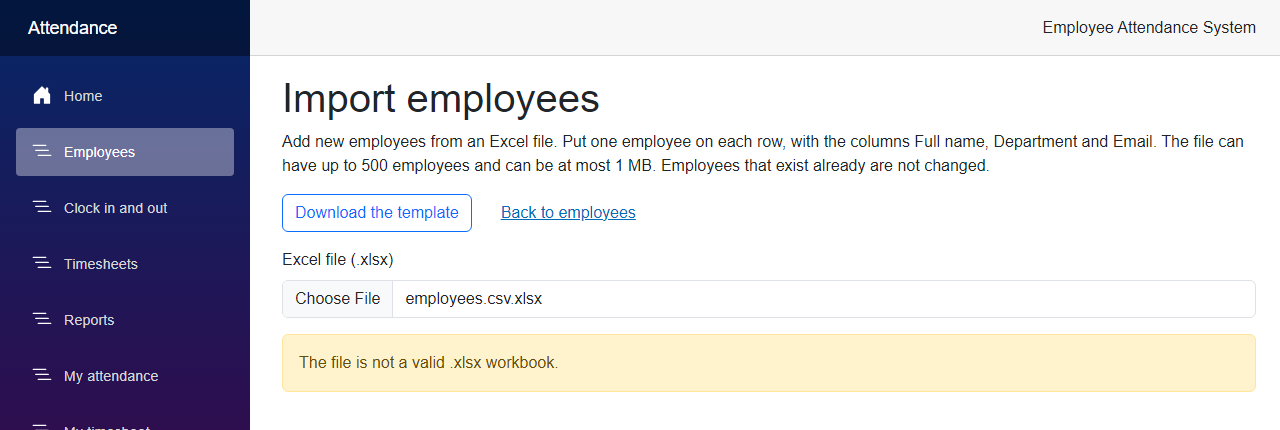
            return EmployeeSheetReadResult.Failed("The file is not a valid .xlsx workbook.");
        }

        using (workbook)
        {
            var sheet = workbook.Worksheets.FirstOrDefault();
            var header = sheet?.FirstRowUsed();
            if (sheet is null || header is null)
            {
                return EmployeeSheetReadResult.Failed("The first sheet of the workbook is empty.");
            }

            var fullName = FindColumn(header, FullNameHeader);
            var department = FindColumn(header, DepartmentHeader);
            var email = FindColumn(header, EmailHeader);

            var missing = new[] { (FullNameHeader, fullName), (DepartmentHeader, department), (EmailHeader, email) }
                .Where(column => column.Item2 is null)
                .Select(column => column.Item1)
                .ToList();
            if (missing.Count > 0)
            {
                return EmployeeSheetReadResult.Failed(
                    $"The first row must have the columns {FullNameHeader}, {DepartmentHeader} and {EmailHeader}. Missing: {string.Join(", ", missing)}.");
            }

            var rows = sheet.RowsUsed()
                .Where(row => row.RowNumber() > header.RowNumber())
                .Select(row => new EmployeeImportRow(
                    row.RowNumber(),
                    row.Cell(fullName!.Value).GetString(),
                    row.Cell(department!.Value).GetString(),
                    row.Cell(email!.Value).GetString()))
                .Where(row => !string.IsNullOrWhiteSpace(row.FullName)
                    || !string.IsNullOrWhiteSpace(row.Department)
                    || !string.IsNullOrWhiteSpace(row.Email))
                .ToList();

            return EmployeeSheetReadResult.Of(rows);
        }
    }

    public byte[] CreateTemplate()
    {
        using var workbook = new XLWorkbook();
        var sheet = workbook.AddWorksheet("Employees");

        string[] headers = [FullNameHeader, DepartmentHeader, EmailHeader];
        for (var column = 0; column < headers.Length; column++)
        {
            var cell = sheet.Cell(1, column + 1);
            cell.Value = headers[column];
            cell.Style.Font.Bold = true;
            sheet.Column(column + 1).Width = column == 2 ? 36 : 28;
        }

        sheet.SheetView.FreezeRows(1);

        using var stream = new MemoryStream();
        workbook.SaveAs(stream);
        return stream.ToArray();
    }

    private static int? FindColumn(IXLRow header, string name) =>
        header.CellsUsed()
            .FirstOrDefault(cell => string.Equals(cell.GetString().Trim(), name, StringComparison.OrdinalIgnoreCase))
            ?.Address.ColumnNumber;
}
It finds the columns by their headers, in any order, and ignores the columns it does not know. It skips the rows with nothing in the three columns, so a few empty rows at the end of a sheet do no harm. A number in a cell is read as text with GetString(). CreateTemplate() writes a workbook with only the three headers, for the manager to fill in.
One thing to know: ClosedXML throws a different exception for each way a file can be broken, so Read catches Exception around opening the workbook and answers with one message.
Step 4 – Add the import routes
There are three routes in the group of EmployeeEndpoints, so they need a manager too. One gives the template, one previews and one imports.
src/FreeCodeSpot.Attendance.Api/Endpoints/EmployeeEndpoints.cs
        // Import from Excel. The preview checks every row and saves nothing. The import saves the
        // rows that are fine. The routes read an upload, which has no antiforgery token, because
        // the caller sends a bearer token and not a cookie.
        group.MapGet("/import/template", (EmployeeImportService import) =>
                Results.File(import.CreateTemplate(), ExcelFile.ContentType, "employee-import-template.xlsx"))
            .WithName("GetEmployeeImportTemplate")
            .Produces(StatusCodes.Status200OK, contentType: ExcelFile.ContentType);

        group.MapPost("/import/preview", (IFormFile? file, EmployeeImportService import, CancellationToken cancellationToken) =>
                RunImportAsync(file, save: false, import, cancellationToken))
            .DisableAntiforgery()
            .WithName("PreviewEmployeeImport")
            .Produces<EmployeeImportReport>()
            .ProducesValidationProblem();

        group.MapPost("/import", (IFormFile? file, EmployeeImportService import, CancellationToken cancellationToken) =>
                RunImportAsync(file, save: true, import, cancellationToken))
            .DisableAntiforgery()
            .WithName("ImportEmployees")
            .Produces<EmployeeImportReport>()
            .ProducesValidationProblem();

        return app;
    }

    private static async Task<IResult> RunImportAsync(
        IFormFile? file,
        bool save,
        EmployeeImportService import,
        CancellationToken cancellationToken)
    {
        if (file is null || file.Length == 0)
            return FileProblem("Choose an .xlsx file to upload.");

        if (file.Length > EmployeeImportService.MaxFileBytes)
            return FileProblem("The file can be at most 1 MB.");

        await using var stream = file.OpenReadStream();
        var result = save
            ? await import.ImportAsync(stream, cancellationToken)
            : await import.PreviewAsync(stream, cancellationToken);

        return result.Outcome == EmployeeImportOutcome.Success
            ? Results.Ok(result.Report)
            : FileProblem(result.Error!);
    }

    private static IResult FileProblem(string message) =>
        Results.ValidationProblem(new Dictionary<string, string[]> { ["file"] = [message] });
The upload comes as a form with a field called file. A route that reads a form expects an antiforgery token, but the caller of this API sends a bearer token and not a cookie, so we turn the check off for these two routes with DisableAntiforgery(). The size check is here and not in the service, because it is about the request. A file that is too big, or no file at all, is a 400 with a message for the file field.
Step 5 – Add the pages
The Excel files come to the browser through two plain links. A link in a page is a GET that the browser makes, and the browser has no API token. So the Web app asks the API for the file with the token of the signed-in user, and passes it on. The token is in the sign-in cookie, like for the other calls of the Web app.
src/FreeCodeSpot.Attendance.Web/Services/ExcelDownloadClient.cs
using System.Globalization;
using System.Net.Http.Headers;

namespace FreeCodeSpot.Attendance.Web.Services;

/// <summary>A file the API sent, ready to be passed on to the browser.</summary>
public sealed record DownloadedFile(byte[] Content, string ContentType, string FileName);

/// <summary>
/// Gets the .xlsx files of the API for the browser. A download is a plain link, not a call
/// from a component, so the Web app asks the API on behalf of the browser. It takes the
/// token of the signed-in user from the sign-in cookie.
/// </summary>
public sealed class ExcelDownloadClient(HttpClient httpClient)
{
    public Task<DownloadedFile?> GetReportAsync(DateOnly? from, DateOnly? to, string? token, CancellationToken cancellationToken = default)
    {
        var query = new List<string>();
        if (from is { } start) query.Add($"from={start.ToString("yyyy-MM-dd", CultureInfo.InvariantCulture)}");
        if (to is { } end) query.Add($"to={end.ToString("yyyy-MM-dd", CultureInfo.InvariantCulture)}");

        var route = query.Count == 0 ? "api/reports/export" : $"api/reports/export?{string.Join("&", query)}";
        return GetAsync(route, token, cancellationToken);
    }

    public Task<DownloadedFile?> GetEmployeeTemplateAsync(string? token, CancellationToken cancellationToken = default) =>
        GetAsync("api/employees/import/template", token, cancellationToken);

    /// <summary>Returns null when the API refuses the request, for example without a Manager token.</summary>
    private async Task<DownloadedFile?> GetAsync(string route, string? token, CancellationToken cancellationToken)
    {
        using var request = new HttpRequestMessage(HttpMethod.Get, route);
        if (token is not null)
        {
            request.Headers.Authorization = new AuthenticationHeaderValue("Bearer", token);
        }

        using var response = await httpClient.SendAsync(request, cancellationToken);
        if (!response.IsSuccessStatusCode)
        {
            return null;
        }

        var disposition = response.Content.Headers.ContentDisposition;
        return new DownloadedFile(
            await response.Content.ReadAsByteArrayAsync(cancellationToken),
            response.Content.Headers.ContentType?.MediaType ?? "application/octet-stream",
            disposition?.FileNameStar ?? disposition?.FileName?.Trim('"') ?? "download.xlsx");
    }
}
Register the client, and map the two links in Program.cs of the Web app. Both need the Manager role.
src/FreeCodeSpot.Attendance.Web/Program.cs
builder.Services.AddHttpClient<ExcelDownloadClient>(client =>
{
    client.BaseAddress = new Uri(apiBaseUrl);
});
src/FreeCodeSpot.Attendance.Web/Program.cs
// Downloads. A link in a page is a plain GET, so the Web app asks the API for the file with the
// token of the signed-in user and passes it on. Only managers can use them.
app.MapGet("/reports/export", async (DateOnly? from, DateOnly? to, HttpContext context, ExcelDownloadClient downloads, CancellationToken cancellationToken) =>
    {
        var token = context.User.FindFirst(SignedInUser.AccessTokenClaim)?.Value;
        var file = await downloads.GetReportAsync(from, to, token, cancellationToken);
        return file is null ? Results.NotFound() : Results.File(file.Content, file.ContentType, file.FileName);
    })
    .RequireAuthorization(policy => policy.RequireRole(AppRoles.Manager));

app.MapGet("/employees/import/template", async (HttpContext context, ExcelDownloadClient downloads, CancellationToken cancellationToken) =>
    {
        var token = context.User.FindFirst(SignedInUser.AccessTokenClaim)?.Value;
        var file = await downloads.GetEmployeeTemplateAsync(token, cancellationToken);
        return file is null ? Results.NotFound() : Results.File(file.Content, file.ContentType, file.FileName);
    })
    .RequireAuthorization(policy => policy.RequireRole(AppRoles.Manager));
The Reports page gets the button. The link uses the range of the report on the page, and not what is typed in the date boxes, so the file is always the report that you are looking at. data-enhance-nav="false" tells Blazor to leave the link to the browser, because it is a download and not a page.
src/FreeCodeSpot.Attendance.Web/Components/Pages/Reports.razor
    @if (report is not null)
    {
        <div class="col-auto">
            <a class="btn btn-outline-primary" href="@ExportUrl" data-enhance-nav="false">Download Excel</a>
        </div>
    }
// The link downloads the report that is on the page, not what is typed in the date boxes.
private string ExportUrl =>
$"reports/export?from={report!.From.ToString("yyyy-MM-dd", CultureInfo.InvariantCulture)}&to={report.To.ToString("yyyy-MM-dd", CultureInfo.InvariantCulture)}";The upload is a call from the page, so it goes in EmployeeApiClient, which already has the token of the signed-in user. The client sends the file as a form with a field called file.
src/FreeCodeSpot.Attendance.Web/Services/EmployeeApiClient.cs
    /// <summary>Checks the rows of a sheet and saves nothing.</summary>
    public Task<ImportResponse> PreviewImportAsync(byte[] file, CancellationToken cancellationToken = default) =>
        UploadAsync("api/employees/import/preview", file, cancellationToken);

    /// <summary>Saves the rows of a sheet that are fine, and skips the others.</summary>
    public Task<ImportResponse> ImportAsync(byte[] file, CancellationToken cancellationToken = default) =>
        UploadAsync("api/employees/import", file, cancellationToken);

    private async Task<ImportResponse> UploadAsync(string route, byte[] file, CancellationToken cancellationToken)
    {
        await UseSignedInUserAsync();

        using var content = new MultipartFormDataContent();
        var part = new ByteArrayContent(file);
        part.Headers.ContentType = new MediaTypeHeaderValue("application/vnd.openxmlformats-officedocument.spreadsheetml.sheet");

        // The API does not need the name of the file the user chose. A name with a quote or a
        // line break in it would break the header, so the upload always has the same name.
        content.Add(part, "file", "employees.xlsx");

        using var response = await httpClient.PostAsync(route, content, cancellationToken);
        if (response.StatusCode == HttpStatusCode.BadRequest)
        {
            // The file cannot be used at all. The API says why, and the page shows the message.
            var problem = await response.Content.ReadFromJsonAsync<ValidationProblemResponse>(cancellationToken);
            return ImportResponse.Refused(string.Join(" ", problem?.Errors.Values.SelectMany(errors => errors) ?? []));
        }

        response.EnsureSuccessStatusCode();
        var report = await response.Content.ReadFromJsonAsync<EmployeeImportReport>(cancellationToken)
            ?? throw new InvalidOperationException("The API returned an empty import report.");
        return ImportResponse.Of(report);
    }
ImportResponse and the EmployeeImportReport model of the Web app have the same shape as the report and the timesheet before them. They are in the source code. Now the page. It has the template link, a file box, the preview table, and the Import button.
src/FreeCodeSpot.Attendance.Web/Components/Pages/EmployeeImport.razor
@page "/employees/import"
@rendermode InteractiveServer
@attribute [Authorize(Roles = AppRoles.Manager)]
@using FreeCodeSpot.Attendance.Web.Models
@using FreeCodeSpot.Attendance.Web.Services
@inject EmployeeApiClient EmployeeApi

<PageTitle>Import employees</PageTitle>

<h1>Import employees</h1>

<p>
    Add new employees from an Excel file. Put one employee on each row, with the columns Full name, Department and Email.
    The file can have up to 500 employees and can be at most 1 MB. Employees that exist already are not changed.
</p>

<div class="d-flex flex-wrap align-items-center gap-3 mb-3">
    <a href="employees/import/template" data-enhance-nav="false" class="btn btn-outline-primary">Download the template</a>
    <a href="employees" class="btn btn-link">Back to employees</a>
</div>

<div class="mb-3">
    <label for="file" class="form-label">Excel file (.xlsx)</label>
    <InputFile id="file" class="form-control" accept=".xlsx" OnChange="ChooseAsync" disabled="@busy" />
</div>

@if (message is not null)
{
    <div class="alert alert-warning" role="alert">@message</div>
}

@if (failed)
{
    <div class="alert alert-danger" role="alert">
        The file could not be sent. Check that the attendance API is running, then try again.
    </div>
}

@if (report is not null)
{
    @if (report.Saved)
    {
        <div class="alert alert-success" role="alert">
            Imported @report.ValidCount @(report.ValidCount == 1 ? "employee" : "employees").
            @if (report.InvalidCount > 0)
            {
                <span>@report.InvalidCount @(report.InvalidCount == 1 ? "row was" : "rows were") skipped. Fix @(report.InvalidCount == 1 ? "it" : "them") in the file and upload it again.</span>
            }
        </div>
    }
    else
    {
        <p>
            Checked @fileName: <strong>@report.ValidCount</strong> @(report.ValidCount == 1 ? "row is" : "rows are") ready to import and
            <strong>@report.InvalidCount</strong> @(report.InvalidCount == 1 ? "has" : "have") a problem. Nothing is saved yet.
        </p>

        <button class="btn btn-primary mb-3" disabled="@(busy || report.ValidCount == 0)" @onclick="ImportAsync">
            Import @report.ValidCount @(report.ValidCount == 1 ? "employee" : "employees")
        </button>
    }

    <table class="table table-striped align-middle">
        <thead>
            <tr>
                <th scope="col">Row</th>
                <th scope="col">Name</th>
                <th scope="col">Department</th>
                <th scope="col">Email</th>
                <th scope="col">Result</th>
            </tr>
        </thead>
        <tbody>
            @foreach (var row in report.Rows)
            {
                <tr>
                    <td>@row.RowNumber</td>
                    <td>@row.FullName</td>
                    <td>@row.Department</td>
                    <td>@row.Email</td>
                    <td>
                        @if (!row.IsValid)
                        {
                            <span class="badge text-bg-danger">Skipped</span>
                            <ul class="mb-0 small">
                                @foreach (var error in row.Errors)
                                {
                                    <li>@error</li>
                                }
                            </ul>
                        }
                        else if (report.Saved)
                        {
                            <span class="badge text-bg-success">Imported</span>
                        }
                        else
                        {
                            <span class="badge text-bg-secondary">Ready</span>
                        }
                    </td>
                </tr>
            }
        </tbody>
    </table>
}

@code {
    private const long MaxFileBytes = 1024 * 1024;

    private string fileName = string.Empty;
    private byte[]? file;
    private EmployeeImportReport? report;
    private string? message;
    private bool failed;
    private bool busy;

    // Choosing a file checks it straight away. Nothing is saved until the manager clicks Import.
    private async Task ChooseAsync(InputFileChangeEventArgs e)
    {
        report = null;
        message = null;
        file = null;

        try
        {
            using var stream = new MemoryStream();
            await e.File.OpenReadStream(MaxFileBytes).CopyToAsync(stream);
            file = stream.ToArray();
            fileName = e.File.Name;
        }
        catch (IOException)
        {
            // OpenReadStream refuses a file that is bigger than the limit.
            message = "The file can be at most 1 MB.";
            return;
        }

        await SendAsync(save: false);
    }

    private Task ImportAsync() => SendAsync(save: true);

    private async Task SendAsync(bool save)
    {
        busy = true;
        try
        {
            var response = save
                ? await EmployeeApi.ImportAsync(file!)
                : await EmployeeApi.PreviewImportAsync(file!);

            message = response.Message;
            failed = false;
            if (response.Report is { } result)
            {
                report = result;
            }
        }
        catch (HttpRequestException)
        {
            failed = true;
        }
        finally
        {
            busy = false;
        }
    }
}
When you choose a file, the page reads it into memory, sends it to the preview route, and shows the rows. It keeps the bytes, so the Import button sends the same file again to the import route. The last change is a link on the Employees page, next to Add employee: Import from Excel, which goes to employees/import.
Step 6 – Add the tests
I asked Claude to test the rules of the import with plain rows, because the service does not need Excel. First, three of the unit tests:
tests/FreeCodeSpot.Attendance.UnitTests/Employees/EmployeeImportServiceTests.cs
    [Fact]
    public async Task AnEmailThatAnEmployeeAlreadyUsesIsAnError_EvenInAnotherCase()
    {
        var (service, _) = CreateService(Row(2, "Another Anna", "Finance", "ANNA@example.com"));

        var row = Assert.Single((await service.PreviewAsync(Stream.Null)).Report!.Rows);

        Assert.Equal(["Another employee already uses this email."], row.Errors);
    }

    [Fact]
    public async Task ASecondRowWithTheSameEmailInTheFileIsAnError()
    {
        var (service, _) = CreateService(
            Row(2, "Joy Mendoza", "Finance", "joy@example.com"),
            Row(3, "Joy Again", "Finance", "JOY@example.com"));

        var rows = (await service.PreviewAsync(Stream.Null)).Report!.Rows;

        Assert.True(rows[0].IsValid);
        Assert.Equal(["An earlier row in this file already uses this email."], rows[1].Errors);
    }

    [Fact]
    public async Task Import_SavesTheRowsThatAreFineAndSkipsTheOthers()
    {
        var (service, repository) = CreateService(
            Row(2, "Joy Mendoza", "Finance", "joy@example.com"),
            Row(3, "", "Finance", "nobody@example.com"),
            Row(4, "Paolo Santos", "Operations", "paolo@example.com"));

        var report = (await service.ImportAsync(Stream.Null)).Report!;

        Assert.True(report.Saved);
        Assert.Equal(2, report.ValidCount);
        Assert.Equal(1, report.InvalidCount);
        Assert.Equal([2, 3], report.Rows.Where(row => row.EmployeeId is not null).Select(row => row.EmployeeId!.Value));
        Assert.Null(report.Rows[1].EmployeeId);
        Assert.Equal(
            ["Anna Cruz", "Joy Mendoza", "Paolo Santos"],
            repository.Employees.Select(employee => employee.FullName));
    }
The class also tests the messages for a row with missing values, a bad row that does not block a later good row, the trimming of the values, a file that the reader refuses, a file with no employees, and a file with more than 500 employees, where nothing is saved.
The reader and the writer are tested with real workbooks, in the integration tests project. These tests need no database. This one writes a sheet whose columns are in another order and have an extra column, and reads it:
tests/FreeCodeSpot.Attendance.IntegrationTests/Excel/ExcelEmployeeSpreadsheetTests.cs
    [Fact]
    public void Read_FindsTheColumnsByTheirHeadersInAnyOrder_AndIgnoresOtherColumns()
    {
        using var file = Workbook(sheet =>
        {
            sheet.Cell("A1").Value = "Notes";
            sheet.Cell("B1").Value = "EMAIL";
            sheet.Cell("C1").Value = "department";
            sheet.Cell("D1").Value = " Full Name ";
            sheet.Cell("A2").Value = "ignored";
            sheet.Cell("B2").Value = "joy@example.com";
            sheet.Cell("C2").Value = "Finance";
            sheet.Cell("D2").Value = "Joy Mendoza";
        });

        var row = Assert.Single(spreadsheet.Read(file).Rows);

        Assert.Equal(("Joy Mendoza", "Finance", "joy@example.com"), (row.FullName, row.Department, row.Email));
    }
To test what the writer saved, we cannot just ask ClosedXML to read the cell back. I found that out the hard way, and I explain it in the next section. The tests read the number that is stored in the cell, straight from the XML inside the .xlsx file, with this small helper:
tests/FreeCodeSpot.Attendance.IntegrationTests/Excel/XlsxXml.cs
using System.Globalization;
using System.IO.Compression;
using System.Xml.Linq;

namespace FreeCodeSpot.Attendance.IntegrationTests.Excel;

/// <summary>
/// Reads what is stored in a cell of an .xlsx file, straight from the XML inside it. A number
/// is stored as a number, a date as the number of days since 1899-12-30, and a time as a
/// part of a day. This is what Excel sees, so a test that reads it does not depend on how
/// a library decides to read a cell back.
/// </summary>
internal static class XlsxXml
{
    private static readonly XNamespace Main = "http://schemas.openxmlformats.org/spreadsheetml/2006/main";

    /// <summary>The sheets are written in order, so sheet 1 is the first tab.</summary>
    public static XElement Cell(byte[] xlsx, int sheetNumber, string reference)
    {
        using var zip = new ZipArchive(new MemoryStream(xlsx));
        using var entry = zip.GetEntry($"xl/worksheets/sheet{sheetNumber}.xml")!.Open();

        return XDocument.Load(entry)
            .Descendants(Main + "c")
            .Single(cell => (string?)cell.Attribute("r") == reference);
    }

    public static double Number(byte[] xlsx, int sheetNumber, string reference) =>
        double.Parse((string)Cell(xlsx, sheetNumber, reference).Element(Main + "v")!, CultureInfo.InvariantCulture);

    public static string? Formula(byte[] xlsx, int sheetNumber, string reference) =>
        (string?)Cell(xlsx, sheetNumber, reference).Element(Main + "f");
}
Here is how the report test uses it. An .xlsx file is a zip file, and a time in it is a part of a day, so 8 hours and 30 minutes is 8.5 / 24:
tests/FreeCodeSpot.Attendance.IntegrationTests/Excel/ExcelReportWorkbookTests.cs
    [Fact]
    public void TheSummaryHoldsHoursAsNumbersWithAHoursFormat()
    {
        var xlsx = Create();
        using var workbook = Open(xlsx);

        // Excel keeps a time as a part of a day, so 8 hours and 30 minutes is 8.5 / 24.
        Assert.Equal(8.5 / 24, XlsxXml.Number(xlsx, Summary, "D2"), precision: 6);
        Assert.Equal("[h]:mm", workbook.Worksheet("Summary").Cell("D2").Style.NumberFormat.Format);
        Assert.Equal(1, XlsxXml.Number(xlsx, Summary, "C2"));
    }
The route tests upload and download real files over HTTP. This one imports a file with one good row and one row whose email exists already:
tests/FreeCodeSpot.Attendance.IntegrationTests/Excel/ExcelEndpointsTests.cs
    [Fact]
    public async Task Import_SavesTheRowsThatAreFineAndReportsTheOthers()
    {
        using var manager = await factory.CreateSignedInClientAsync(AttendanceApiFactory.ManagerEmail);
        var good = NewEmail();
        var file = Workbook(("Joy Imported", "Finance", good), ("Anna Again", "Finance", "anna@freecodespot.local"));

        var response = await manager.PostAsync("/api/employees/import", Upload(file));

        var report = await response.Content.ReadFromJsonAsync<EmployeeImportReport>();
        Assert.True(report!.Saved);
        Assert.Equal(1, report.ValidCount);
        Assert.Equal(["Another employee already uses this email."], report.Rows[1].Errors);

        var roster = await manager.GetFromJsonAsync<List<Employee>>("/api/employees?includeInactive=true");
        var joy = Assert.Single(roster!, employee => employee.Email == good);
        Assert.Equal(report.Rows[0].EmployeeId, joy.Id);
        Assert.True(joy.IsActive);
    }
The other tests check the sheets and the file name of the export, the 400 for a range that is too long, the template, the preview that saves nothing, a second upload of the same file that saves nothing new, the 400 for a file that is not a workbook, for no file and for a file over 1 MB, the 403 for an employee and the 401 without a token. Now run all the tests:
dotnet testAll 75 unit tests and 102 integration tests passed. Ten unit tests and twenty-eight integration tests are new. They did not all pass the first time, and I explain that in the next section.
Reviewing the Generated Code
Most of the generated code was fine. I found two real problems, one in the tests and one in the page, and there are a few limits that you should know about.
The first run of the new tests had four failures. Claude wrote the checks of the export by reading the cells back with ClosedXML, with GetDouble() and GetDateTime(). They failed with System.InvalidCastException : Specified cast is not valid. ClosedXML reads a cell with the [h]:mm format back as a DateTime, and a cell with the hh:mm format back as a TimeSpan, so the type that we asked for was not the type that came back. The files were fine. The test was asking the library to interpret what it had written. We replaced those checks with XlsxXml, which reads the number in the file, so the tests now check what Excel gets. A fifth check failed for a plain reason: my expected hours were wrong. The record was from 08:25 to 16:00, which is 7h 35m and not 7h 30m.
The upload crashed the page when I tried it in the browser. The first version of the client sent the name of the file that the user chose, in the form field. When I chose a file for the screenshots, the name that arrived in the page had a path and a line break in it, because of the way my screenshot script passed the path to the browser. MultipartFormDataContent.Add threw a FormatException with the message The format of value ... is invalid, and the preview never appeared. A real file name is different, but a name that is not valid in a header would do the same. The API does not need the name, so the client now always sends employees.xlsx, and the page keeps the real name only to show it. There is no automatic test for this, because the client is part of the Web app and has none.
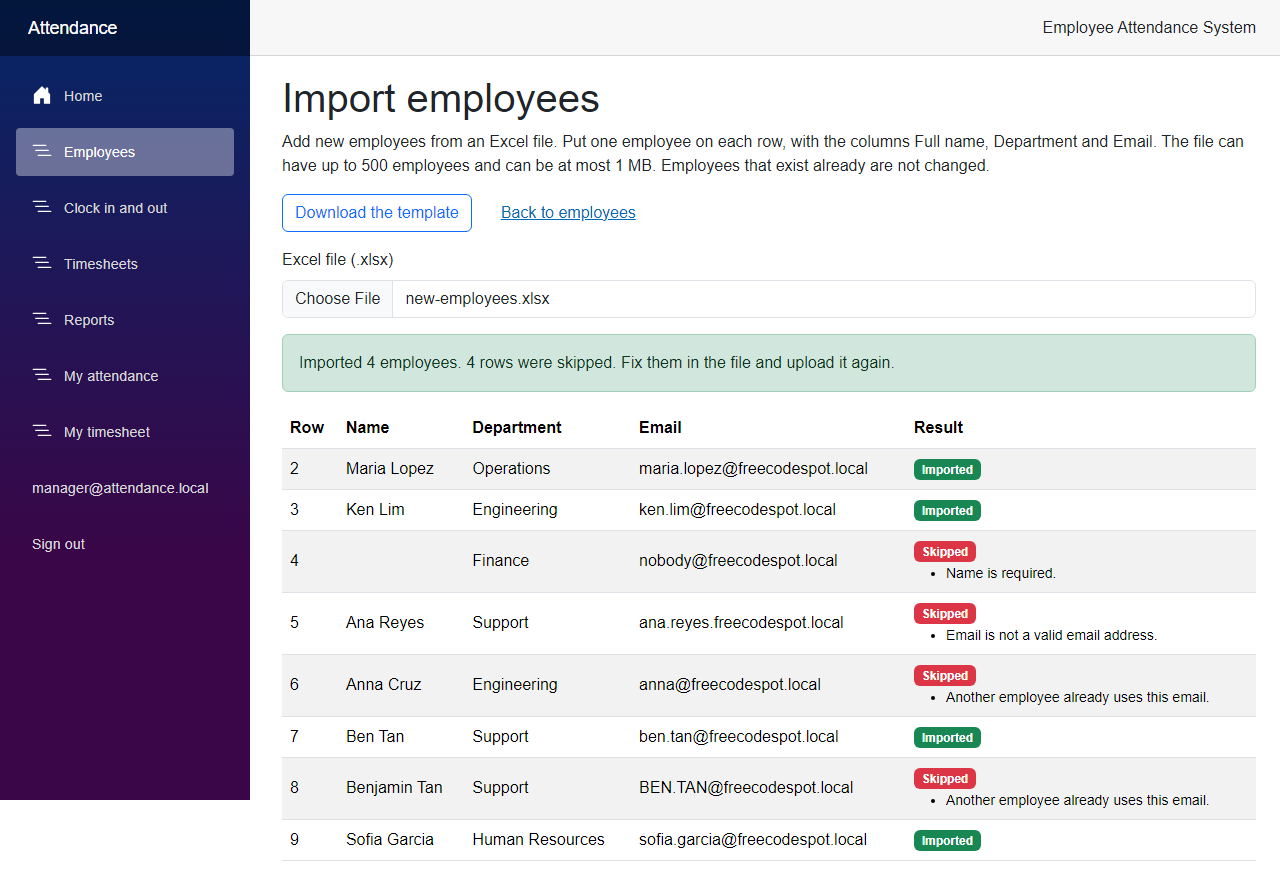
The same duplicate gets a different message in the preview and after the import. In the preview, row 8 says "An earlier row in this file already uses this email." After the import, the same row says "Another employee already uses this email." The reason is that row 7 was saved by then, so the database check catches it first. Both messages are true, but you can see the difference in the two screenshots.
The import only adds. An email that exists already is an error, and the employee is not updated. I did not add updates, because then the file would need a way to say which fields to change.
The file is checked twice. The page sends the file when you choose it, and sends it again when you click Import. The second check is the real one. If somebody added an employee in between, the result can be different from the preview.
The size limit is on the upload. A file can be at most 1 MB, but an .xlsx file is a zip file, and a small file can have a lot of data inside it. I did not protect against that. For a tool that only managers can use, I left it. If you open this up to more people, check the size of the sheet before you read the cells.
One query for each row. The check for an email that exists already is one query for each row, so 500 rows is 500 small queries. I did not measure it.
The total row has formulas with no stored result. ClosedXML writes the SUM formula and not its result. Excel calculates it when you open the file, but a viewer that does not calculate shows an empty cell. I checked this by opening the file with Python and openpyxl, which showed the formula and no value.
A wrong range in the address gives a 404. The button always links to a range that the API accepted. If you type a range that is too long in the address bar of /reports/export, the Web app answers with the not found page, and not with the message of the API.
I did not open the files in Excel. I opened the downloaded report with openpyxl, a different library from the one that wrote it. It read the four sheets, the dates, the hours as time values, and the formula. The look of the file in Excel itself is not tested, and there is no screenshot of it.
Seeing It in Action
Now let's run the employee attendance system. There is no migration this time, so start the API and the Web app in two terminals:
cd src/FreeCodeSpot.Attendance.Api
dotnet run --launch-profile https
cd src/FreeCodeSpot.Attendance.Web
dotnet run --launch-profile httpsFor the screenshots, I needed attendance records for the first days of October, and a file with new employees. The records came from a SQL script, and I wrote the Excel file with a small Python script, so a different library made it. Neither script is part of the source code. When I was done, I removed the records and the imported employees from the database. You can clock in and out on a few days, and fill in the template, to get something to look at.
Sign in as the manager and open Reports. Click Download Excel next to Show report. The browser downloads attendance-report-2026-10-01-to-2026-10-11.xlsx. The API sends these headers:
HTTP/1.1 200 OK
Content-Type: application/vnd.openxmlformats-officedocument.spreadsheetml.sheet
Content-Disposition: attachment; filename=attendance-report-2026-10-01-to-2026-10-11.xlsx; filename*=UTF-8''attendance-report-2026-10-01-to-2026-10-11.xlsx
I opened the file with openpyxl. These are the first rows of the Summary and the Late arrivals sheets, as it read them:
['Summary', 'Late arrivals', 'Absences', 'Records']

Summary
('Employee', 'Department', 'Days worked', 'Hours worked', 'Late', 'Absent')
('Anna Cruz', 'Engineering', 7, datetime.timedelta(days=2, seconds=53160), 1, 0)
('Carla Ramos', 'Finance', 3, datetime.timedelta(days=1, seconds=4860), 0, 4)
('Joy Mendoza', 'Accounting', 8, datetime.timedelta(days=2, seconds=24900), 0, 0)

Late arrivals
('Date', 'Employee', 'Department', 'Clocked in', 'Minutes late')
(datetime.datetime(2026, 10, 5, 0, 0), 'Marco Diaz', 'Support', datetime.datetime(2026, 10, 5, 8, 45), 45)
(datetime.datetime(2026, 10, 6, 0, 0), 'Anna Cruz', 'Engineering', datetime.datetime(2026, 10, 6, 8, 22), 22)
The dates are dates and the hours are time values, not text. Anna Cruz's days=2, seconds=53160 is 62 hours and 46 minutes, which is 62h 46m on the Reports page.
Now open Employees and click Import from Excel. Click Download the template if you want an empty file with the three headers. I chose a file with eight rows. The page checked it, as in the screenshot at the beginning of the article: four rows are ready, and four are skipped, each one with its reason. Nothing is saved yet. Now click Import 4 employees:
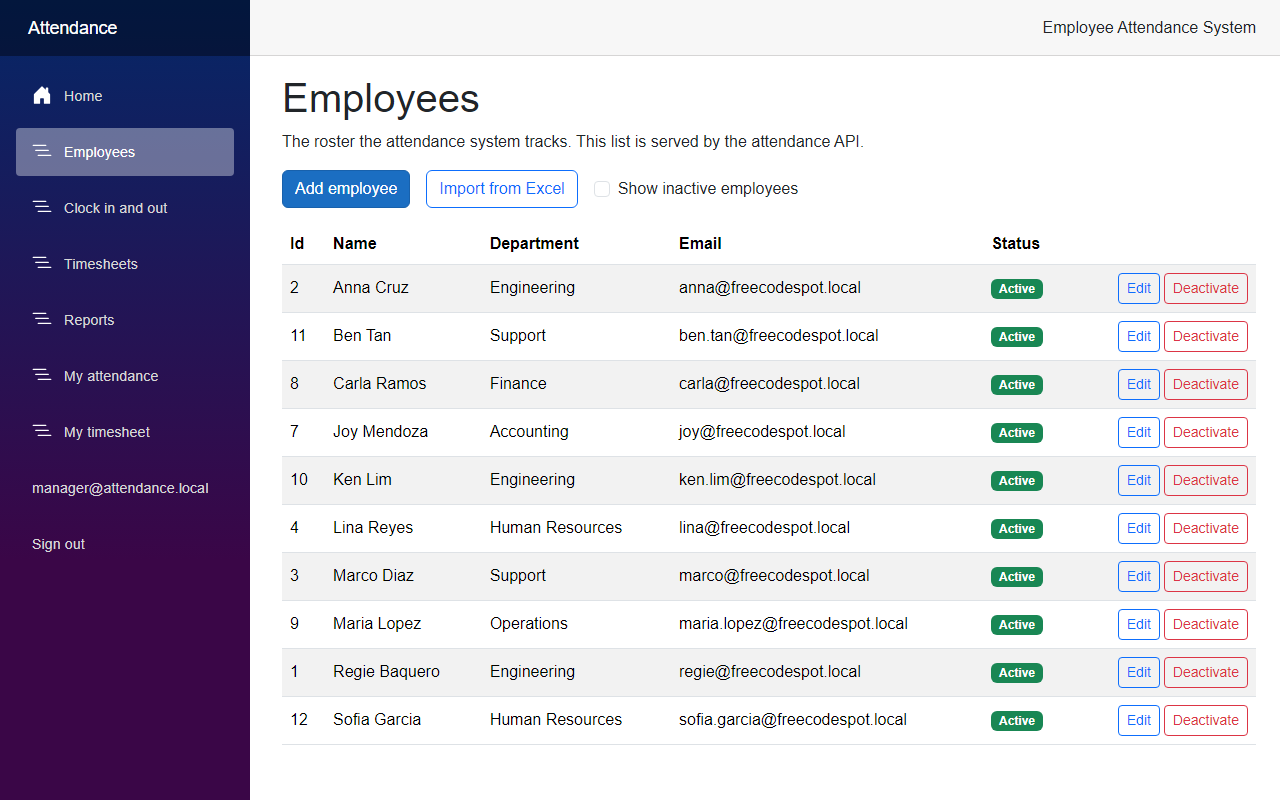
The roster has the new employees now. They are active, like every new employee:
Last, choose a file that is not a workbook. The one I used is a text file with the name employees.csv.xlsx:
In the tests, the export and the import routes answered 403 for an employee. In the browser, the Web app did not serve the download links to the employee and redirected them.
Project Structure
These are the files this article added or changed.
src/
  FreeCodeSpot.Attendance.Application/
    Employees/Import/EmployeeImportReport.cs           added
    Employees/Import/EmployeeImportRow.cs              added
    Employees/Import/EmployeeImportService.cs          added
    Employees/Import/IEmployeeSpreadsheet.cs           added
    Employees/EmployeeService.cs                       changed
    Reports/IReportWorkbook.cs                         added
    Reports/ReportExportResult.cs                      added
    Reports/ReportExportService.cs                     added
    ExcelFile.cs                                       added
  FreeCodeSpot.Attendance.Infrastructure/
    Excel/ExcelEmployeeSpreadsheet.cs                  added
    Excel/ExcelReportWorkbook.cs                       added
    DependencyInjection.cs                             changed
    FreeCodeSpot.Attendance.Infrastructure.csproj      changed (ClosedXML)
  FreeCodeSpot.Attendance.Api/
    Endpoints/EmployeeEndpoints.cs                     changed
    Endpoints/ReportEndpoints.cs                       changed
    Program.cs                                         changed
  FreeCodeSpot.Attendance.Web/
    Components/Pages/EmployeeImport.razor              added
    Components/Pages/Employees.razor                   changed
    Components/Pages/Reports.razor                     changed
    Models/EmployeeImportReport.cs                     added
    Services/EmployeeApiClient.cs                      changed
    Services/ExcelDownloadClient.cs                    added
    Services/ImportResponse.cs                         added
    Program.cs                                         changed
tests/
  FreeCodeSpot.Attendance.UnitTests/
    Employees/EmployeeImportServiceTests.cs            added
  FreeCodeSpot.Attendance.IntegrationTests/
    Excel/ExcelEmployeeSpreadsheetTests.cs             added
    Excel/ExcelReportWorkbookTests.cs                  added
    Excel/ExcelEndpointsTests.cs                       added
    Excel/XlsxXml.cs                                   added
    FreeCodeSpot.Attendance.IntegrationTests.csproj    changed (ClosedXML)
Source Code
You can find the complete source code for this tutorial on GitHub. The code is tagged article-009 so it stays exactly as described here.
Summary
In this tutorial, we added Excel to the Employee Attendance System. Managers can download the attendance report as an .xlsx file, and import employees from Excel after a preview that shows the problem of every row. We used ClosedXML in the Infrastructure project, kept the rules of the import in a service that does not know about Excel, and tested the files by writing and reading real workbooks.
