
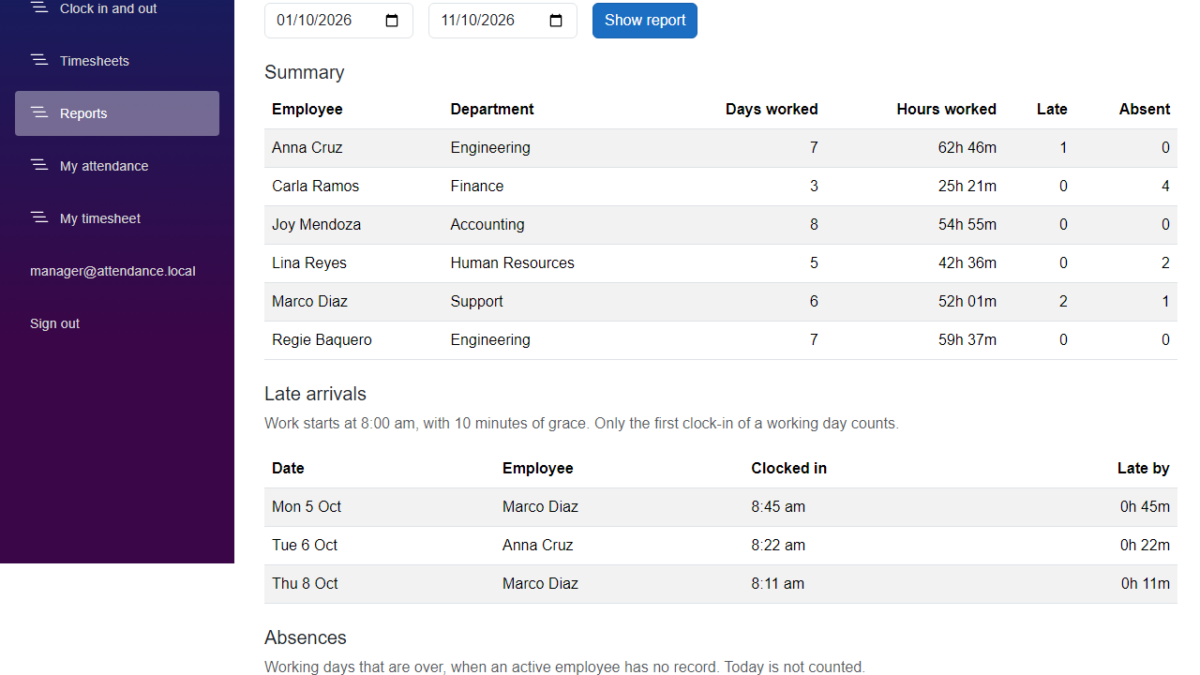
In this tutorial, we will add an attendance report to our Employee Attendance System. A manager will be able to pick two dates and see who was late, who was absent, and how many days and hours every employee worked. We will build it on top of the timesheet code from the previous article, so there are no new tables and no new packages. I used Claude Code to generate the code again, and I will show what we decided before we kept it.
Table of Contents
This is part of the Employee Attendance System series:
- Project Setup
- SQL Server with Entity Framework Core
- Employee Management with Blazor Forms
- Blazor Authentication and Roles
- Clock In and Clock Out
- Employee Clock In Without a Manager
- Attendance Timesheets
- Attendance Reports (this article)
What We're Building
By the end of this article, a manager can open a Reports page and see the attendance report of a month, or of any range of up to 31 days.
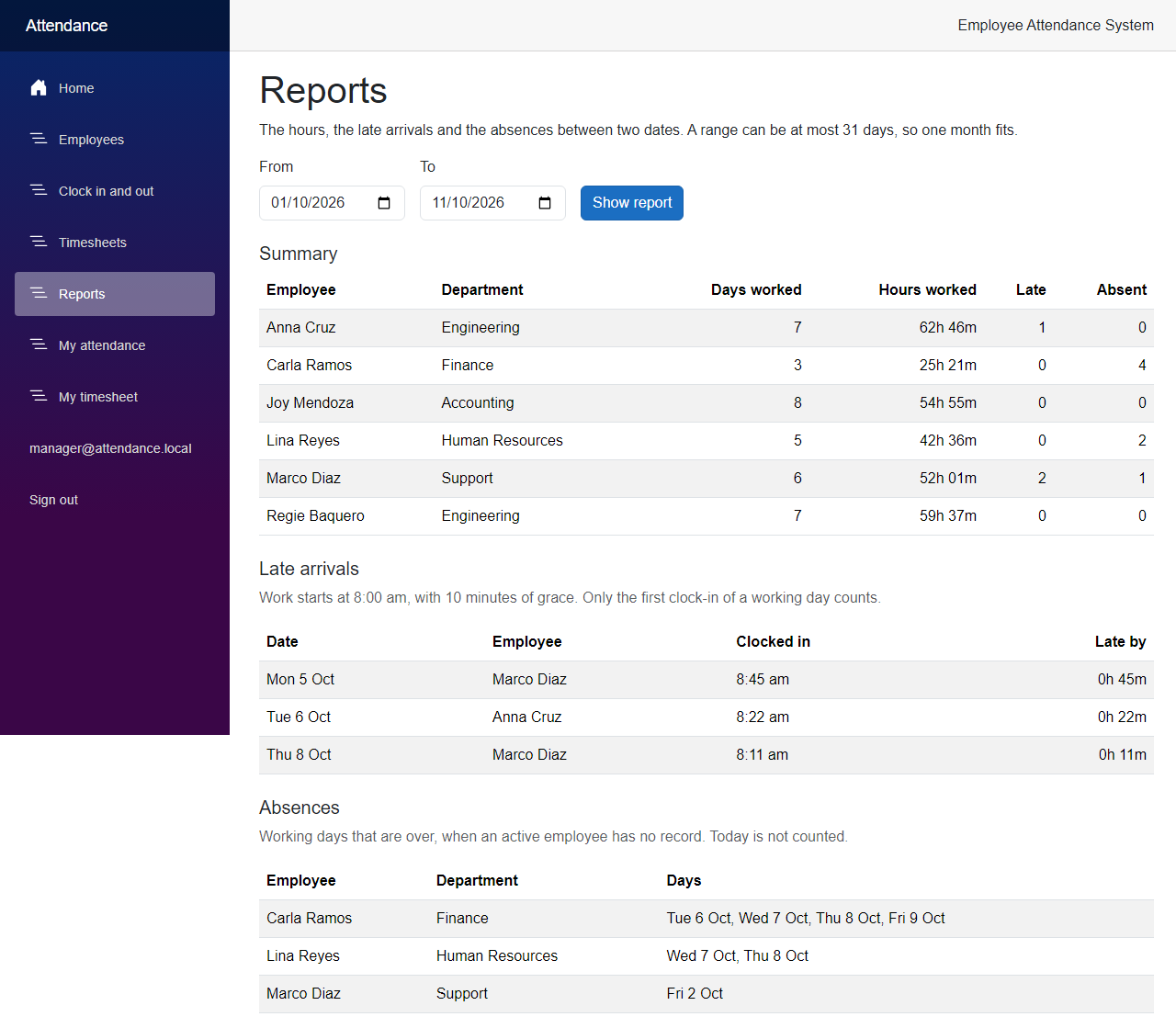
Now let's see how we built it.
Before We Start
Before we start, make sure you have the following installed:
- .NET 10 SDK (I used 10.0.401)
- SQL Server LocalDB, or the SQL Server instance you used in the previous articles
- Claude Code
We do not add any new NuGet packages in this article, and there is no new migration.
Starting Point
After the previous article, a manager can open a timesheet and see the records and the hours of anyone between two dates. But to find out who was late on Tuesday, or who did not come on Friday, the manager has to read every table. Nothing in the system says what late means, and an employee with no records is not in a timesheet at all.
The Goal
- Decide what late and absent mean, and keep those rules in the settings
- List the late arrivals of a range, and by how many minutes each one was late
- List the working days an active employee has no record on
- Show a summary for every employee: days worked, hours, late and absent
- Reuse the timesheet code for the range, the days and the hours
- Let only managers read the report
- Test the rules with a fake clock and a fake time zone
Building It with AI
Step 1 – Decide what late and absent mean
I asked Claude Code to add reports for late arrivals, absences and hours. We did not write any code before we had answered a few questions, because the records only say when someone clocked in and out.
- When is somebody late? We need a time when work starts. We use 08:00, and ten minutes of grace. An employee is late when the first clock-in of a working day comes after 08:10. The report shows how late, counted from 08:00, so a clock-in at 08:11 is late by 11 minutes. A clock-in at exactly 08:10 is on time.
- Which days count? Monday to Friday. There is no holiday calendar, so a public holiday looks like a day when nobody came.
- When is somebody absent? An active employee is absent on a working day when there is no record that day. A record that is still open counts as present.
- What about today? The day is not over yet, so today is never an absence. Only the days before today are checked.
- What about inactive employees? They are never absent. They are in the summary only when they have records in the range.
These rules go in appsettings.json, next to the time zone from the previous article.
src/FreeCodeSpot.Attendance.Api/appsettings.json
  "Attendance": {
    "TimeZoneId": "",
    "WorkStart": "08:00",
    "GraceMinutes": 10,
    "WorkingDays": [ "Monday", "Tuesday", "Wednesday", "Thursday", "Friday" ]
  },
The report uses the same time zone as the timesheets, so "08:00" is 8 am in that zone. Now we need a class that holds the settings.
src/FreeCodeSpot.Attendance.Application/Reports/ReportOptions.cs
namespace FreeCodeSpot.Attendance.Application.Reports;

/// <summary>
/// The rules the reports use, read from the Attendance section of appsettings.json.
/// An employee is late when the first clock-in of a working day comes after
/// WorkStart plus the grace minutes. Times of day are in the time zone of the API.
/// </summary>
public sealed class ReportOptions
{
    public TimeOnly WorkStart { get; set; } = new(8, 0);

    public int GraceMinutes { get; set; } = 10;

    /// <summary>The days of the week people are expected to work. There is no holiday calendar.</summary>
    public DayOfWeek[] WorkingDays { get; set; } = [];

    /// <summary>The working days to use when the setting is missing: Monday to Friday.</summary>
    public static readonly DayOfWeek[] DefaultWorkingDays =
        [DayOfWeek.Monday, DayOfWeek.Tuesday, DayOfWeek.Wednesday, DayOfWeek.Thursday, DayOfWeek.Friday];
}
WorkingDays is empty in the class, and Program.cs fills it with Monday to Friday when the setting is missing. This way, a missing setting does not leave us with no working days. Open Program.cs and register the options and the service we are going to write, below the timesheet service.
src/FreeCodeSpot.Attendance.Api/Program.cs
builder.Services.AddScoped<TimesheetService>();

// The rules of the reports: when work starts, the grace period and the working days.
var reportOptions = builder.Configuration.GetSection("Attendance").Get<ReportOptions>() ?? new ReportOptions();
if (reportOptions.WorkingDays.Length == 0)
{
    reportOptions.WorkingDays = ReportOptions.DefaultWorkingDays;
}

builder.Services.AddSingleton(reportOptions);
builder.Services.AddScoped<ReportService>();
Step 2 – Add the types of the report
The report has three lists, so it is one record with three lists in it. Everything the page needs comes in one answer.
src/FreeCodeSpot.Attendance.Application/Reports/AttendanceReport.cs
namespace FreeCodeSpot.Attendance.Application.Reports;

/// <summary>
/// Late arrivals, absences and a summary per employee between two dates, both included.
/// The dates are days in the time zone named by TimeZoneId, and WorkStart and
/// GraceMinutes are the rules the report applied.
/// </summary>
public sealed record AttendanceReport(
    DateOnly From,
    DateOnly To,
    string TimeZoneId,
    TimeOnly WorkStart,
    int GraceMinutes,
    IReadOnlyList<EmployeeSummary> Summary,
    IReadOnlyList<LateArrival> LateArrivals,
    IReadOnlyList<EmployeeAbsences> Absences);

/// <summary>
/// What one employee did in the range. TotalWorked adds up the closed records only.
/// </summary>
public sealed record EmployeeSummary(
    int EmployeeId,
    string FullName,
    string Department,
    int DaysWorked,
    TimeSpan TotalWorked,
    int LateCount,
    int AbsentCount);

/// <summary>A working day when the first clock-in came after the grace period. Late is counted from WorkStart.</summary>
public sealed record LateArrival(
    int EmployeeId,
    string FullName,
    string Department,
    DateOnly Date,
    DateTimeOffset ClockInUtc,
    TimeSpan Late);

/// <summary>The working days an active employee has no record on, oldest first.</summary>
public sealed record EmployeeAbsences(
    int EmployeeId,
    string FullName,
    string Department,
    IReadOnlyList<DateOnly> Dates);
The report carries the work start and the grace minutes, so the page can say which rules it used. There is also a ReportResult, with the same shape as TimesheetResult from the previous article, but without NotFound, because a report has no employee in its request. You can find it in the source code.
Step 3 – Build the attendance report service
This is the main part of the article. We do not write a new query. The TimesheetService from the previous article already gives us the records of everyone for a range, grouped by employee and by day in the right time zone, with the hours. It also refuses a range of more than 31 days. The report service asks it for the timesheet of everyone, and applies the rules on top.
src/FreeCodeSpot.Attendance.Application/Reports/ReportService.cs
using FreeCodeSpot.Attendance.Application.Employees;
using FreeCodeSpot.Attendance.Application.Timesheets;

namespace FreeCodeSpot.Attendance.Application.Reports;

/// <summary>
/// Builds the attendance report. It starts from the timesheet of everyone, so the
/// range rules, the days in the time zone and the hours are the ones the timesheets
/// use, and then applies the rules for late arrivals and absences on top.
/// </summary>
public sealed class ReportService(
    TimesheetService timesheets,
    IEmployeeRepository employees,
    TimeProvider timeProvider,
    TimeZoneInfo timeZone,
    ReportOptions options)
{
    /// <summary>
    /// Returns the report between two days, both included. Without a range it returns
    /// the current month up to today. A day counts as an absence only once it is over,
    /// so today never does.
    /// </summary>
    public async Task<ReportResult> GetReportAsync(
        DateOnly? from,
        DateOnly? to,
        CancellationToken cancellationToken = default)
    {
        var today = Today();
        if (from is null && to is null)
        {
            from = new DateOnly(today.Year, today.Month, 1);
            to = today;
        }

        var result = await timesheets.GetTimesheetAsync(from, to, employeeId: null, cancellationToken);
        if (result.Timesheet is not { } timesheet)
        {
            return ReportResult.Invalid(result.Errors);
        }

        var roster = await employees.GetAllAsync(includeInactive: true, cancellationToken);
        var sheets = timesheet.Employees.ToDictionary(sheet => sheet.EmployeeId);
        var graceEnd = options.WorkStart.AddMinutes(options.GraceMinutes);

        // The first clock-in of a working day decides whether the employee was late.
        var lateArrivals = timesheet.Employees
            .SelectMany(sheet => sheet.Days
                .Where(day => IsWorkingDay(day.Date))
                .Select(day => (Sheet: sheet, Day: day, ClockIn: day.Entries.Min(entry => entry.ClockInUtc))))
            .Where(first => TimeOfDay(first.ClockIn) > graceEnd)
            .Select(first => new LateArrival(
                first.Sheet.EmployeeId,
                first.Sheet.FullName,
                first.Sheet.Department,
                first.Day.Date,
                first.ClockIn,
                TimeOfDay(first.ClockIn) - options.WorkStart))
            .OrderBy(late => late.Date)
            .ThenBy(late => late.FullName, StringComparer.OrdinalIgnoreCase)
            .ToList();

        var daysOver = WorkingDaysBefore(timesheet.From, timesheet.To, today);

        var absences = roster
            .Where(employee => employee.IsActive)
            .Select(employee =>
            {
                var present = sheets.TryGetValue(employee.Id, out var sheet)
                    ? sheet.Days.Select(day => day.Date).ToHashSet()
                    : [];

                return new EmployeeAbsences(
                    employee.Id,
                    employee.FullName,
                    employee.Department,
                    daysOver.Where(day => !present.Contains(day)).ToList());
            })
            .Where(absent => absent.Dates.Count > 0)
            .OrderBy(absent => absent.FullName, StringComparer.OrdinalIgnoreCase)
            .ToList();

        // Every active employee has a row, even with no records. An inactive employee
        // only shows up when they have records in the range.
        var summary = roster
            .Where(employee => employee.IsActive || sheets.ContainsKey(employee.Id))
            .Select(employee =>
            {
                sheets.TryGetValue(employee.Id, out var sheet);
                return new EmployeeSummary(
                    employee.Id,
                    employee.FullName,
                    employee.Department,
                    sheet?.Days.Count ?? 0,
                    sheet?.TotalWorked ?? TimeSpan.Zero,
                    lateArrivals.Count(late => late.EmployeeId == employee.Id),
                    absences.FirstOrDefault(absent => absent.EmployeeId == employee.Id)?.Dates.Count ?? 0);
            })
            .OrderBy(row => row.FullName, StringComparer.OrdinalIgnoreCase)
            .ToList();

        return ReportResult.Success(new AttendanceReport(
            timesheet.From,
            timesheet.To,
            timeZone.Id,
            options.WorkStart,
            options.GraceMinutes,
            summary,
            lateArrivals,
            absences));
    }

    private List<DateOnly> WorkingDaysBefore(DateOnly from, DateOnly to, DateOnly today)
    {
        var days = new List<DateOnly>();
        for (var day = from; day <= to && day < today; day = day.AddDays(1))
        {
            if (IsWorkingDay(day))
            {
                days.Add(day);
            }
        }

        return days;
    }

    private bool IsWorkingDay(DateOnly day) => options.WorkingDays.Contains(day.DayOfWeek);

    private DateOnly Today() => DateOnly.FromDateTime(InZone(timeProvider.GetUtcNow()));

    private TimeOnly TimeOfDay(DateTimeOffset utc) => TimeOnly.FromDateTime(InZone(utc));

    private DateTime InZone(DateTimeOffset utc) => TimeZoneInfo.ConvertTime(utc, timeZone).DateTime;
}
Let's go through it.
- Without a range, the report is the current month up to today. Otherwise it passes the two dates on to
GetTimesheetAsync. If the timesheet service refuses the range, the report returns the same errors. - For the late arrivals, we take every day of every employee that is a working day, and the earliest clock-in of that day. If its time of day is after the work start plus the grace, the employee was late. The time of day is the time in the time zone of the API, not UTC.
WorkingDaysBeforelists the working days of the range that are over. The loop stops before today, which is why today is never an absence.- For the absences, we look at the active employees only. An employee is absent on every working day that is over and is not one of the days in their timesheet. An employee with no records at all gets every working day.
- The summary has a row for every active employee, and for an inactive employee only when there are records. The days worked is the number of days in the timesheet. The late and absent counts come from the two lists.
Step 4 – Add the API route
The route goes in its own file, with its own group. The group needs a manager, so an employee gets 403 and a request without a token gets 401, like on the other manager routes.
src/FreeCodeSpot.Attendance.Api/Endpoints/ReportEndpoints.cs
using FreeCodeSpot.Attendance.Api.Auth;
using FreeCodeSpot.Attendance.Application.Reports;

namespace FreeCodeSpot.Attendance.Api.Endpoints;

/// <summary>
/// Maps the report route. Only managers can use it.
/// </summary>
public static class ReportEndpoints
{
    public static IEndpointRouteBuilder MapReportEndpoints(this IEndpointRouteBuilder app)
    {
        var group = app.MapGroup("/api/reports")
            .WithTags("Reports")
            .RequireAuthorization(Policies.ManagerOnly);

        // Without from and to, the current month up to today.
        group.MapGet("/", async (DateOnly? from, DateOnly? to, ReportService reports, CancellationToken cancellationToken) =>
                ToResult(await reports.GetReportAsync(from, to, cancellationToken)))
            .WithName("GetAttendanceReport")
            .Produces<AttendanceReport>()
            .ProducesValidationProblem();

        return app;
    }

    internal static IResult ToResult(ReportResult result) =>
        result.Outcome switch
        {
            ReportOutcome.Success => Results.Ok(result.Report),
            _ => Results.ValidationProblem(result.Errors.ToDictionary())
        };
}
Then add one line to Program.cs, below the other Map calls.
src/FreeCodeSpot.Attendance.Api/Program.cs
app.MapMyAttendanceEndpoints();
app.MapReportEndpoints();
Step 5 – Build the Reports page
The Web app keeps its own copy of the report shape in Models/AttendanceReport.cs, like it does for the timesheet. A new client, ReportApiClient, calls the route with the token of the signed-in user, and turns a 400 into a message, the same way the timesheet client does. Both files are in the source code. We register the client in the Web app's Program.cs.
src/FreeCodeSpot.Attendance.Web/Program.cs
builder.Services.AddHttpClient<ReportApiClient>(client =>
{
    client.BaseAddress = new Uri(apiBaseUrl);
});
Now the page. It needs a manager. It has two dates and a button. When you open it, it asks the API without dates, and then fills the two date boxes with the range that came back, which is the current month.
src/FreeCodeSpot.Attendance.Web/Components/Pages/Reports.razor
@page "/reports"
@rendermode InteractiveServer
@attribute [Authorize(Roles = AppRoles.Manager)]
@using FreeCodeSpot.Attendance.Web.Models
@using FreeCodeSpot.Attendance.Web.Services
@inject ReportApiClient ReportApi

<PageTitle>Reports</PageTitle>

<h1>Reports</h1>

<p>The hours, the late arrivals and the absences between two dates. A range can be at most 31 days, so one month fits.</p>

<div class="row g-3 align-items-end mb-3">
    <div class="col-auto">
        <label for="from" class="form-label">From</label>
        <input id="from" type="date" class="form-control" @bind="from" @bind:format="yyyy-MM-dd" />
    </div>
    <div class="col-auto">
        <label for="to" class="form-label">To</label>
        <input id="to" type="date" class="form-control" @bind="to" @bind:format="yyyy-MM-dd" />
    </div>
    <div class="col-auto">
        <button class="btn btn-primary" @onclick="LoadAsync">Show report</button>
    </div>
</div>

@if (message is not null)
{
    <div class="alert alert-warning" role="alert">@message</div>
}

@if (loadFailed)
{
    <div class="alert alert-danger" role="alert">
        The report could not be loaded. Check that the attendance API is running, then try again.
    </div>
}
else if (report is not null)
{
    <h2 class="h5 mt-4">Summary</h2>
    <table class="table table-striped align-middle">
        <thead>
            <tr>
                <th scope="col">Employee</th>
                <th scope="col">Department</th>
                <th scope="col" class="text-end">Days worked</th>
                <th scope="col" class="text-end">Hours worked</th>
                <th scope="col" class="text-end">Late</th>
                <th scope="col" class="text-end">Absent</th>
            </tr>
        </thead>
        <tbody>
            @foreach (var row in report.Summary)
            {
                <tr>
                    <td>@row.FullName</td>
                    <td>@row.Department</td>
                    <td class="text-end">@row.DaysWorked</td>
                    <td class="text-end text-nowrap">@row.TotalWorked.ToHoursAndMinutes()</td>
                    <td class="text-end">@row.LateCount</td>
                    <td class="text-end">@row.AbsentCount</td>
                </tr>
            }
        </tbody>
    </table>

    <h2 class="h5 mt-4">Late arrivals</h2>
    <p class="text-body-secondary">
        Work starts at @report.WorkStart.ToString("t"), with @report.GraceMinutes minutes of grace. Only the first clock-in of a working day counts.
    </p>
    @if (report.LateArrivals.Count == 0)
    {
        <p><em>Nobody was late.</em></p>
    }
    else
    {
        <table class="table table-striped align-middle">
            <thead>
                <tr>
                    <th scope="col">Date</th>
                    <th scope="col">Employee</th>
                    <th scope="col">Clocked in</th>
                    <th scope="col" class="text-end">Late by</th>
                </tr>
            </thead>
            <tbody>
                @foreach (var late in report.LateArrivals)
                {
                    <tr>
                        <td class="text-nowrap">@late.Date.ToString("ddd d MMM")</td>
                        <td>@late.FullName</td>
                        <td>@InZone(late.ClockInUtc).ToString("t")</td>
                        <td class="text-end text-nowrap">@late.Late.ToHoursAndMinutes()</td>
                    </tr>
                }
            </tbody>
        </table>
    }

    <h2 class="h5 mt-4">Absences</h2>
    <p class="text-body-secondary">
        Working days that are over, when an active employee has no record. Today is not counted.
    </p>
    @if (report.Absences.Count == 0)
    {
        <p><em>Nobody was absent.</em></p>
    }
    else
    {
        <table class="table table-striped align-middle">
            <thead>
                <tr>
                    <th scope="col">Employee</th>
                    <th scope="col">Department</th>
                    <th scope="col">Days</th>
                </tr>
            </thead>
            <tbody>
                @foreach (var absent in report.Absences)
                {
                    <tr>
                        <td>@absent.FullName</td>
                        <td>@absent.Department</td>
                        <td>@string.Join(", ", absent.Dates.Select(date => date.ToString("ddd d MMM")))</td>
                    </tr>
                }
            </tbody>
        </table>
    }
}

@code {
    private DateOnly? from;
    private DateOnly? to;
    private AttendanceReport? report;
    private string? message;
    private bool loadFailed;
    private TimeZoneInfo zone = TimeZoneInfo.Local;

    // Without dates, the API answers with the current month, and we show them in the inputs.
    protected override Task OnInitializedAsync() => LoadAsync();

    private async Task LoadAsync()
    {
        try
        {
            var response = await ReportApi.GetReportAsync(from, to);

            message = response.Message;
            loadFailed = false;
            if (response.Report is { } result)
            {
                report = result;
                from = result.From;
                to = result.To;
                zone = FindZone(result.TimeZoneId);
            }
        }
        catch (HttpRequestException)
        {
            loadFailed = true;
        }
    }

    // The API decided the days in its own time zone, so the times are shown in that zone too.
    private static TimeZoneInfo FindZone(string id)
    {
        try
        {
            return TimeZoneInfo.FindSystemTimeZoneById(id);
        }
        catch (TimeZoneNotFoundException)
        {
            return TimeZoneInfo.Local;
        }
    }

    private DateTime InZone(DateTimeOffset utc) => TimeZoneInfo.ConvertTime(utc, zone).DateTime;
}
The page uses ToHoursAndMinutes() from the previous article to show 62h 46m. The last change is a Reports link in NavMenu.razor, in an AuthorizeView for managers, below Timesheets.
Step 6 – Add the tests
I asked Claude to test the rules with a fake clock that is set to Monday 5 October 2026, and a time zone that is eight hours ahead of UTC. In that week, Thursday the 1st and Friday the 2nd are over, the 3rd and the 4th are a weekend, and the 5th is today. First, two tests for the late rule, one on each side of the grace period:
tests/FreeCodeSpot.Attendance.UnitTests/Reports/ReportServiceTests.cs
    [Fact]
    public async Task AClockInAfterTheGracePeriodIsLate_AndLateIsCountedFromTheStartOfWork()
    {
        var report = await ReportAsync([Anna], [Record(Anna, 1, 1, 8, 11)]);

        var late = Assert.Single(report.LateArrivals);
        Assert.Equal(Anna.Id, late.EmployeeId);
        Assert.Equal(Day(1), late.Date);
        Assert.Equal(TimeSpan.FromMinutes(11), late.Late);
    }

    [Fact]
    public async Task AClockInAtTheEndOfTheGracePeriodIsOnTime()
    {
        var report = await ReportAsync([Anna], [Record(Anna, 1, 1, 8, 10)]);

        Assert.Empty(report.LateArrivals);
    }
Then the absences. Marco has no record, so he is absent on the two working days that are over, and the weekend and today are left out:
    [Fact]
    public async Task AnEmployeeWithNoRecordIsAbsentOnEveryWorkingDayThatIsOver()
    {
        var report = await ReportAsync([Anna, Marco], [Record(Anna, 1, 1, 8, 0), Record(Anna, 2, 2, 8, 0)]);

        var absent = Assert.Single(report.Absences);
        Assert.Equal(Marco.Id, absent.EmployeeId);
        // The weekend and today are left out.
        Assert.Equal([Day(1), Day(2)], absent.Dates);
    }
The class also tests that only the first clock-in of a day counts, that a weekend clock-in is never late, that today is never an absence, that an open record counts as present, that an inactive employee is never absent, that the work start, the grace and the working days come from the options, the numbers of the summary, the default range and the range that is too long.
The integration tests run the API in UTC, with the default rules, and save the records on fixed days in March 2026, so they do not depend on today's date. This one checks the late arrival through the real route:
tests/FreeCodeSpot.Attendance.IntegrationTests/Reports/ReportEndpointsTests.cs
    [Fact]
    public async Task Report_ListsALateArrivalWithTheMinutesAfterTheStartOfWork()
    {
        using var manager = await factory.CreateSignedInClientAsync(AttendanceApiFactory.ManagerEmail);
        var (_, employee) = await factory.CreateLinkedEmployeeClientAsync();
        await SaveAsync(employee.Id, Monday.AddMinutes(25), Monday.AddHours(8));
        await SaveAsync(employee.Id, Monday.AddDays(1).AddMinutes(5), Monday.AddDays(1).AddHours(8));

        var report = await manager.GetFromJsonAsync<AttendanceReport>($"/api/reports?{WeekRange}");

        var late = Assert.Single(report!.LateArrivals, arrival => arrival.EmployeeId == employee.Id);
        Assert.Equal(new DateOnly(2026, 3, 2), late.Date);
        Assert.Equal(TimeSpan.FromMinutes(25), late.Late);
        Assert.Equal("UTC", report.TimeZoneId);
        Assert.Equal(new TimeOnly(8, 0), report.WorkStart);
        Assert.Equal(10, report.GraceMinutes);
    }
The other integration tests check the absences, the summary, the default range, the 400 for a range of more than 31 days, the 403 for an employee and the 401 without a token. Now run all the tests:
dotnet testAll 65 unit tests and 74 integration tests passed. Fifteen unit tests and seven integration tests are new.
Reviewing the Generated Code
This time, no test failed when I ran them. But there are a few decisions and limits that you should know about.
The report reuses the timesheet service. We could have added a new repository with its own queries for the report. We did not need it. The timesheet already gives us the records of everyone, with the days in the right time zone, the hours, and the limit of 31 days. The report is a few LINQ queries over that, and it is easier to test, because the tests do not need a database for the rules.
There is no start date for an employee. I wanted to skip the days before an employee was added to the roster, so a new employee would not look absent for the days before they started. But the Employee record has no start date or creation date, and adding one needs a migration, which is more than this article needs. So the report counts those days as absences. If you add an employee in the middle of a range, check the dates before you read the absences.
Only the first clock-in of the day counts for late. If somebody clocks in at 8:00, leaves for lunch, and clocks in again at 1 pm, they are not late. The second record is not looked at.
Days worked is any day with a record. In the screenshot, Joy Mendoza has 8 days worked, because one of them is a Saturday. A weekend day is not late, and it is not an absence, but it is a day worked.
The absences follow the roster of today. An employee who is deactivated now is not in the absences of a past month. The report only knows who is active when you ask for it.
Holidays are absences. There is no calendar of holidays. A day when nobody comes shows everybody as absent.
The settings are read when the API starts. If you change the work start or the working days in appsettings.json, restart the API.
The report is not measured. It reads the records of up to 31 days into memory, and groups them there. With the sizes in this series, this is fine, but I did not measure it with a big roster.
The Reports page keeps the old report when a range is refused. This is the same as the Timesheets page. The page shows the message above the report that was there before.
Seeing It in Action
Now let's run the employee attendance system. There is no migration this time, so start the API and the Web app in two terminals:
cd src/FreeCodeSpot.Attendance.Api
dotnet run --launch-profile https
cd src/FreeCodeSpot.Attendance.Web
dotnet run --launch-profile httpsI needed records for the first days of October, with some people late and some absent. I added them with a SQL script that is not part of the source code, and I removed them from the database when I was done. You can clock in and out on a few days, or change the dates, to get something to look at. My dev machine is in Singapore, so the times in the screenshots are Singapore times.
Sign in as the manager and open Reports. The page opens with the current month up to today, as in the screenshot at the beginning of the article. Scroll down to the two tables:
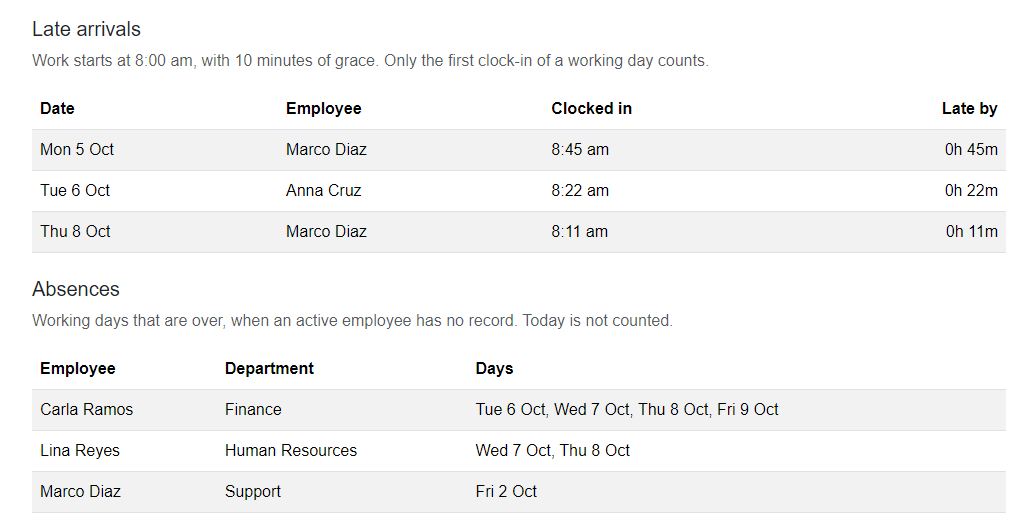
Marco is absent on Friday 2 October, and Carla Ramos on four days from Tuesday to Friday. Saturday 3 October, Sunday 4 October and today are not in the list.
Next, ask for a range that is too long. Change the start date to 1 August and click Show report:
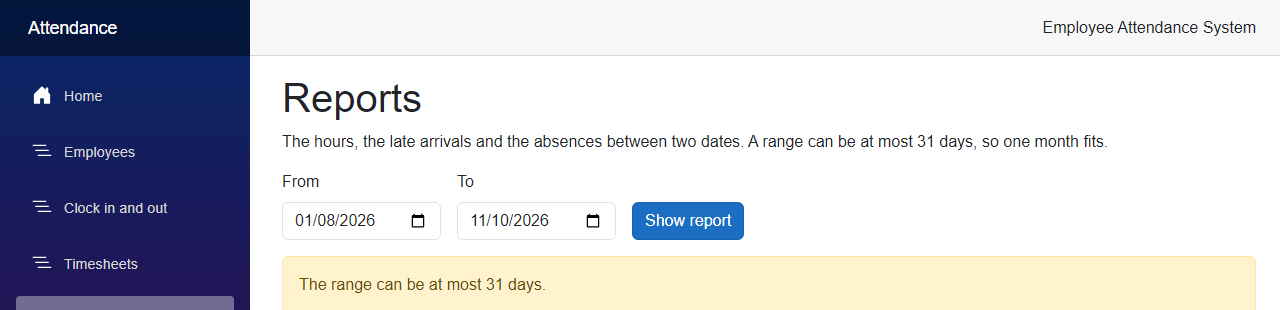
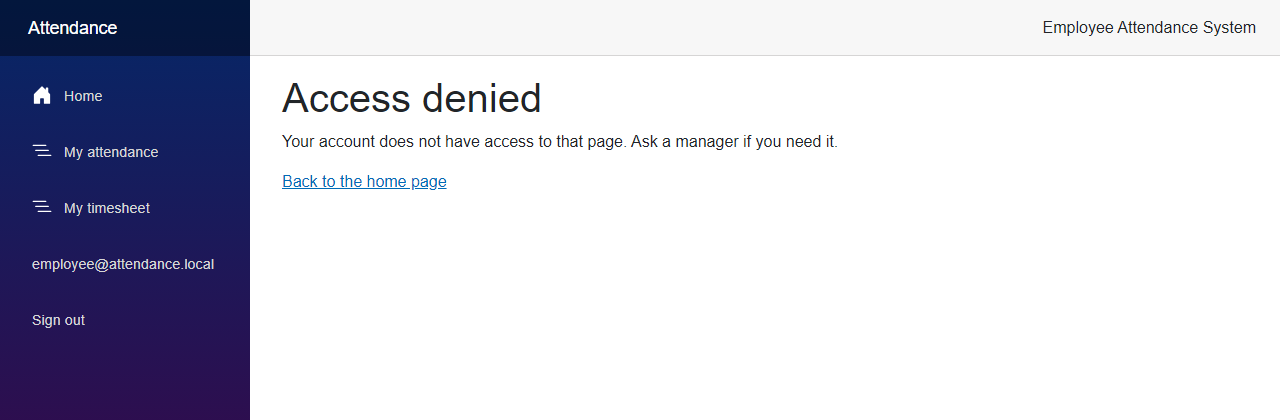
Sign out and sign in as the employee. The Reports link is not in the menu, and if you type the address, you get the access denied page:
Project Structure
These are the files this article added or changed.
src/
  FreeCodeSpot.Attendance.Application/
    Reports/AttendanceReport.cs                        added
    Reports/ReportOptions.cs                           added
    Reports/ReportResult.cs                            added
    Reports/ReportService.cs                           added
  FreeCodeSpot.Attendance.Api/
    Endpoints/ReportEndpoints.cs                       added
    Program.cs                                         changed
    appsettings.json                                   changed
  FreeCodeSpot.Attendance.Web/
    Components/Layout/NavMenu.razor                    changed
    Components/Pages/Reports.razor                     added
    Models/AttendanceReport.cs                         added
    Services/ReportApiClient.cs                        added
    Services/ReportResponse.cs                         added
    Program.cs                                         changed
tests/
  FreeCodeSpot.Attendance.UnitTests/
    Reports/ReportServiceTests.cs                      added
  FreeCodeSpot.Attendance.IntegrationTests/
    Reports/ReportEndpointsTests.cs                    added
Source Code
You can find the complete source code for this tutorial on GitHub. The code is tagged article-008 so it stays exactly as described here.
Summary
In this tutorial, we added an attendance report to the Employee Attendance System. Managers can see the days and hours of every employee, the late arrivals, and the absences between two dates. We built the report on the timesheet service, kept the rules for late and absent in the settings, and tested them with a fake clock and a fake time zone.
